I am trying to use Action Points to add a Stop Torch, Pause for 4 mins, then start torch and proceed with cut. This is to help with duty cycle on the torch and machine during longer and higher amp cuts. I can add the action point, but I do not see it in the code when I post process. I am also unable to edit the code snippets from the tools table. Has anyone had any success? I have tried Version 7 and 8 of Sheetcam
On version 7 you can just add a pause after each cut loop in your tool.
I’ve been using Sheetcam for years and never heard of action points
1 Like
Action points are supposed to allow you to add code snippets into the outputted G-Code.
I have pauses already after each cut before the next rapid. I need to add pauses on the longer cuts where I am hitting the duty cycle. So I can cut for say 5-6 minutes then a 4 minute cool down, then continue on with the cut to finish
I have used pp code in recent past to plant a machine pause for similar use cases such as waiting on air supply to catch up, or retrieve a finished part from the table; adding wait on duty cycle cool down is another good one. Rather than use action points, I choose to test the conditions and plant the machine pause just prior to the pierce in OnPenDow(), that way there is no torch restart necessary which can be tricky and ugly.
Here is a pp function that may work for you. Call this function in OnPenDown() and see the
special comment to define ppOpFeedRate = feedRate in OnNewOperation() …
function ppChkPauseOnTime()
   local torchProbeTime = 4/60      -- fraction of minute
   local airSupplyTime = 0          -- minutes, 0 = don't pause
   local plasmaDutyCycleTime = 4    -- minutes, 0 = don't pause
   local pauseOnNewPart = false
   local machinePause = "M01 \n"    -- gcode for your machine pause, nil = don't pause

   if not ppTimeAccumulator then ppTimeAccumulator = 0 end
   if not ppLastPartIndex then ppLastPartIndex = partIndex end

   -- define ppOpFeedRate in OnNewOperation() as: ppOpFeedRate = feedRate
   --    cutting feedRate can't be read here because feedRate has been changed to the plungeRate in OnPenDown()
   local thisCutTime = entityLength / ppOpFeedRate  -- cut time in mins

   -- conditionally insert a machine Pause, requiring operator intervention to Resume,
   -- can be used to retrieve parts from the table, wait on an air compressor to build tank pressure,
   -- or wait on plasma source to cool down due to expired duty cycle.
   ppTimeAccumulator = ppTimeAccumulator + torchProbeTime + thisCutTime
   if ( ( (airSupplyTime > 0) and (ppTimeAccumulator > airSupplyTime) )
         or ( pauseOnNewPart and (partIndex ~= ppLastPartIndex) )
         or ( (plasmaDutyCycleTime > 0) and (ppTimeAccumulator > plasmaDutyCycleTime) )
      ) and machinePause
   then
      ppTimeAccumulator = torchProbeTime + thisCutTime
      ppLastPartIndex = partIndex
      endZ = safeZ
      OnRapid()   -- retract to safeZ while waiting...
      post.Text(" ( ====== Machine Pause for air supply catchup, OR Part removal, OR duty cycle ======== )\n")
      post.Text( machinePause )
      post.Text(" ( **** ATTENTION OPERATOR **** )\n")
      post.Text(" ( **** PRESS CYCLE START or RESUME button when ready for motion **** )\n")
      endZ = pierceHeight
      OnRapid()
   end
end
Lou, what is an ‘Action Point’? I never heard of it. Of course my SheetCam is probably about 100 years old…
Action Point is accessed via menu Mode / ‘Edit action points’. These are events you can drop on a toolpath to trigger planting a Code Snippet.
How is that different than using a Code Snippet as the next operation?
similar concept as menu Operation / ‘Insert code’, itself a good alternative, but Action Points provide more granularity as they operate on individual and exact toolpaths, so they are more tedious to apply. Hence the pp function driven by accumulated cut time.
1 Like
I will try this out. Thank you. But question for you. Where does it get the probe time and this cut time from
I see where this cut time comes from. I missed it when I read the code earlier. So this will calculate the time say 5 minutes of cutting, issues a pause which should stop the torch fire, r e tract to safe height, then after I hit resume it will retire the torch and continue?
That’s correct, although the pause is applied before the torch fires to begin the cut, the cut which would increment the accumulated cut time beyond your programmed limit as defined by the variable plasmaDutyCycleTime.
1 Like
Sorry for the questions. Where would this be inserted into the post processor?
You said call it from onpendown. so would it be this simple
function OnPenDown()
ppChkPauseOnTime()
post.TextDirect (“\n”)
ihs = pierceHeight ~= 0 and cutHeight ~= 0 --enable IHS if both pierce and cut are non-zero
if (ihs) then
post.TextDirect (“G92 Z0.\n”) – reset Z to 0
post.TextDirect (“G38.2 Z”.. post.FormatNumber(-5 * 25.4 * scale, “0.0##”) .." F".. post.FormatNumber(100 * 25.4 * scale, “0.0##”) ..“\n”) – IIHS Fast Down
post.TextDirect (“G38.4 Z”.. post.FormatNumber(0.5 * 25.4 * scale, “0.0##”) .." F".. post.FormatNumber(20 * 25.4 * scale, “0.0##”) ..“\n”) – IIHS Slow Up
post.TextDirect (“G92 Z”..post.FormatNumber(0, “0.0##”) ..“\n”) – reset Z to IHS 0
post.TextDirect (“G0 Z”..post.FormatNumber(0.02 * 25.4 * scale, “0.0##”) .." (IHS Backlash)\n") – reset Z to IHS 0
post.TextDirect (“G92 Z”..post.FormatNumber(0, “0.0##”) ..“\n”) – reset Z to IHS 0
post.TextDirect ("G0 Z"..post.FormatNumber(pierceHeight * scale, "0.0##") .." (Pierce Height)\n") -- Z to Pierce
end
post.Text (“M3\n”) – fire torch
if (pierceDelay + firstPierce > 0.001) then – pierce delay
post.Text (“G4 P”)
post.Number (pierceDelay + firstPierce,“0.###”)
firstPierce = 0
post.Eol()
end
if (ihs) then
post.TextDirect (“G1 Z”..post.FormatNumber(cutHeight * scale, “0.0##”) .." F".. post.FormatNumber(plungeRate * scale, “0.0##”) .." (Cut Height)\n") – Z to Cut
end
post.TextDirect (“H1\n”) – thc ON, THC in control of Z
end
I added the function to the beginning and then called the function. when I run the post process I get this error:
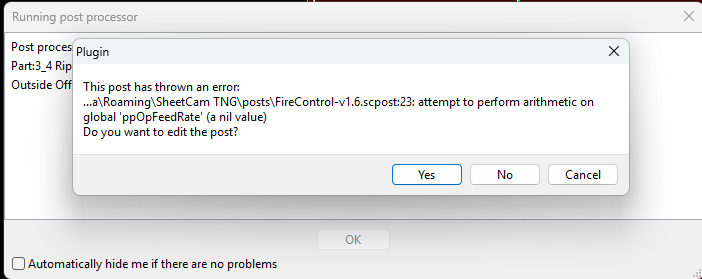
Here is the complete Post Processor
– Langmuir Systems
– www.langmuirsystems.com
firstPierceTime = 0 --this is an extra delay added to the first pierce as needed by some machines
version = 1.6
local function isEmpty(s)
return s == nil or s == ‘’
end
function ppChkPauseOnTime()
local torchProbeTime = 4/60 – fraction of minute
local airSupplyTime = 0 – minutes, 0 = don’t pause
local plasmaDutyCycleTime = 4 – minutes, 0 = don’t pause
local pauseOnNewPart = false
local machinePause = “M01 \n” – gcode for your machine pause, nil = don’t pause
if not ppTimeAccumulator then ppTimeAccumulator = 0 end
if not ppLastPartIndex then ppLastPartIndex = partIndex end
– define ppOpFeedRate in OnNewOperation() as: ppOpFeedRate = feedRate
– cutting feedRate can’t be read here because feedRate has been changed to the plungeRate in OnPenDown()
local thisCutTime = entityLength / ppOpFeedRate – cut time in mins
– conditionally insert a machine Pause, requiring operator intervention to Resume,
– can be used to retrieve parts from the table, wait on an air compressor to build tank pressure,
– or wait on plasma source to cool down due to expired duty cycle.
ppTimeAccumulator = ppTimeAccumulator + torchProbeTime + thisCutTime
if ( ( (airSupplyTime > 0) and (ppTimeAccumulator > airSupplyTime) )
or ( pauseOnNewPart and (partIndex ~= ppLastPartIndex) )
or ( (plasmaDutyCycleTime > 0) and (ppTimeAccumulator > plasmaDutyCycleTime) )
) and machinePause
then
ppTimeAccumulator = torchProbeTime + thisCutTime
ppLastPartIndex = partIndex
endZ = safeZ
OnRapid() – retract to safeZ while waiting…
post.Text(" ( ====== Machine Pause for air supply catchup, OR Part removal, OR duty cycle ======== )\n")
post.Text( machinePause )
post.Text(" ( **** ATTENTION OPERATOR **** )\n")
post.Text(" ( **** PRESS CYCLE START or RESUME button when ready for motion **** )\n")
endZ = pierceHeight
OnRapid()
end
end
function OnAbout(event)
ctrl = event:GetTextCtrl()
ctrl:AppendText(“Post for CrossFire PRO and CrossFire using FireControl Software\n”)
ctrl:AppendText(“\n”)
ctrl:AppendText(“For CrossFire PRO and CrossFire w/powered z-axis add-on, be sure to set Pierce Height, Plunge Rate, and Cut Height values in order to activate IHS sequence. There is a 1 inch rapid retract move after each cut loop by default.\n”)
ctrl:AppendText(“\nFor CrossFire without powered Z-axis, Pierce Height and Cut Height must be both set to 0 to disable IHS.\n”)
end
function OnInit()
programSpeed = 0 – variable overridden with fastest cut speed
post.SetOptions(post.ARC_SEGMENTS)
post.SetCommentChars (“()”, “”) --make sure ( and ) characters do not appear in system text
post.Text (“(v”.. version ..“-sc)\n”)
post.Text (“G90 G94\n”)
post.Text (“G17\n”)
if(scale == metric) then
post.Text (“G21 (Units: Metric)\n”) --metric mode
else
post.Text (“G20 (Units: Inches)\n”) --inch mode
end
post.TextDirect (“H0\n”) – thc OFF, Machine in control of Z
bigArcs = 1 --stitch arc segments together
minArcSize = 0.05 --arcs smaller than this are converted to moves
firstPierce = firstPierceTime
end
function OnFinish()
post.Text (“M5 M30\n”)
post.Text (“(PS” .. programSpeed .. “)\n”)
end
function OnRapid()
if (math.hypot(endX - currentX, endY - currentY) < 0.001) then return end
if(endX > 1e30) then return end
post.Text (“G0”)
post.ModalNumber (" X", endX * scale, “0.0###”)
post.ModalNumber (" Y", endY * scale, “0.0###”)
– post.ModalNumber (" Z", endZ * scale, “0.0###”)
post.Eol()
end
function OnMove()
if(currentX ~= endX or currentY ~= endY) then
post.Text (“G1”)
post.ModalNumber (" X", endX * scale, “0.0###”)
post.ModalNumber (" Y", endY * scale, “0.0###”)
–post.ModalNumber (" Z", endZ * scale, “0.0###”)
post.ModalNumber (" F", feedRate * scale, “0.0###”)
post.Eol()
if(feedRate * scale > programSpeed and leadinType == 0) then
programSpeed = feedRate * scale
end
end
end
function OnArc()
if(arcAngle <0) then
post.Text (“G3”)
else
post.Text (“G2”)
end
post.NonModalNumber (" X", endX * scale, “0.0###”)
post.NonModalNumber (" Y", endY * scale, “0.0###”)
– post.ModalNumber (" Z", endZ * scale, “0.0###”)
post.Text (" I")
post.Number ((arcCentreX - currentX) * scale, “0.0###”)
post.Text (" J")
post.Number ((arcCentreY - currentY) * scale, “0.0###”)
post.ModalNumber (" F", feedRate * scale, “0.0###”)
post.Eol()
if(feedRate * scale > programSpeed and leadinType == 0) then
programSpeed = feedRate * scale
end
end
function OnPenDown()
ppChkPauseOnTime()
post.TextDirect (“\n”)
ihs = pierceHeight ~= 0 and cutHeight ~= 0 --enable IHS if both pierce and cut are non-zero
if (ihs) then
post.TextDirect (“G92 Z0.\n”) – reset Z to 0
post.TextDirect (“G38.2 Z”.. post.FormatNumber(-5 * 25.4 * scale, “0.0##”) .." F".. post.FormatNumber(100 * 25.4 * scale, “0.0##”) ..“\n”) – IIHS Fast Down
post.TextDirect (“G38.4 Z”.. post.FormatNumber(0.5 * 25.4 * scale, “0.0##”) .." F".. post.FormatNumber(20 * 25.4 * scale, “0.0##”) ..“\n”) – IIHS Slow Up
post.TextDirect (“G92 Z”..post.FormatNumber(0, “0.0##”) ..“\n”) – reset Z to IHS 0
post.TextDirect (“G0 Z”..post.FormatNumber(0.02 * 25.4 * scale, “0.0##”) .." (IHS Backlash)\n") – reset Z to IHS 0
post.TextDirect (“G92 Z”..post.FormatNumber(0, “0.0##”) ..“\n”) – reset Z to IHS 0
post.TextDirect ("G0 Z"..post.FormatNumber(pierceHeight * scale, "0.0##") .." (Pierce Height)\n") -- Z to Pierce
end
post.Text (“M3\n”) – fire torch
if (pierceDelay + firstPierce > 0.001) then – pierce delay
post.Text (“G4 P”)
post.Number (pierceDelay + firstPierce,“0.###”)
firstPierce = 0
post.Eol()
end
if (ihs) then
post.TextDirect (“G1 Z”..post.FormatNumber(cutHeight * scale, “0.0##”) .." F".. post.FormatNumber(plungeRate * scale, “0.0##”) .." (Cut Height)\n") – Z to Cut
end
post.TextDirect (“H1\n”) – thc ON, THC in control of Z
end
function OnPenUp()
ihs = pierceHeight ~= 0 and cutHeight ~= 0 --enable IHS if both pierce and cut are non-zero
post.Text (“H0\n”) – thc OFF, Machine in control of Z
post.Text (“M5\n”)
if (endDelay > 0) then
post.Text (“G4 P”)
post.Number (endDelay,“0.###”)
post.Eol()
end
if (ihs) then
post.TextDirect (“G0 Z” .. post.FormatNumber(25.4 * scale, “0.0##”) .. “\n”) – Z to rapid height
end
post.CancelModalNumbers()
end
function OnDrill()
OnRapid()
OnPenDown()
endZ = drillZ
OnMove()
OnPenUp()
endZ = safeZ
OnRapid()
end
The pp runtime error you’re getting is because you did not put the following statement in function OnNewOperation()
ppOpFeedRate = feedRate
re. placement of the function definition ppChkPauseOnTime()… that appears to be fine as is, well done. It can go anywhere, but best to keep it in the global definition scope of the pp, meaning not nested within another function, you have it correct.
re. the call (invocation) of the new function in OnPenDown(), you have that placed correctly also, best to do it first thing.
well done.
Fixed. Should I see anything different in the G-Code output? I am going out to test on a dry run, but I am not seeing anything different in the G-Code
Edit. I see it in the code. I forgot i had it on a faster cut time.
When running a dry run. I saw it in the code, but nothing popped up on the screen and it continued without me having to do anything so it did not pause. And it was after the first circle right before the long cut
1 Like
The machine pause gcode cmd may not be right as “M01”, try “M00” .
I’m not an expert on FireControl and the langmuir grbl controller, I don’t even use that CNC brand. Here is what AI reports …
The G-code command for pausing in Langmuir FireControl is typically the M00 command, which is used to stop the machine and allow for manual intervention. However, users have reported issues with this command not functioning as expected in some versions of FireControl.
Langmuir FireControl Pause Command
G-code for Pausing
In Langmuir FireControl, the common G-code command used to pause a cutting operation is M00. This command is intended to stop the machine, allowing for adjustments or changes, such as modifying the amperage on the plasma cutter.
Functionality of M00
- Pauses the Cut: When the M00 command is executed, the machine should stop cutting.
- Resumption Issues: Some users have reported that after pausing with M00, the machine may not resume correctly, often requiring a reboot of FireControl.
Alternative Commands
- M01: This command is also used for pausing but may not function as expected in all versions of FireControl. Users have noted that the machine does not always stop when M01 is called.
Recommendations
- Testing: It is advisable to test these commands during a dry run to ensure they work as intended before executing actual cuts.
- Documentation: For the most accurate and updated information, refer to the official FireControl documentation or user forums, as software updates may affect command functionality.
The best way to pause in Firecontrol is G4 P?, with the question mark being the amount of time to pause in seconds.
This will cause the program to resume at the end of the pause. If the pause happens mid-cut, you will need a way to program the torch to refire after the pause.
It just seems to be a lot of trouble to avoid manually pausing or investing in a machine with a longer duty cycle.
1 Like
Understand. This is what I was trying to do with action point. Trying to make it automated as per say. I like Lou’s way as it takes into account cut time. For now I have to do something until a other machine is in the budget.
1 Like