Hey everyone noob here. I have been trying to figure what is causing small alignment issues between my cut and where I am physically positioning my torch tip with respect to cam origin and FireControl origin/zero. The discrepancy is small about .036" -.04" in the -X and -Y directions but thats enough to cause me issues for my particular application.
I have tried everything I can think of and cant seem to get the cut to align properly. To be clear the cuts are straight and consistent, the dimensions are as good as one could reasonably expect. I can reproduce the same results time after time after time (thats good at least).
after exploring numerous Fusion setup and post settings and pretty much always coming up with the same result I began to think maybe I had a backlash issue or something. However when I tested that theory by jogging at max speed in all directions as erratically as I possible then returning to zero its right on the money. I even rigged up a marker and ran a dry run and pretty got the results i’m looking for baring some small margin of error I am contributing to deflection of the marker. The point is its better and this perplexes me the most!
I do a lot of manual machining, mill work, etc and checked square with precision Starrett machinist squares ,calipers, test indicators, and levels. I cannot make it any better in that regard.
Can anyone help this noob? Im sure i’m just overlooking something obvious being very new to CNC. Sorry for the long first post. Im sure I could rig up a couple lasers and calibrate for the discrepancy since it is so consistent, but I don’t like bandaids! More information and pics below. Thanks so much!
What Im doing: Cutting slots and rectangles in 14ga mild steel square tubing where I need to accurately index my torch to one of the corners.
My setup:
Crossfire Pro with Z axis THC/IHS
Hypertherm Powermax 45XP with shielded machine torch and new HT consumables.
Air supply 19 CFM at 100psi, Air dryer followed by redundant 5 stage water/oil vapor and desiccant filtration.
Using Fusion for design and CAM
General Settings:
45 Amps
speed 225 ipm
torch height .06 in
initial pierce .015 in
pierce delay .4 sec
IHS spring back tried at both default .02 in and 0 (no noticeable difference)
Manual recommends 128 volts. FireControl smart voltage live readings seem to fluctuate between 125-130v. Tolerance is set at ± 1.5V, test cuts are very small only .5" x 1" so a little hard to get the most accurate voltage until I try something bigger but seems to be within reasonable range?
All setting are based on the HT manual recommendations for 45A - Air -Shielded “Best Quality Setting”. Except for the pierce delay which they recommend .2 sec but thats seems to occasionally cause some issues for FireControl initializing the cut.
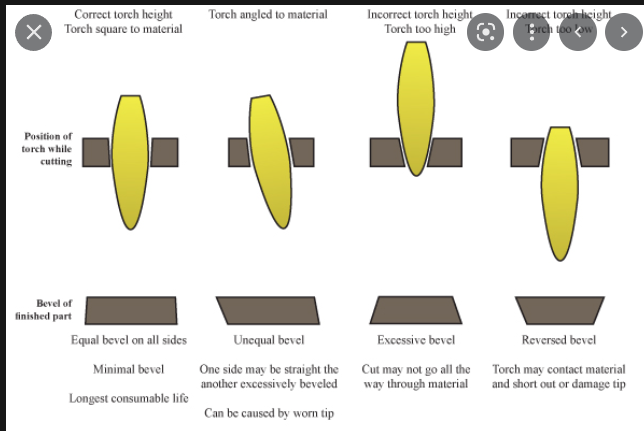
How thick is that metal? 225 IPM seems a bit too fast, as it looks like a lot of taper on the straight runs. It looks like it’s cutting clean when it slows down in the turn. I think the Hypertherm chart is based on a down draft table and speeds should be reduced when using a water table.
Grab your torch and try to move it front to back and side to side, to see if there is any play in the Z axis carriage. It could be the torch wobbling when it changes direction.
Ok I tightened things up and id say that was helpful for making the corners a bit cleaner but overall didnt seem to help with aligning the edge of the cut where I expect it to be. I also switched to a fine cut tip and reduced the speed to 200 ipm and I think I like that better as well. the manual specified a .054 kerf with the first tip I used and .049 with the fine tip. In both cases what I am finding now is that my alignment from the center of the torch tip and the edge of the cut is off by about half of the kerf width.
My understaning is that Fusion should be correcting my tool path to account for kerf based on my selected tool/configuration. The G code produced seems to reflect this as well far as I can tell. So at this point my only assumption is that my actual kerf is wider than what the manual states or there is some other setting in fusion I am missing or have wrong. Im inclined to think its the later because if the kerf is off I would expect that to affect the overall cut dimensions and they are perfect.
Ill do a few line cuts and measure the actual kerf to rule that out but does anyone have any other thoughts?
The manual doesn’t say anything about downdraft vs water table but does state “Settings are a recommended starting point for finding the best angle, least dross, and best cut-surface finish. Adjust the speed for your application and table to obtain desired results.” So I think that covers your point, but honestly I don’t have any issue with the cut quality. I think my cell phone is distorting things a bit in that regard making it look like its worse than it is. The production cut I just attempted is very nice in my opinion. One side is nearly a perfect 90 the other side does have a slight angle but my understanding is that is normal? Some more pics below of the production cut with the camera lens directly over the side thats very squared off. I did initially try some lower speeds down around 190 and 200. It didn’t seem like it made too much difference but did have a larger heat affected zone at the cut edge and the opposite side of the tube steel. I do plan on running a chamfer mill down the length of the cut and would rather avoid excessive hardening of the edge surface as well as the opposite side of the tube that will eventually receive a finish patina. For this scenario I believe the faster speed and less heat affected areas are the lesser evil. In any case my concern has far more to do with the misalignment.
You may be on to something with the Z axis carriage there is some play in both directions but it is only in the bracket with the bearings that rest against the X axis gantry bar. I assume this is what you are referring to?
Ill try tightening that up and see if it improves but it seems like I should have seen the same thing with the maker test no?
@WillKatt welcome to the forum! First verify your torch is traveling in the correct direction. If the part you want to keep is the part with the holes the torch should be traveling counter clockwise. If you are keeping the parts that drop out then it should run clockwise to ensure you are cutting on the “good” side of the arc. Usually fusion chooses it correctly but you can verify which way the torch is traveling by looking at the little arrows when you select the geometry… or you could do a simulation.
Second I would verify your actual cut height search test cut height. @Phillipw has a program to test the actual cut height… or you could pause a cut and check with a feeler gauge. Lots of info about testing cut height on here. You can search it using the magnifying glass.
I’m assuming by “misalignment” you are trying to use the x/y zero to align the cut on your tube. I had this issue when trying to make similar cuts and it comes down to the lead in location. I forget exactly what I did, but I found that Firecontrol would offset the design on the side where the lead in was located.
Thanks everyone, I appreciate all the feed back. At this point I am perfectly happy with the cuts and when making larger cuts the bevel is pretty much even on both sides. I think with the small test cuts the duration was so short the THC didnt even have time to make any adjustments before it was done.
@72Pony Yep cuts are on the right side and traveling in the correct direction.
To re-iterate I have no issues with the cuts im getting what so ever just the the alignment with what I consider the origin or x/y zero reference. Currently I have the lead in/out setting turned off but have played with those pretty extensively without any discernible improvement one way or another, but yes this was my thought as well or at least something similar.
Perhaps my manual zero isn’t as accurate as I think it is or i’m just expecting too much from this machine. Right now im scribing my piece with where I expect my cut lines to be and am checking it with a set of calipers. I am firmly clamping the pieces down as well so I shouldnt be getting any movement. Doing it this way has been producing pretty consistent results but it does vary a little bit. I did a couple different test cuts for some door hardware that came out pretty good. One was off my mark about a 1/16 of an inch and the other only about 1/32. Both were slightly off in the same direction. Perhaps this wont be the case once I create some sort of fence to align my piece with and come up with some laser crosshairs I can calibrate to the actual cut.
Well I think you are very close to that point. 1/32" in plasma land is just about as close as it gets. Those cuts are near perfect and that little bot you are off the scribed lines looks very close to me.
My question is if you cut 10 holes would that discrepancy get larger each hole?