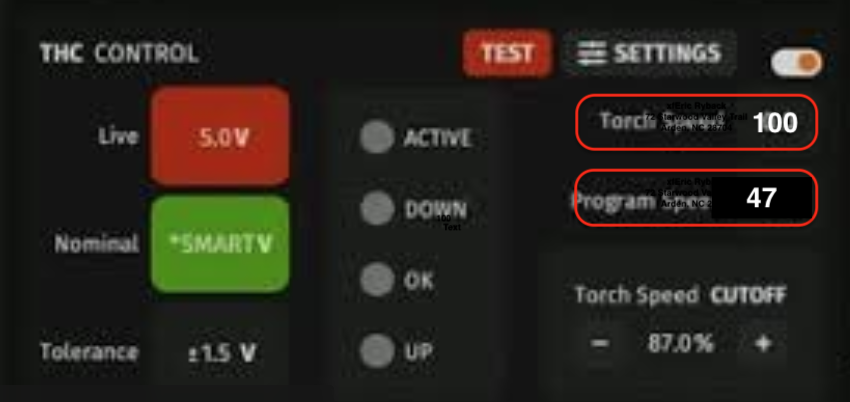
I am cutting a bunch of 1/4 steel. Today it started the holes and was not cutting good so I replaced the nozzle and started where I left off. It completed the holes but then when starting the outside it would start cutting but then stop cutting through even though the torch was running the whole time spraying sparks all over from the top. I tried the cut by turning on the torch manually on the software and then running the XY by hand with arrows at 50 speed. My cut speed for the program is set to 47. Running by hand with < > arrows at 50 works great but it will not cut with the program. Running the program shows torch speed 100 and program speed 47 but it really looks like it is moving too fast but I could be wrong. It is the same example program in Sheetcam that I have used on many previous cuts, only change out the artwork. Any suggestions what is going on? Is there some way the XY could start running faster?
Post the first 20 lines of your .nc gcode text and we can see if something is off.
OK heres the file but the question is how can torch speed be 100 and program speed 47?
AD Strike Plate WidePanel TOP 36in.tap (41.6 KB)
You’re going to have to post a screenshot showing this 100 torch speed. There is nothing in that code that would cause Firecontrol to report that.
Ther are some issues with your settings. The first one being the plunge rate is still at the default Sheetcam speed of just over 3 inches per minute. That needs to be set at 50 inches per minute as a minimum.
The second issue is that some of your cut loops have a line that sets the cut speed at 45 inches per minute. You must have a path rule that is causing that speed change for most of your cut loops. Whatever that rule is, it isn’t helping anything, because a 2 IPM change is not even noticeable.
All my holes and internal small slots are set to 45 which works fine. Outside cuts are 47 which is just my default for 1/4 steel A36. I have never given thought to plunge rate but it’s easy to change, not sure what it will do. I will have to load some material and test it to get the screenshot. It was repeating the same speed on this one part that didnt cut through just reflecting off the surface. It always said 100 torch speed and 47 program under the THC section.
Are you sure the 100ipm you noticed wasn’t when the torch transitioned from the end of a cut path to the next?
Torch will move only at the speed that’s in your g code.
At all times during the long outside cut is says 100 Torch Speed. I can’t run it today but this is what it said during the cuts. I tried for an hour to solve it. Rebooted the box, restarted the Firecontrol. I had to complete the part by selecting a line, generating code from an outside line and hitting start. Then when the nozzle got to the start point I hit stop. Then started the torch manually and used < > buttons to complete the cut with the speed set to 50. Took about an hour but I manually cut it out.
I just did a dry run of that whole program and it never went over 47IPM, except on the rapids between cuts.
That’s what I was conveying to @tchap, that it will only exceed program speed during rapid (non-cutting) movement.
Now I want to see - camera phone recording the actual table during a program being run while screen record captures what Firecontrol is displaying.
If there were broken lines in the program and the plasma cuter was in 4T then that may be what is causing it.
One thing to keep in mind that there were already a bunch of holes that have been cut. I was trying to run from line not run from loop so I clicked on a line of the outside cut and it generated a new g code. however, that still would not explain why torch speed can be 100 and program speed would show as 47 but the point is the code I uploaded was the entire code where is the problem? I’m having is running from line. We’ll see today if the problem persists. It is not a 4t problem.
I cut a similar part today with the same settings and could not get the error. Maybe it was some glitch that day in the computer.
I found the problem. Every time I run cut from line it runs the torch at 100. Program is 47. I am cutting some metal that has holes and sometimes I ru. Over a home and it stops. So I can easily turn on the torch and run it to finish that line. But if I click on the next line past the hole and hit generate it runs the torch at 100.

Maybe something to report to Langmuir as a possible bug with Firecontrol.
If this is the same file, the code is posted earlier in this thread. The program speed is 47. I did a dry run of it, but dry run on 20.6 doesn’t allow the “run from” feature and I wasn’t going to actually cut a part to find out if it does this on 20.6. It looks like this may be a bug in the latest version of Firecontrol.
I will create a small test file. Then regenerate from a line and save that file to compare.
I had a laptop for a while that died a few months ago getting dropped in water. It would cut from line no problem. The new laptop has the bug. Cut from loop works.
I have 24.1.6
I updated firmware and THC firmware. Even on dryrun I get 100.2 torch speed while program speed is 47. It is not required to run the torch to see the error. The torch speed shows 100.2 with THC enabled or off while dry running.
I uploaded a file that came from sheetcam and works. I click on a line and press “Line” which generates gcode from that line. I export that file to the computer and you can see that file.
AD Strike Plate Face 12in.tap (3.0 KB)
RUNFROM - AD Strike Plate Face 12in-DRY_RUN-v1.6.gcode (285 Bytes)
Holes are 45. Outside line is 47. The run from line is ONLY 2 lines from the outside cut and it deletes all holes and inside holes at 45.
I will try it with all cuts at 45, and try run from line. But still I have parts that must have different speeds and this would only be a bandaide. I need to have any speeds I want for any cut and I always have to do run from line because of frequent other problems that make me have to resume some cuts almost daily when I use the machine.