My program wont show in firecontrol display- (solved)

HELP, Please,

I’ve owned my crossfire pro for 5 years. I’ve had very few issues with it ( mostly user errors). But today i’m at a loss . I can’t figure it out, my progam won’t show in the display. Fire control comes up i select the progam i want to run and it does’nt display. It will run you just can’t see the image its blank . I’m not sure how to fix this. Any help will be appreciated
Chris

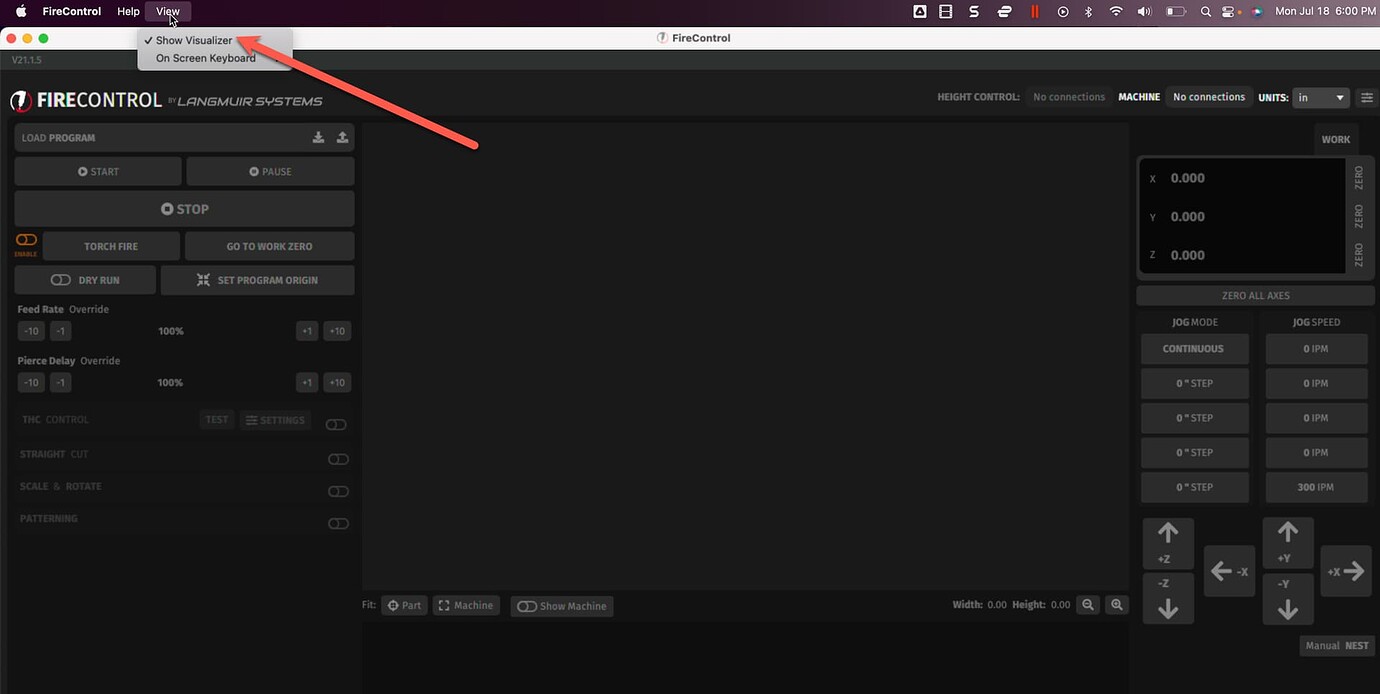
See if the “Show Visualizer “ is clicked on.

In some cases, you will need to reload FireControl. Only after you delete it in its entirety.

1 Like

Thank you i will look into that.

Chris

Uninstall FireControl from your computer via the Control Panel.

Delete the “.FireControl” folder, which is typically located at the file path: C:/Users/[YOUR USERNAME]/.FireControl

Restart your computer.

Reinstall FireControl.

If the issue persists, try again, this time installing the “compatibility” version of FireControl.

2 Likes

Worked like a champ. Thank you again. Back to work. man i love this thing. and Thanks BigDaddy216

Chris

3 Likes

Which one worked?

1 Like

Removing firecontrol and reinstalling.

1 Like