help im new to all of this, and am struggling to figure out how to add my machine into the fusion 360 program . For some reason its only showing milling machines what am i doing wrong. i have a thermal dynamics cutmaster 42
1 Like
oh that makes me chuckle… I just had to redo this a few days ago
There is a video in that link for everything you need to include loading firecontrol if you need to do that also
1 Like
You don’t add the machine at all.
If you’re in the milling section, it means you’re in the wrong setting of the Manufacture tab.
You need to click on Fabrication to see the options for setting things up for CNC plasma.
After which, you add any and all settings into a Tool Library you create.
1 Like
In Setup, you want to pick “Cutting” in the drop down menu for “Operation Type” in the options box of the SetUp:
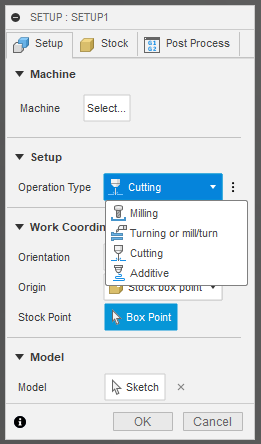
Fusion 360 does not care if you pick a “Machine” in the setup. You will need to pick a “post-processor” when you come to the final stage of “Manufacturing” for Fusion to create your g-code file. That will assign the specifics for FireControl to the g-code file.
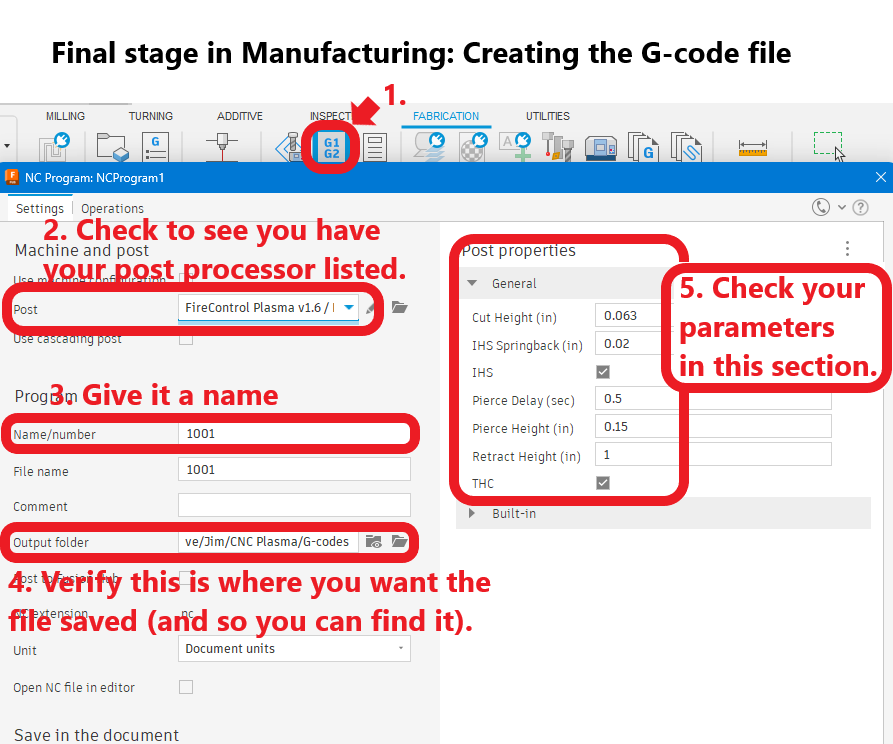
3 Likes
Quick Tip -
When doing the setup, on the third tab - Post Process - you can type in the name of the file there so when you do the Post Process, the Name/Number is already populated with the file name you want. Saves haveing to keep typing it in if you have to tweak your file then re-post process it.
3 Likes