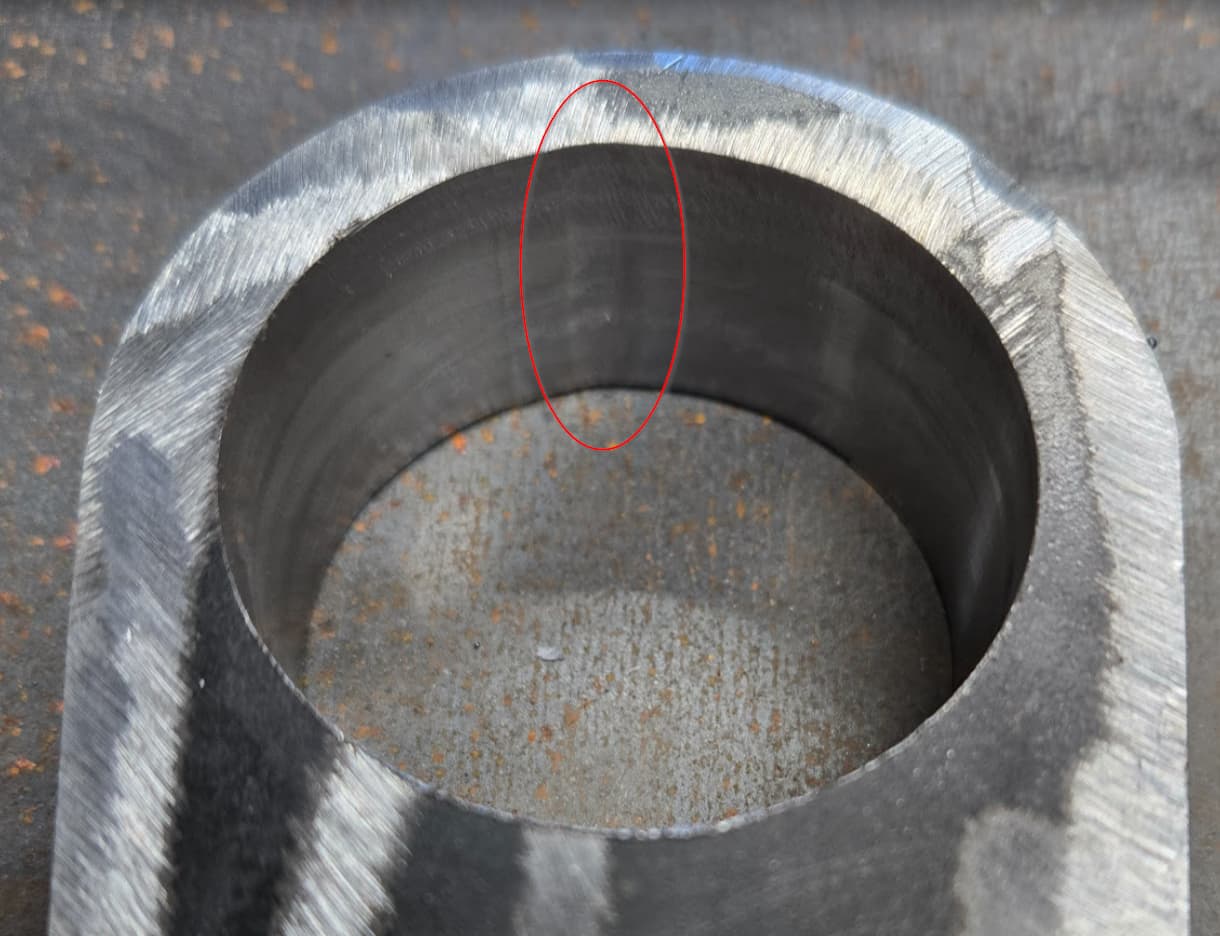
Looking to see if there is a large contributor to my errors here. I have no background in machining, let alone a CNC.
I am sure there are serveral little things I have done that aren’t up to best practrices, but didn’t know if there was one main one.
I had the MR1 machine 2 bores with a 1/4” flat end mill. I used the adaptive clearing feature asking to leave 0.05 of stock left. Then asked it to do the “ramp” path in fusion to cut out the remaining stock.
The bores have some chatter, not my main concern, Where the start and stop point of the circumfrance is, there is an indent from the end mill. What would cause this? It seems to be most of the length of the bore, easy to feel with a finger, and can kinda pick up with a shaddow.
Would this be a feeds and speeds thing, or a tool path issue? I have it on 2 bores, the start stop were in different clocked positions, so I assume that rules out a backlash/timing of the lead screw issue?
I used a 1/4” end mill, 4 flute. 1” deep bore on mild steel
That is probably from deflection and on your final pass you are taking too much material off. I would do 0.005”-0.010” to leave, depending on the steel, then come in with a 2d contour with smoothing enabled to get the best surface finish.
I second ST’s thoughts. More than likely it’s tool pressure, combined with a little backlash in the axis. I usually do .010 or .005 finish passes when I’m going for a totally smooth bore. I also check the box for fusion to repeat the finish pass to have the mill cut a spring pass and take any tool pressure or deflection out of the equation.
Thanks all, that makes sense. I appriciate the tips on how to correct it as well and a better practice in leaving less material for the final pass, and or doing a second pass.
Yes that is the enter/exit point, just wasn’t sure why it would overshoot but tool delfection seems to fit really well.
Here is a video that gives some good tips and tricks for boring perfect holes with the MR-1. It’s focused on eliminating burr creation but these tips will also fix other hole quality issues.
I have had very good success when boring holes like this by using the “Bore” tool path as the finishing strategy that is listed in the 2D dropdown menu.