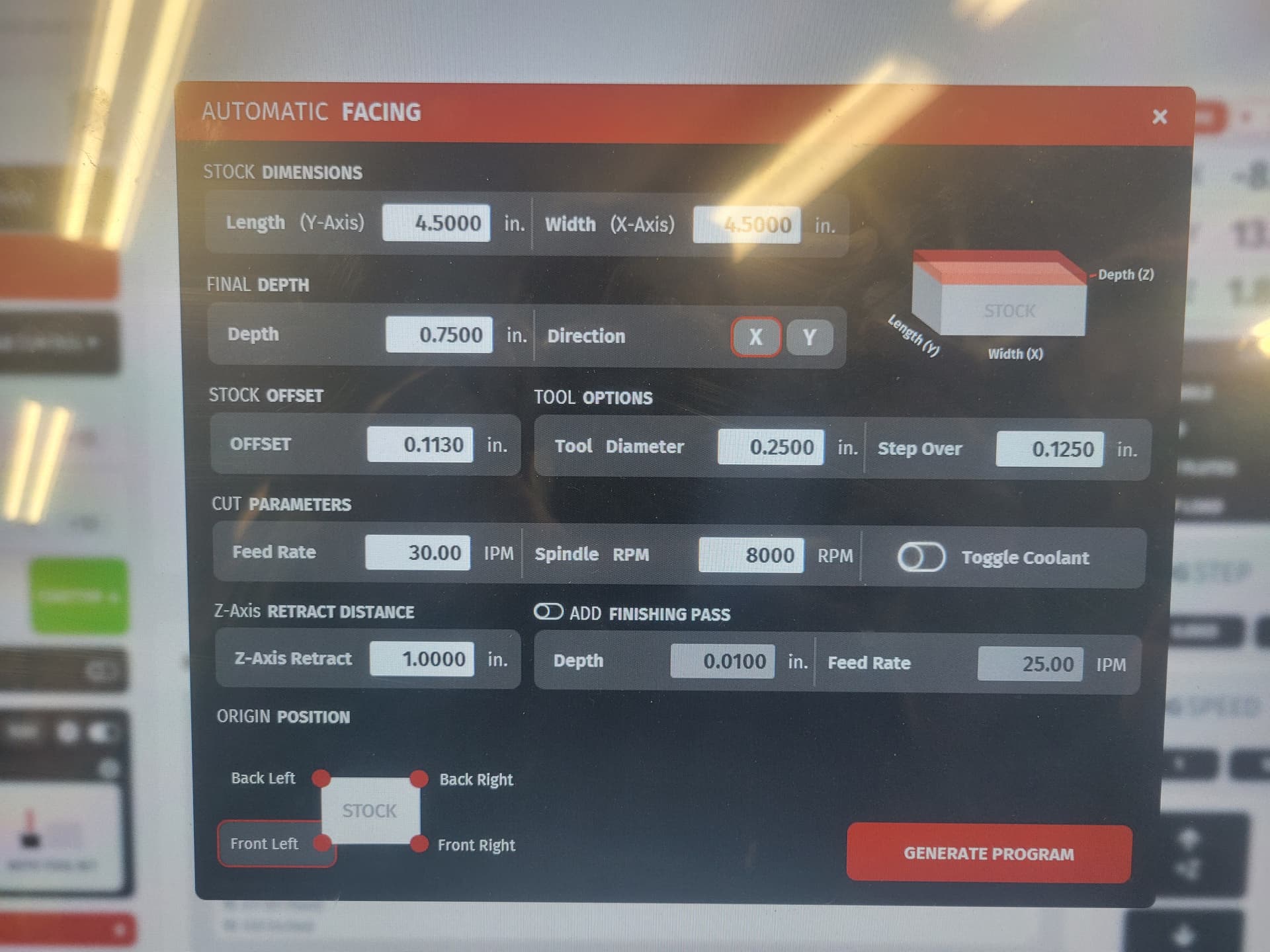
How does the facing function work? Im confused on whats being asked for input in the stock offset field. Let me set the scene, i had a piece of stock roughly 4.5 x 4.5 x .875 and wanted to bring it down to.750. I got all the tool parameters in, starting location ect. Im just expiermenting with it at this point hence the .250 tool. Could someone explain how to use this? Am i missing something obvious?
In your example here, you would end up taking a single 0.75” depth pass (from Z0, which is your top plane of the stock). Your final part thickness remaining would be 0.875 - 0.75 = 0.125”. The feature does not know how thick your stock is to start, only what the X/Y and Z zero points are.
Anyone else notice that that the starting position (plunge vector) is 2xDiameter + offset instead of 1xDiameter + offset? Is this expected? This seems like a lot especially when using a fly cutter. @langmuir-daniel@langmuirsystems
@langmuirsystems If this 2x plunge distance is expected, can you provide a field for this? Sometimes with the fly cutter, this is too far outside machine limits.
I also encountered this the first time I used the fly cutter. I was able to work around it by changing the direction from X to Y to stay within the allowable travels. I haven’t hit it since as I decided to always use f360 cam for the flycutter after the first experience.