Elements of SVG not generating tool paths - once selected

Hi,

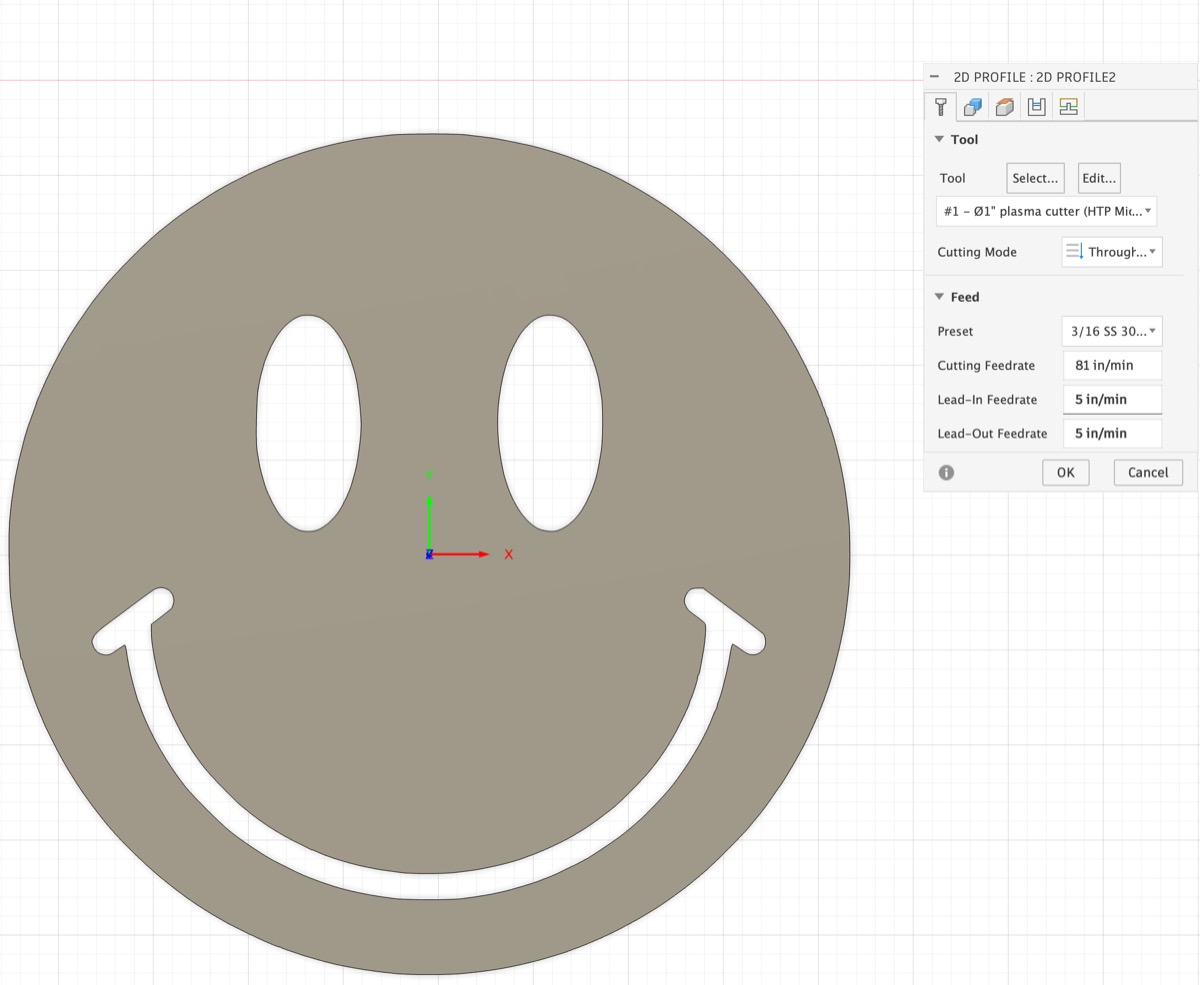
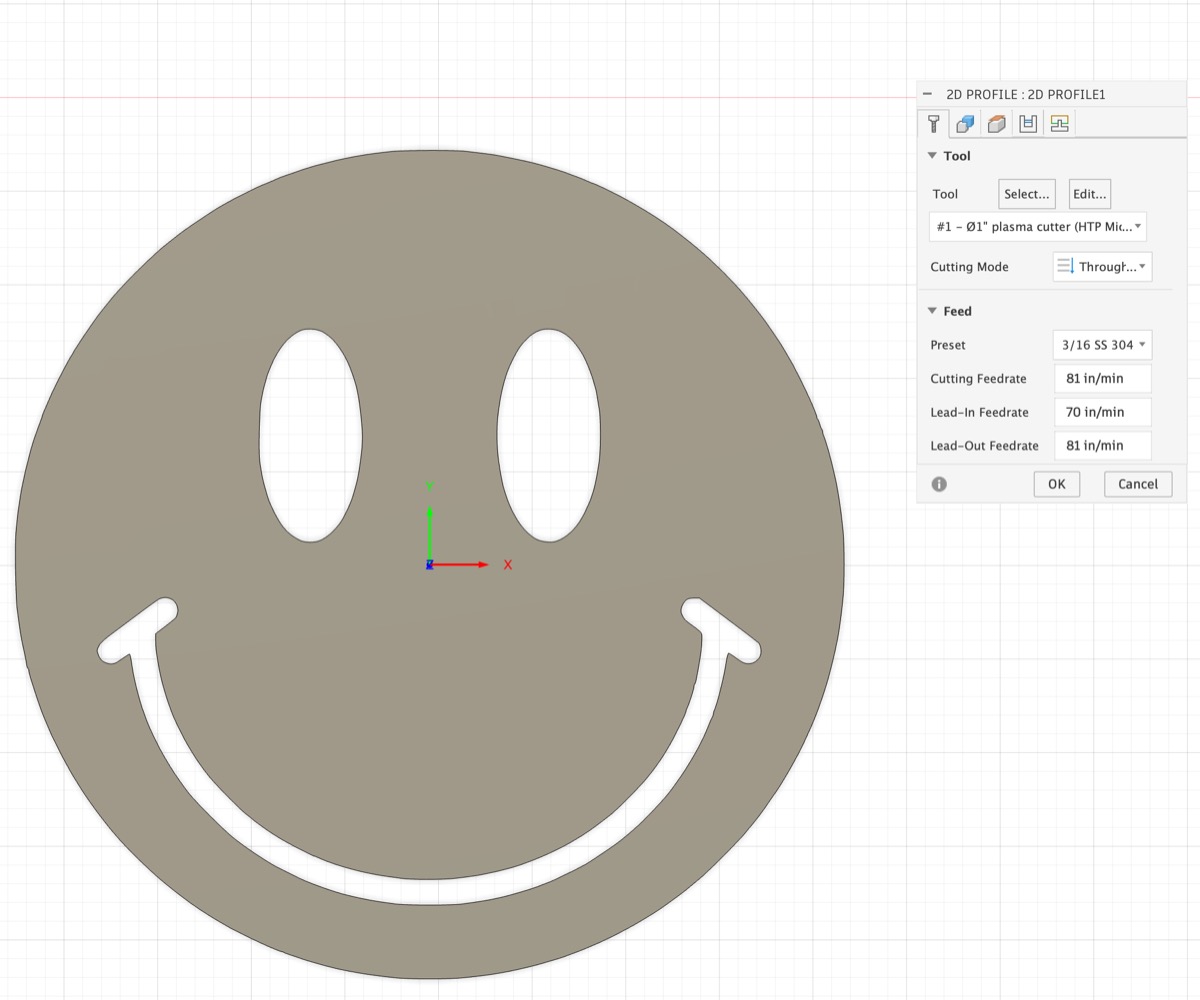
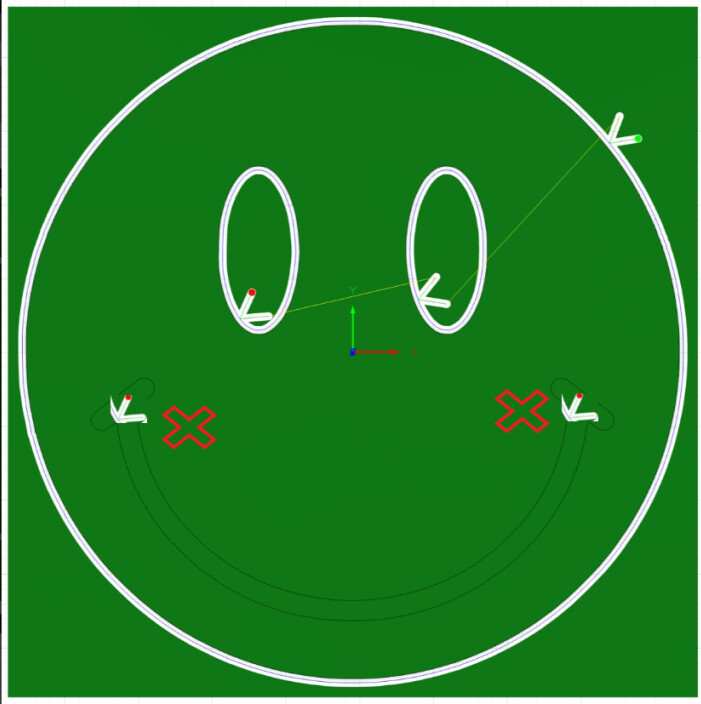
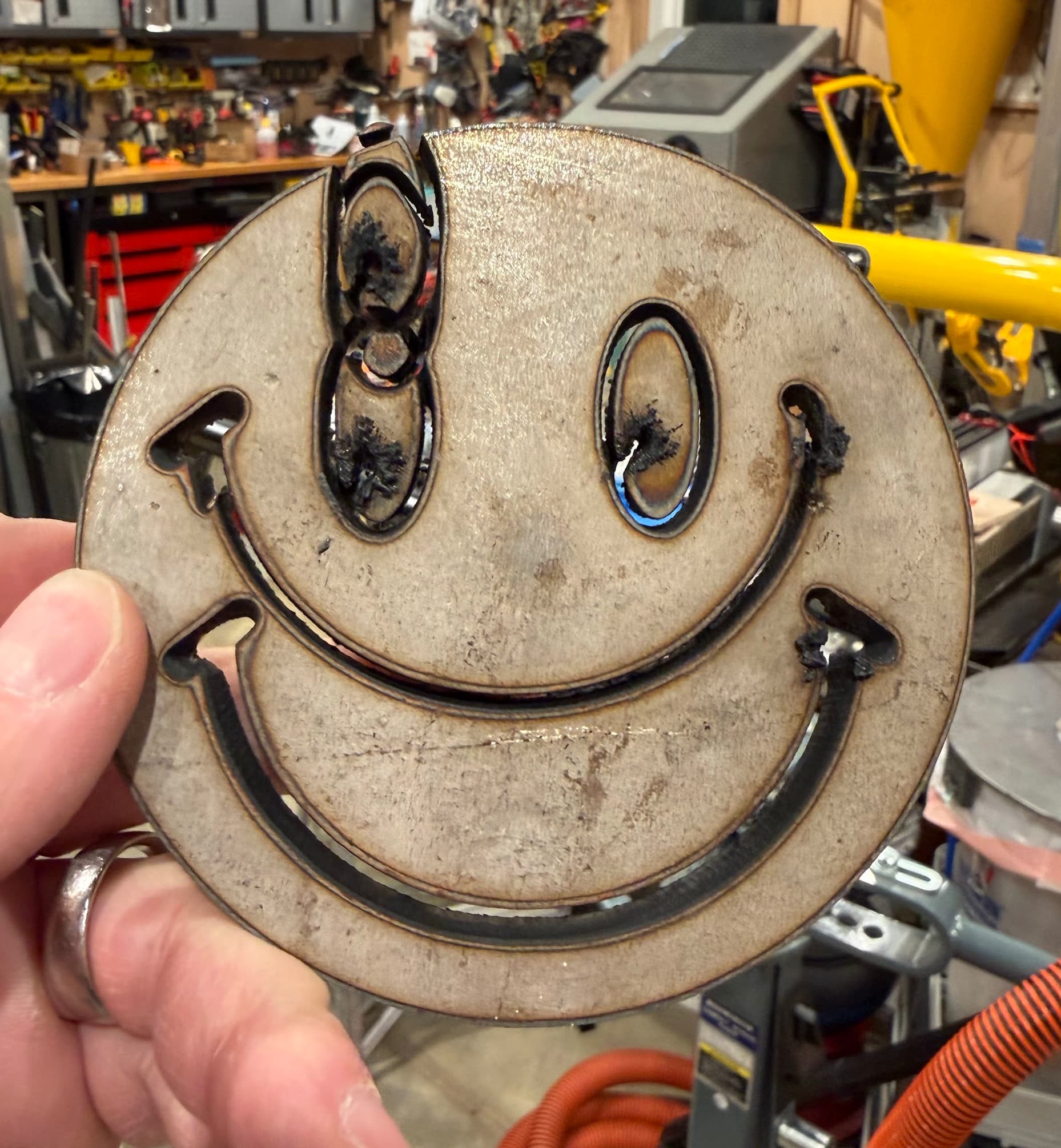
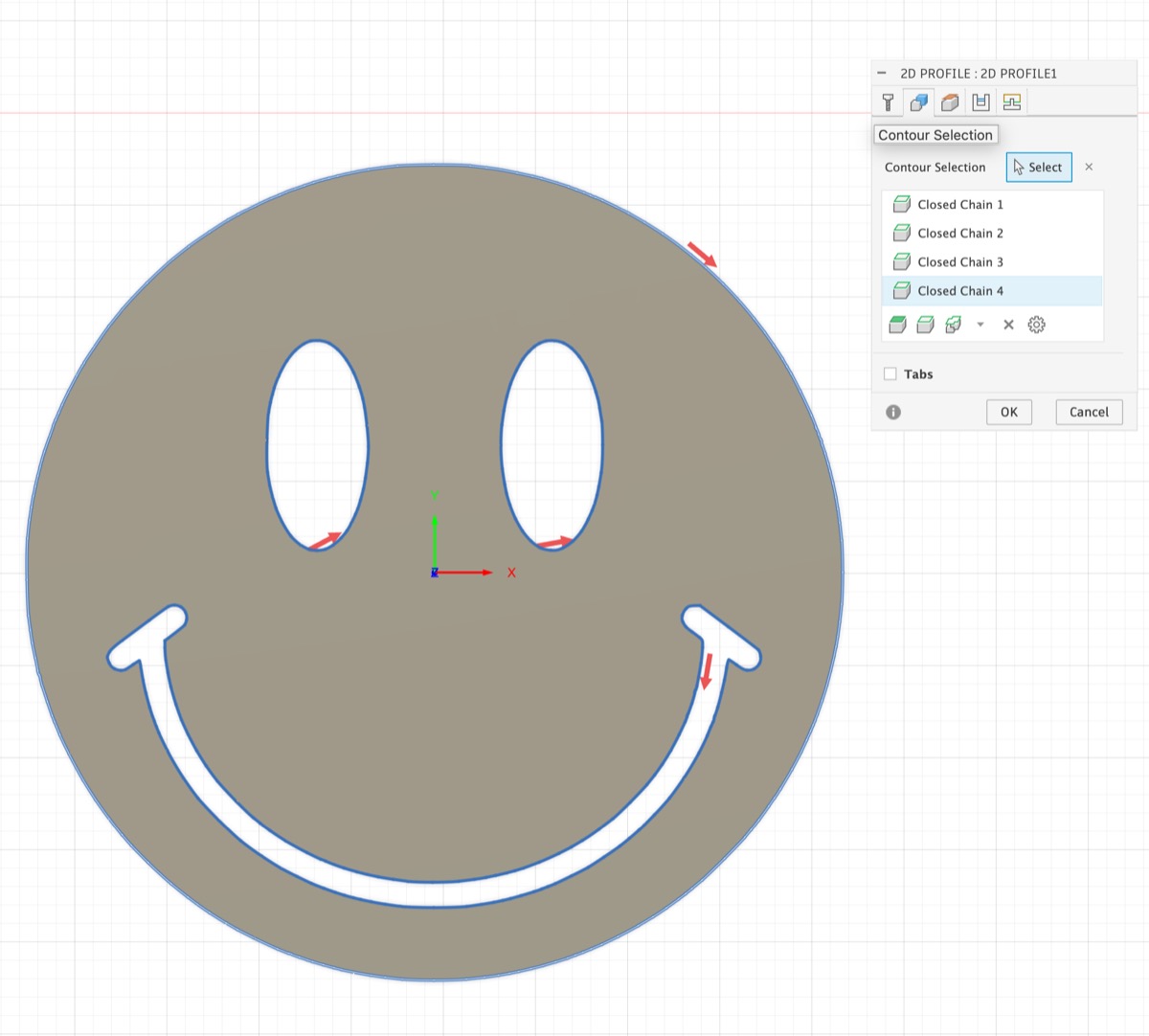
I am new to CNC and have only previously used fusion for 3d printing.. on my initial test piece “hello world” project, I am having issue where one of the elements is not generating a tool path, even though I can easily select a closed contour and align the cut to inside the tool patch when setting up the Cutting 2D config.

I saw another post where the lead-in and lead-out in/min rate if set too high can prevent this, so I reduced them to 5 in/min and it still didn’t work.. any other ideas?

Below are the setting screenshots and the fusion file.

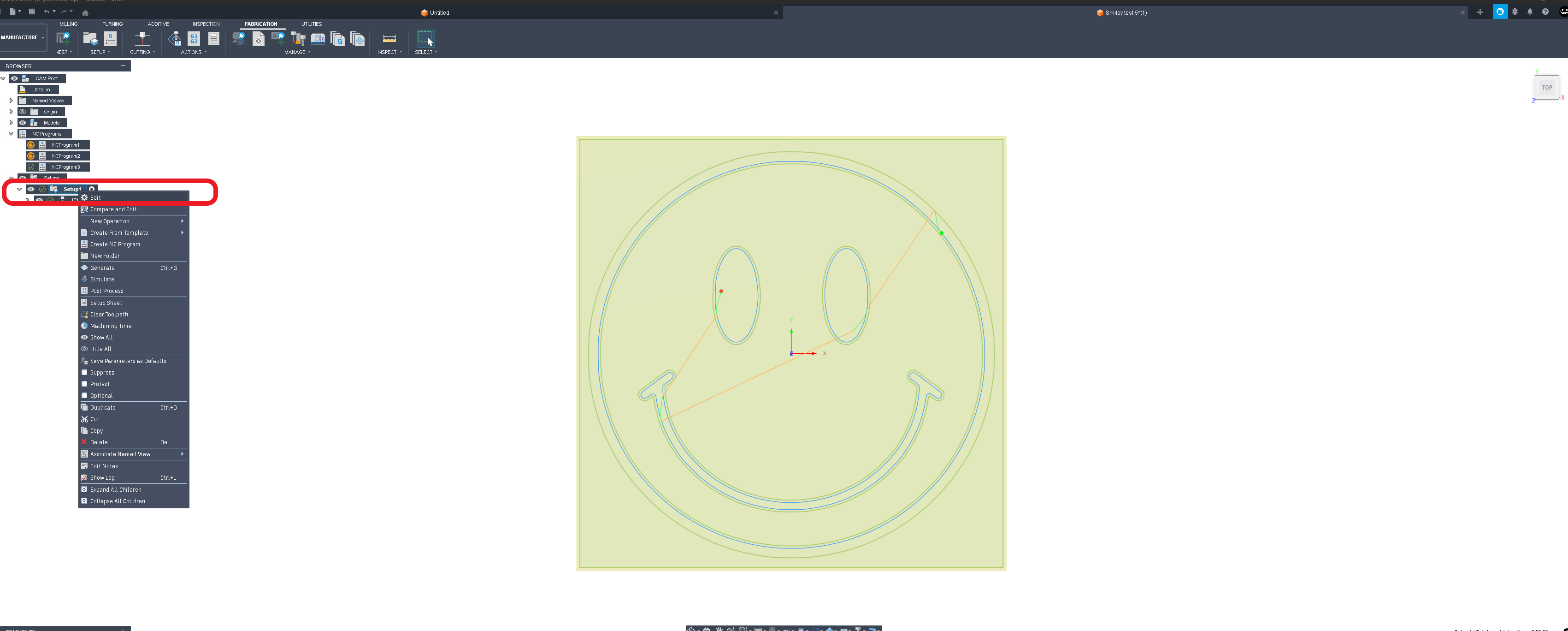
Yeah, your leadi in & lead out LENGTH is too long to fit inside the ‘smile’.

Welcome to the forum!

3 Likes

Along with what @TomWS said you could also choose the location of the lead-in. Usually fusion does a good job choosing the location but sometimes I find if I manually select a location I can get it to pickup the dropped geometry.

If it were me I would choose a different location for those lead-ins for the eyes too.

2 Likes

As Tom pointed out, there is no location where you could place your Lead in/out paths that they did not conflict with the cut path or the body that you are intending to keep. If that conflict exists, Fusion will discard the contour, as it did in your case.

Welcome to the forum!

I like your profile picture :wink:

2 Likes

Of course you do.

Be warned, @zargnut , watch out if he starts sniffing around your butt! :grimacing:

4 Likes

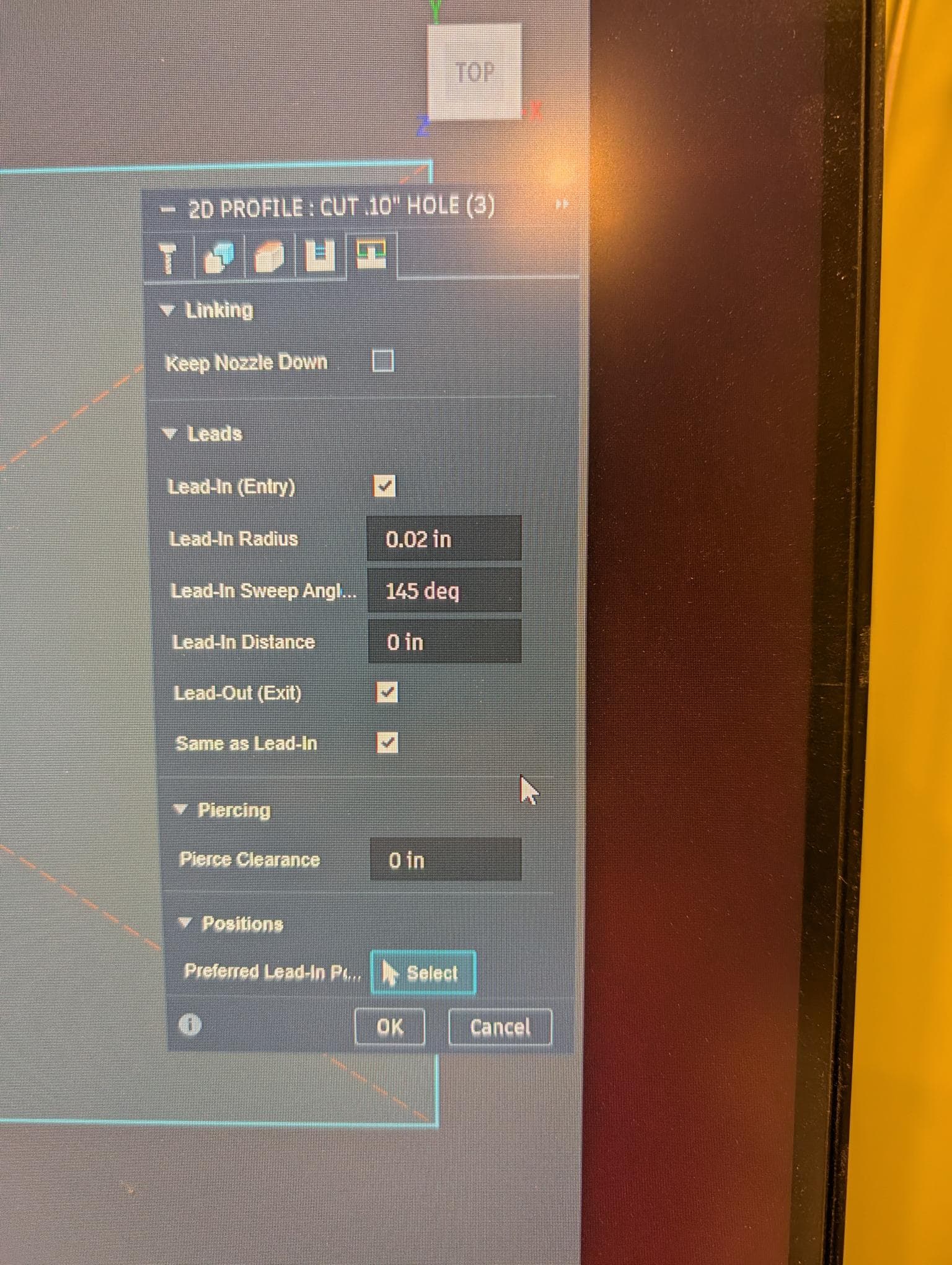
As others noted it is the leadin….here is an example of what I do on small diameter holes…kinda the same thing and problem/

Note the small leading radius and angled arc’ed approach…

Here is the resulting tool path…

Sorry about the lousy screen pic, but notice how little room there is to get this done.

Also you don’t need a lead in or out, you could start on the longer part of the smile without it. I prefer a leadin if I can get one.

3 Likes

Thanks all for your help and advice. Sorry for delayed responses.. I am newbie and still being moderated.

I went ahead and refactored

  • chose lead in points at locations where there were not any abrupt angles
  • chose a shallow lead in angle which allowed me to retain a longer lead in distance

I will give this a shot and report back on how bad the first cuts are :slight_smile:

If there is an existing post on general setting tips, tricks can someone please drop a link?

Stuff like:

  • ideal lead in locations for different types of contours
  • impact of parameters and how they interrelate:
    • lead in radius
    • lead-in sweep angle
    • lead-in distance
    • lead-in feed-rate

Shorten you lead in and out to 3x your kerf width. You are likely going to run into a voltage failure with THC (if you have it) as your drop material will fall out before the cut finishes.

1 Like

Thank you.. great advice.. hard to cut what is no longer there, huh?

I shrunk the radius to .25, distance I got down to .155, and removed the lead-out entirely.

Ready for a trial?

Mmmmm.. So… Yeah… Got some tuning to do..

  • I was cutting 1/4” 304 Stainless.
  • HTP MicroCut 45DV with Machine Torch set at 45 AMPs
  • Plasma has built in connector with 50:1 Div V which was passed into the Div-IN port
  • Air at 72 PSI, Compressor –> Ingersol-Rand Refrigerated Dryer → 16 oz Desiccant Dryer –> Plasma Cutter
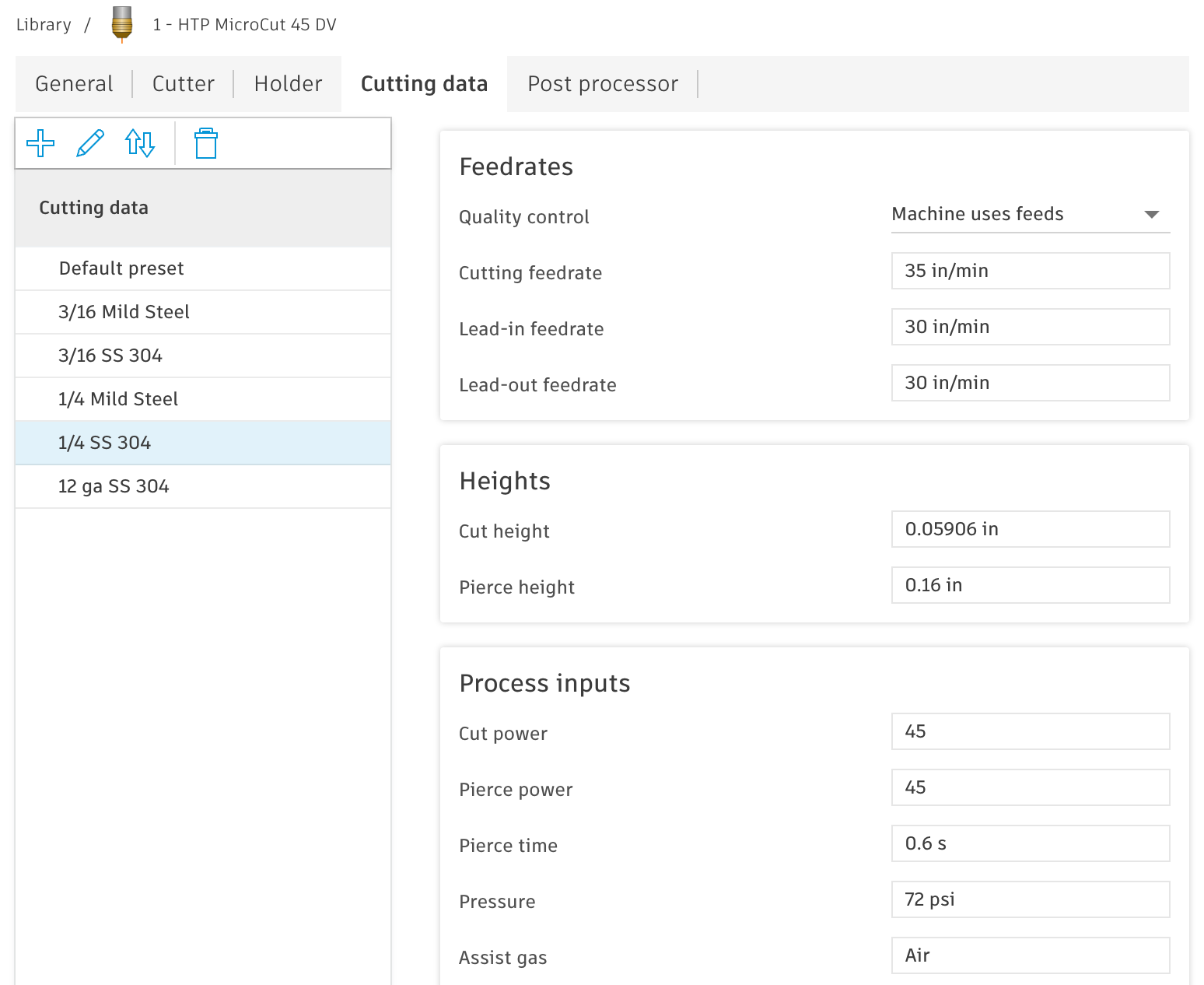
  • Started with default settings 49 rpm, Cut height .06, Pierce delay .55, Pierce height .12
  • Using Z axis IHS THC. I did go through the THC test program of firing 3x and it was in spec.

I made several attempts (2 other pieces not seen in pics) and had to make a bunch of changes along the way…

  1. Speed was way too fast apparently.. I titrated down from 49 IPM to 35 IPM before I was not getting sparks flying from the top of the piece after piercing. 49 IPM came from the plasma cutter manual for 1/4 SS

  2. I kept getting errors from THC that my pierce delay was too short or too long and I ended up having to juggle around with values .55 → .50 → .52 → .51… It seems like there is something else at play here..

  3. The lead-out that I removed seems to have caused issues because the cut isn’t finished on any of the closed contours (on the back side - ie not cutting through at end). Could use a good setting/solution to this to get clean finish cuts before moving to another section.

Here is link to pics and videos. Any and all advice is greatly appreciated. Developing a pile of expensive scrap :stuck_out_tongue_winking_eye:

Google Album with pics / Videos - First Cuts/Errors

Album of Table build, water drains, desiccant, plasma cutter, etc

Smiley test 5.f3d (409.5 KB)

Smiley 7.nc (87.3 KB)

1 Like

There are many experts on this forum who will help you, but I will offer some ‘sage’ advice.

  1. 1/4” SS does NOT need THC on a 4 inch diameter cut. THC is a complication in this case. Turn it off and focus on cutting flat material.
  2. SS is the second most difficult metal to cut, Aluminum being the first.
  3. Use cheap Cold Rolled steel to learn. It cuts easily and is well behaved.

Other than that, good start! :slightly_smiling_face:

5 Likes

Crazy material to cut your teeth on.

I just picked up a piece of quarter inch 304 today at 56 bucks a square foot.

Langmuir wants to see a 50 to 1 divided voltage so 15 to 1 is going to cause some issues.

EDIT: ( I read through the manual and there is no 15 to 1 output so this must be a typo on your part)

Also if you’re using feed optimization it’s going to compound issues because it would have been slowing down for the curves and everything’s curve in your example. So smart voltage with not have a good datum to start with.

I would try a test Square to start with.

Having the work clamp directly on the material is very helpful.

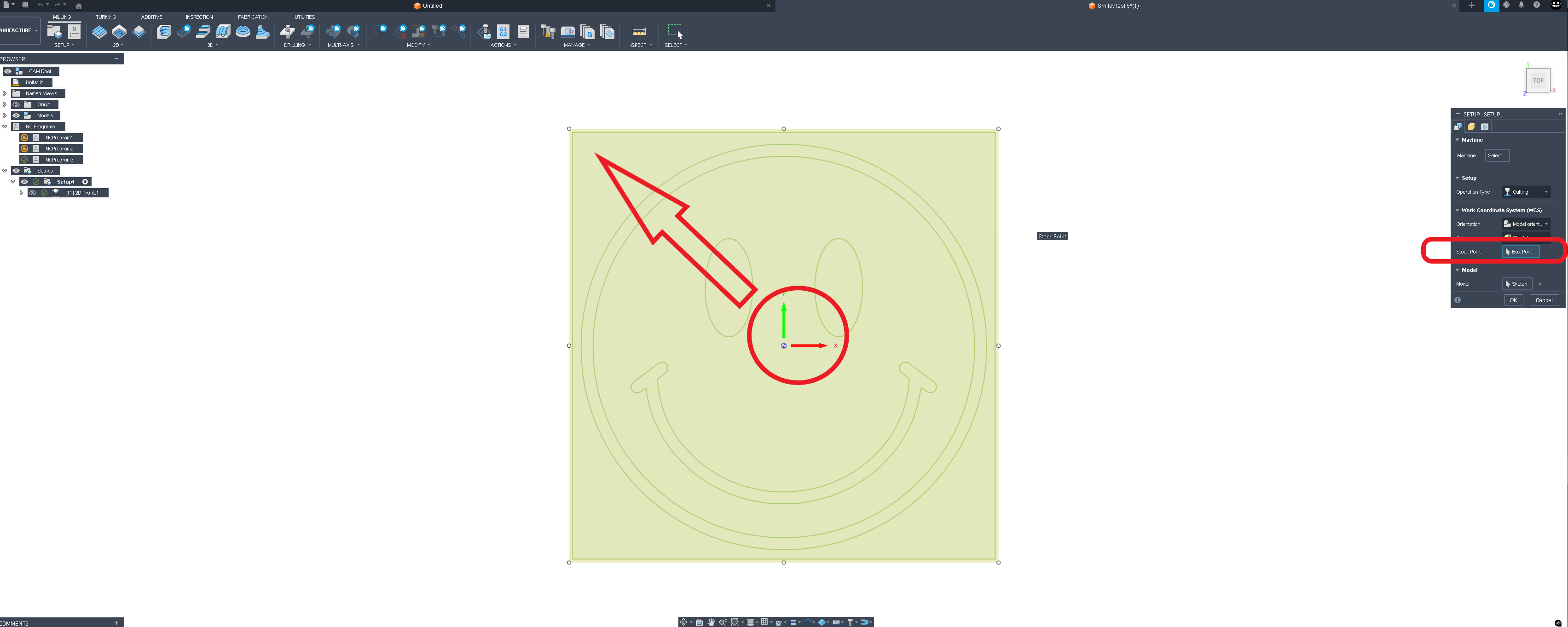
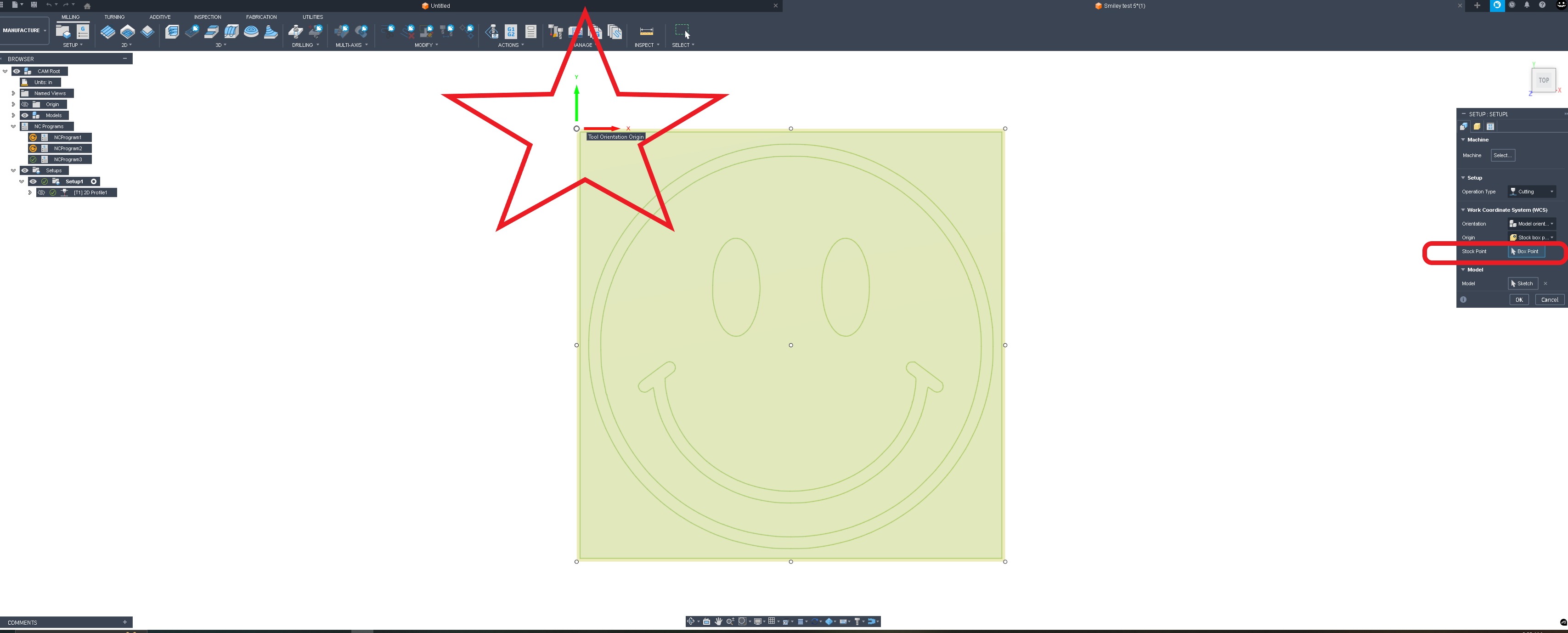
Also I can tell you’re having problems indexing on the sheet because your starting your program at the middle of the work it’s way easier to index off an edge. This setting is in setup and it’s called the stock box point origin try to locate it to the upper left. This is why you’re cutting right off the sheet and losing the arc.

And the black edges are normal for stainless steel unless you’re using F5 gas which is recommended for thicker stainless cuts.

https://share.google/hK0IiqHT4AOZGFcfQ

I agree good start.

I ll dive into your f3d tomorrow.

1 Like

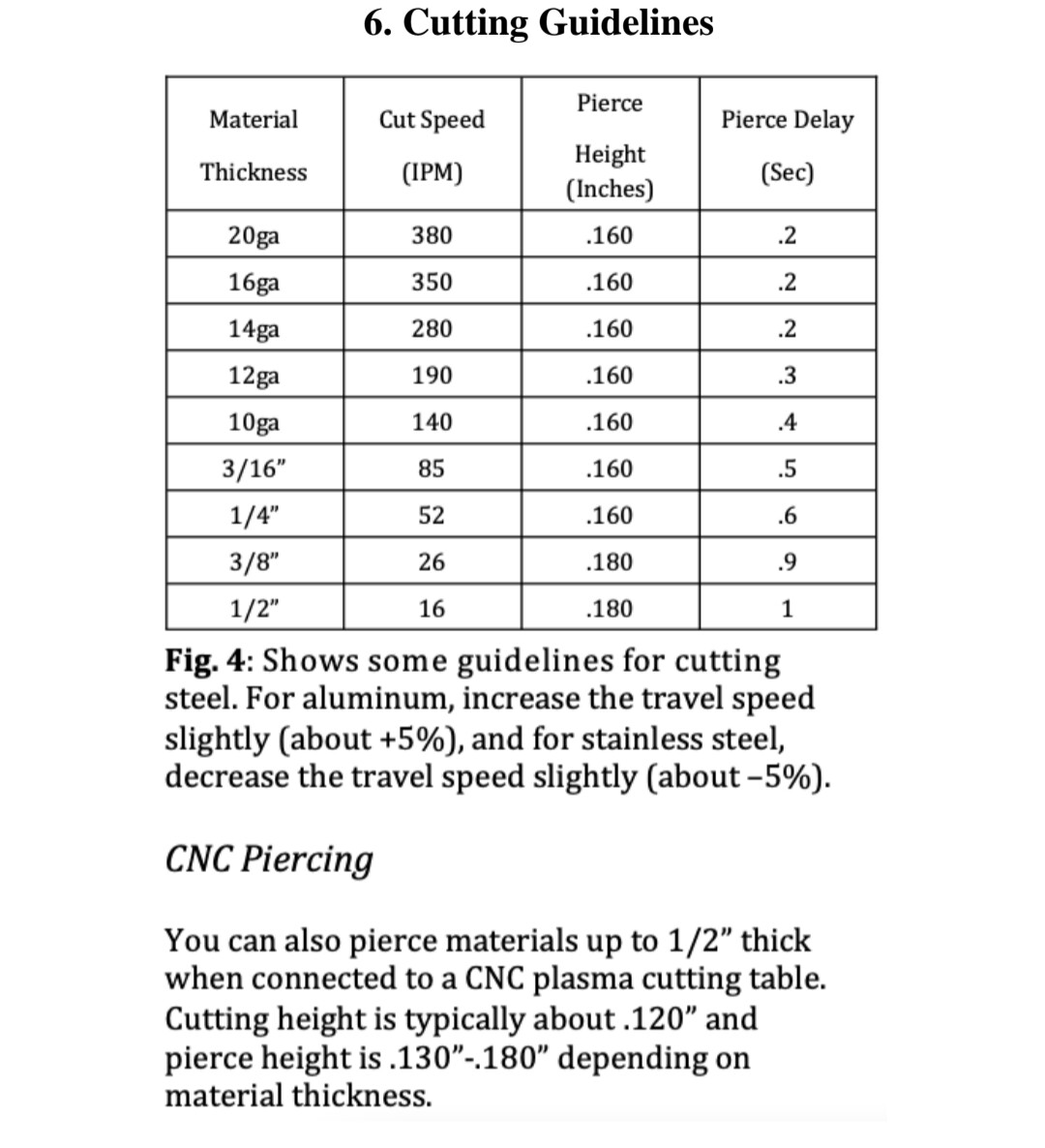
For defaults the manual the shows a pierce height of 0.16 and it also the states that the cutting height is typically 0.12 for CNC cutting

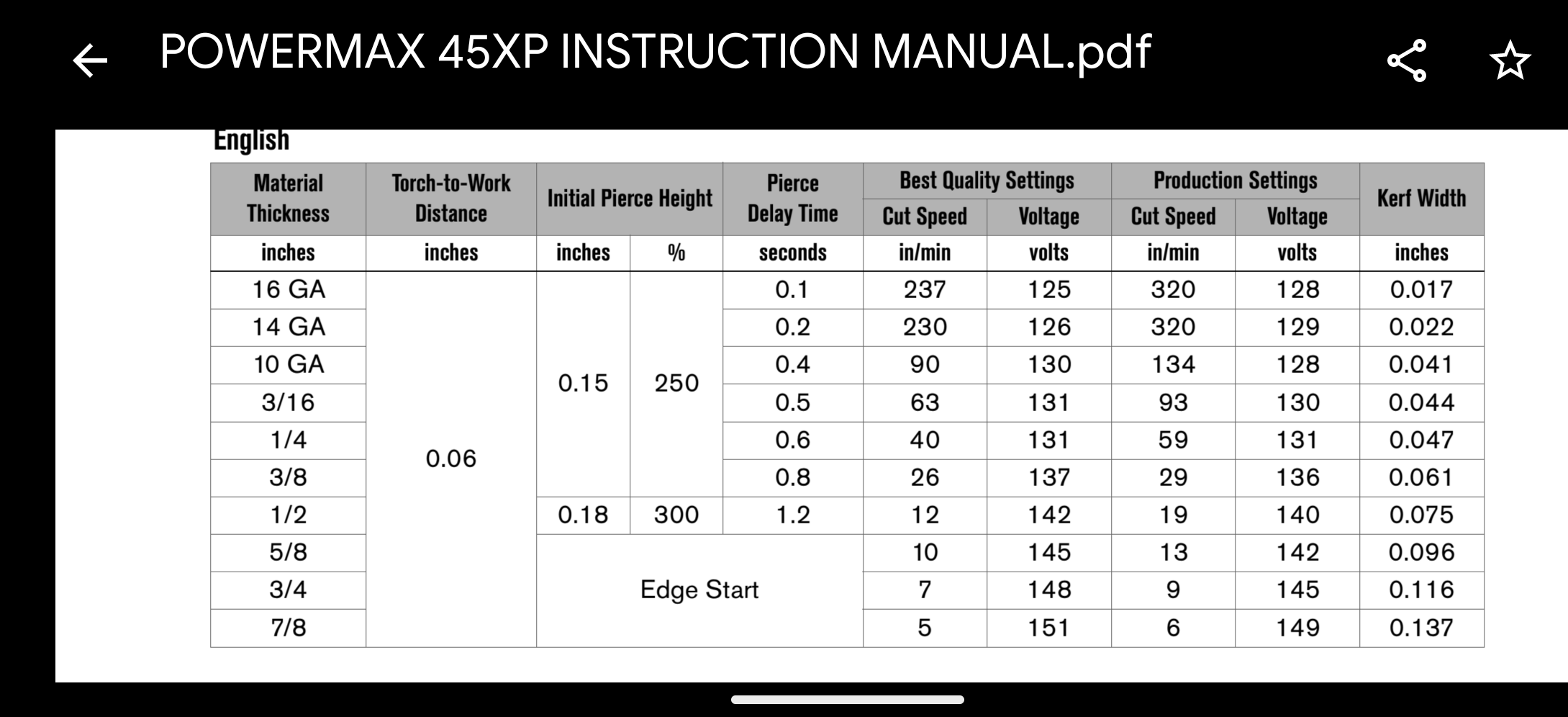
It also gives the cut speed of 52 - 5% to the 49 IPM is correct for stainless

49 in a minute does seem a little aggressive. if we look at the hypertherm cut charts which I don’t think is an argument at all that it’s a fastly superior machine .it’s looking for 40 inches per minute for best quality cut and 59 inches per minute for production quality.

the real question is how many PSI ( dynamic) do you have at the plasma while it’s running. You’re starting at 72 at the compressor but through the pipe work ,the refrigerated air dryer and the desiccant cell you’re likely going to have some pressure drop. Your unit cutting at 45 amps is looking for 4.2- 5.6Bar. (4.8 bar which is approximately 70 PSI.) my assumption would be when cutting thick stainless plate you would be to the higher end of that range. 5.6bar = 81psi .

On a side note a company that’s called HTP America and has welding units with names like revolution 2500 and freedom 3000 you would think they would display the pressure in freedom units(psi) by default ( but it is selectable). Seems downright Un American.

You’re running a crossfire machine so you have a built-in .5 seconds of latency on the pierce delay. So use the book Pierce delay of 0.6 and add another 0.5 for a total of 1.1 to start with.

And again get that work clamp ( often mis referred to as a ground clamp) on to the material being cut.

forest-gump-smile

Another note is just choose the one profile or face contour instead of individually selecting every closed contour. It’ll save yourself a lot of headache/time in the future.

@zargnut welcome to the forum

3 Likes

Opposed to wizard advice? :joy:

3 Likes

Lots of good feedback. Thank you for taking the time to investigate.. Here is some clarification…

Plasma has built in connector with 15:1 Div V which was passed into the Div-IN port

This was a typo by me.. it does output 50:1 by default had has adjustable dip switch resistor network to adjust output if required. THC testing confirmed the correct output.

For defaults the manual the shows a pierce height of 0.16 and it also the states that the cutting height is typically 0.12 for CNC cutting

I was also confused about that language in the manual.. I called HTP and their tech advised the cutting height is 0.06 and that mention of 0.12 is not applicable. definitely confusing.

It also gives the cut speed of 52 - 5% to the 49 IPM is correct for stainless

Yes, this is how I arrived at my starting speed of 49.. but clearly that is too fast for this setup. I am assuming the best way to validate is to adjust while cutting until I get clean lines without blowback above the workpiece?

the real question is how many PSI ( dynamic) do you have at the plasma while it’s running. You’re starting at 72 at the compressor but through the pipe work ,the refrigerated air dryer and the desiccant cell you’re likely going to have some pressure drop. Your unit cutting at 45 amps is looking for 4.2- 5.6Bar. (4.8 bar which is approximately 70 PSI.) my assumption would be when cutting thick stainless plate you would be to the higher end of that range. 5.6bar = 81psi .

My compressor Is set at 135 PSI with 60 gallon tank, running through 3/4 L Copper up to the 3/8” hose.. so it should be able to sustain 70+ PSI at the torch.. It is definitely blowing the water all over the place when there is not a piece present. I was more concerned about the moisture, so doubled up, running it through a refrigeration dryer and also the desiccant as backup.. so I think that Air is likely not the problem.. There is system regulated 100 PSI reaching the plasma cutter and the internal regulator is stepping it down to 72.. I believe I can adjust that if needed. The menu on the device does permit changing units to PSI, which I have done for familiarity :slight_smile:

You’re running a crossfire machine so you have a built-in .5 seconds of latency on the pierce delay. So use the book Pierce delay of 0.6 and add another 0.5 for a total of 1.1 to start with.

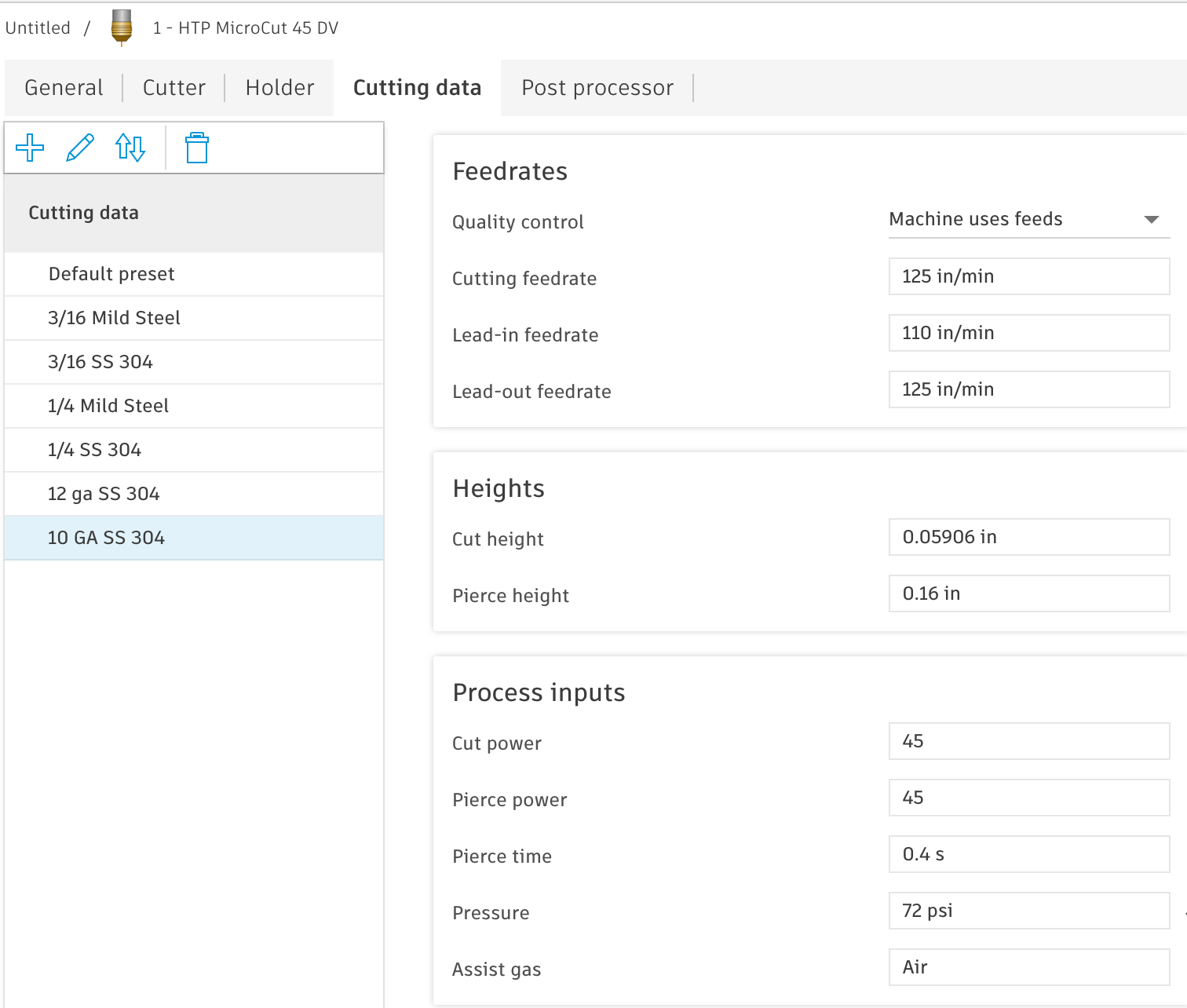
This is one, I could use some clarification on? I See a pierce delay on the fire control screen.. this value is in addition to what is programmed into fusion’s tool library settings for the material? Not an override? I just updated my tool library based on initial experience. These are latest settings.

And again get that work clamp ( often mis referred to as a ground clamp) on to the material being cut.

Wondering if this is one of my biggest problems.. I just had a magnetic clamp riding the edge of one of the slats. I did check conductivity with ohm meter and there was no resistance between the workpiece and the ground clamp.. but I do have multiple ground clamps with DINSE adapters so I can easily swap to a C-clamp directly on the plate. The issue with the torch popping and triggering the THC error seems familiar to manual cutting without ground connected, and just getting the pilot arc pop?

Thanks again.. will implement recommendations and see what happens.
1 Like

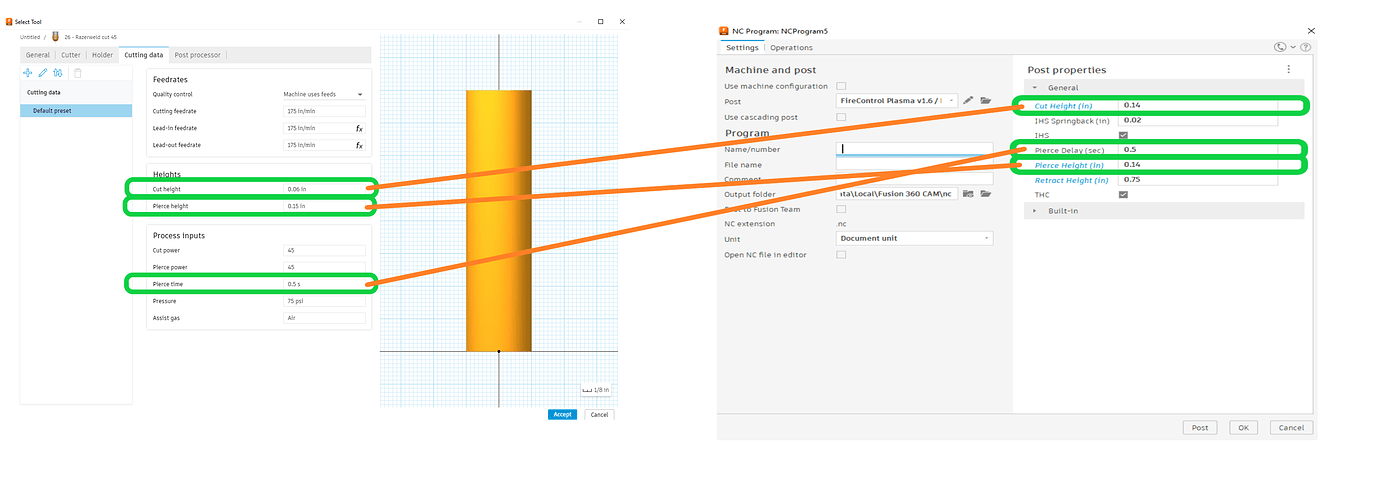
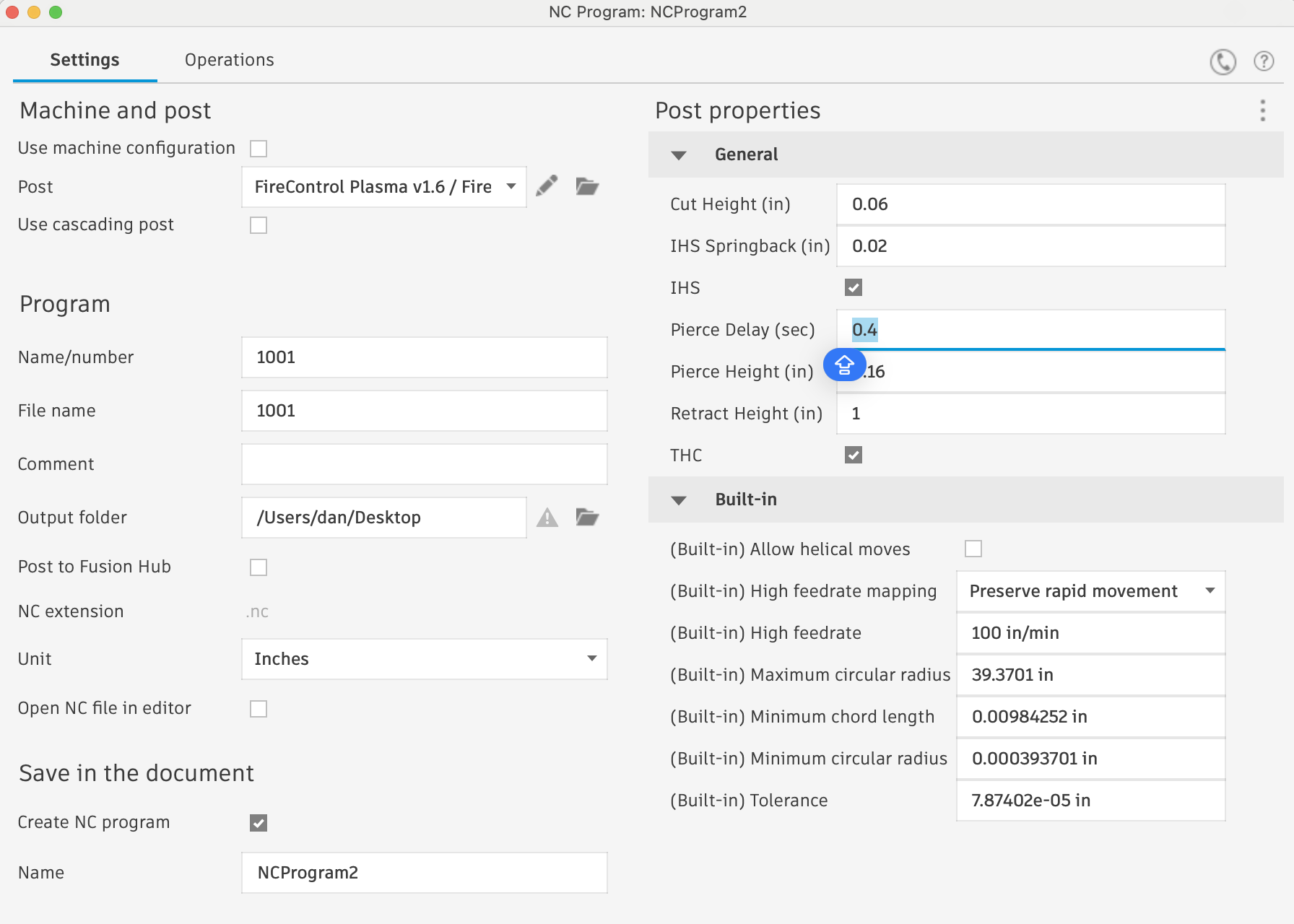
These parameters from the tool library do not move to the G code.

Only the final G code screen screen where you enter that data will move forward to the G code . You’ll have to add .5 seconds to anything the book says to actually be what is stated in the manual. If you add a value less than .5 seconds in firecontrol your torch will start to misfire or not fire at all. This does not apply to the XR (this does not apply to the XR)

3 Likes

You can test this using the set air function of your plasma cutter. Reading through the manual it appears you can do this by pressing the function button. Pressing the function button should turn the air on without firing the torch. You can watch the pressure gauge/digital display to verify your cutting pressure.

If this doesn’t work.. you could always watch the pressure display while cutting, to see what the pressure drop is.

The 0.5 second latency means that it takes 0.5 seconds for the signal to fire to reach the torch. If you enter anything less than or equal to 0.5s you aren’t getting any pierce delay. If the value, you enter is less than 0.5s you have negative pierce delay which means your torch starts moving before it fires. If you enter .05s for pierce delay your torch starts moving the instant your torch fires, which means you are effectively getting 0.0s pierce delay.

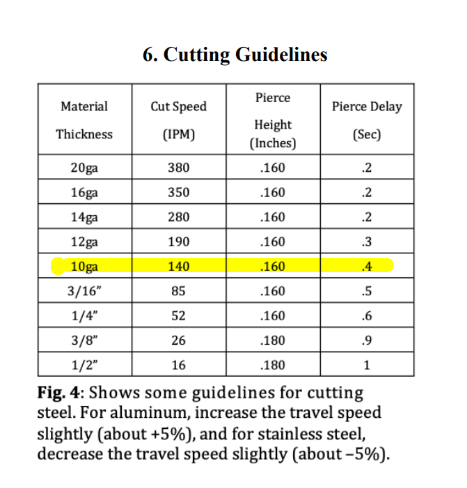
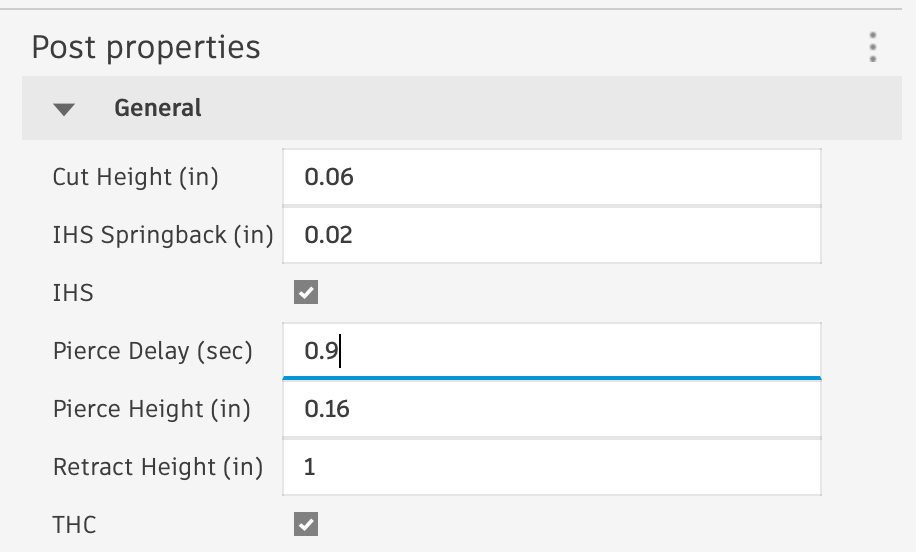
Using the cutting guidelines chart from your manual if you were cutting 10-gauge steel (highlighted below) you would need to set a pierce delay of 0.9s (0.5+0.4 = 0.9)

3 Likes

Ok.. I am following that the CF has internal/functional 0.5s delay… and I apologize for being thick.. but does this mean that I would include that and enter 0.9 (in your example) for 10ga steel in my fusion tool setup, which would carry over to the post processor fire control NC output file? or just maintain the machine manual recommended pierce time of 0.4s and accept that the CF will ADD 0.5s to that value for a total delay of 0.9s?

EDIT

I just re-read @TinWhisperer last post.. so it sounds like I do have to update the Post Processor dialog and do the simple arithmetic to arrive at a total delay?

2 Likes

For thick material like that I would also get rid of your spring back on the post processor just said that to zero. Some people even said it to -.02

Myself I use nominal voltage so it’s kind of a moot point but it matters when using smart voltage.

3 Likes

That is correct

1 Like