Hello there. New Langmuir owner. I finally have my Crossfire XR put together and I had a part I needed to cut for a customer out of 3/16 mild steel. I designed a little test cut program to see the best cutting results because I have the Razorcut 45 and it doesn’t have a cut chart. Found 3 different sets of charts on the forum so I was trying to figure out the best settings for the best cut. I had my very first cut pierce then the torch went out moving to the cut height and I got the Cutting Voltage Lost During Cut error. Was able to restart the program and it pierced through the existing hole then proceeded to cut the rest of the test cut. It moved to the next section, pierced, and then the torch went out again moving to the cut height. Restarted the program from that point then it cut the next 4 out without a problem. Ran the test program again and after every pierce the torch goes out now. It does the same thing for straight line cuts. Contacted Langmuir support and ran all the tests. He said my voltage was at a very healthy level and everything seemed to be operating properly. At the end he determined that I cannot use smart voltage and I needed to set my nominal voltage to 110 and manually set my voltage for all cuts on “thinner metal”. I ended up proceeding to cut a part afterwards and the problem popped up again. Called customer support back and got a few suggestions, tried them out, and they didn’t work. I turned up the internal regulator on the razorcut, turned it from 40 to 45a, decreased/increased pierce time and nothing has worked. Haven’t been able to call them back yet, but I will call back tomorrow for some more troubleshooting. Hoping to get some insight from all you on the forums. Summary of info to provide from all the other threads I have read. Used Fusion 360 to design and post. Material: 3/16 steel with mill scale ground off for grounding clamp and ground clamp attached directly to material, Cut height: .06, pierce times tested: .5, .8, 1.0, 1.2, pierce height: .15, cutting ipm: 30,40,50,60,70,80. Crossfire XR table, Razorcut 45 set to 2t, Quincy QT-54 compressor 60 gallon, HTP Max Dry 5 stage air dryer. Consumables are good on the torch. THC is wired properly. Error seems to always pop up at line 33 in the code, even new code generated to continue the cut where it left off. Thank you for your help!
That is one big block of text!
Whats the air pressure read on the RW while cutting?
Have you verified you pierce and cut height with a feeler gauge?
Try .3 pierce
Make sure your work clamp has good connections on each end, Some people have had cables that did not get crimped correctly.
Have you tried turning off THC in fire control?
Yeah it is! Did my best to be thorough to answer all the normal follow up questions.
The air pressure is now reading 85 psi while it is running.
I have not verified with feeler gauges but I have measured an average height with my machine ruler that has a thickness of about 3/64.
.06 is the proper height and I confirmed it today with Jasic Technologies. They actually sent me 3 proper cut charts for the Razorcut 45A for mild steel, stainless steel, and aluminum that I will share with the community since it seems like the most recent info. (I found 3 other cut sheets in the forum. One was an unfinished one from razorweld a while ago, and two were forum member generated from test cuts and I haven’t seen a more recent one so this will be great new info for the forum.)
My ground clamp has a good connection on the clamp end. I have not tried to pull back and look at the end that plugs into the machine yet.
I’m pretty sure when I was doing all my tests with Langmuir support that we did a test with it turned off for one of the tests (they were remotely controlling the table) but I don’t recall. I am going to do that test tomorrow because Jasic support suggested that as well and wanted me to document it on video like the rest of the cuts I did. I will update with the results after I test with the THC turned off.
So, with the cut chart settings, it cut perfect. I also believe it could have been an issue with the lead in distance being too small on Langmuir’s test program they sent over. I tried re-cutting their sample with the new numbers and had the same problem which is what leads me to believe that conclusion.
To sum it up the pierce delay was too long and on Langmuir’s test cut the lead in was too small.
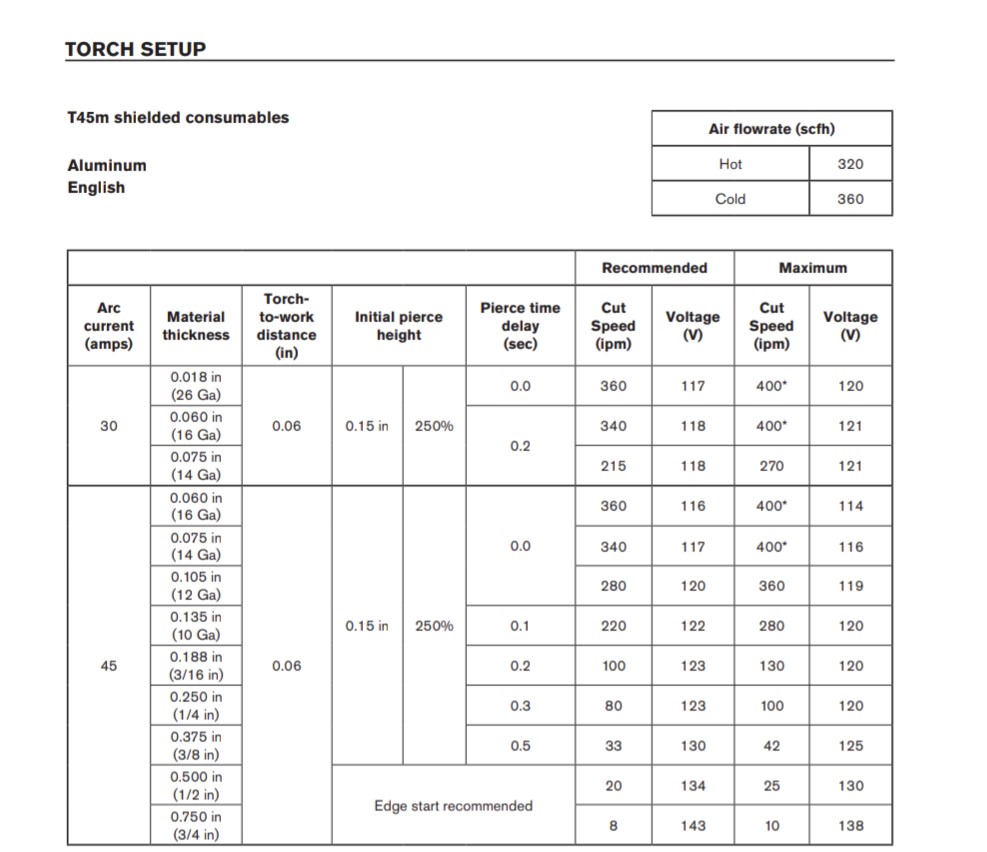
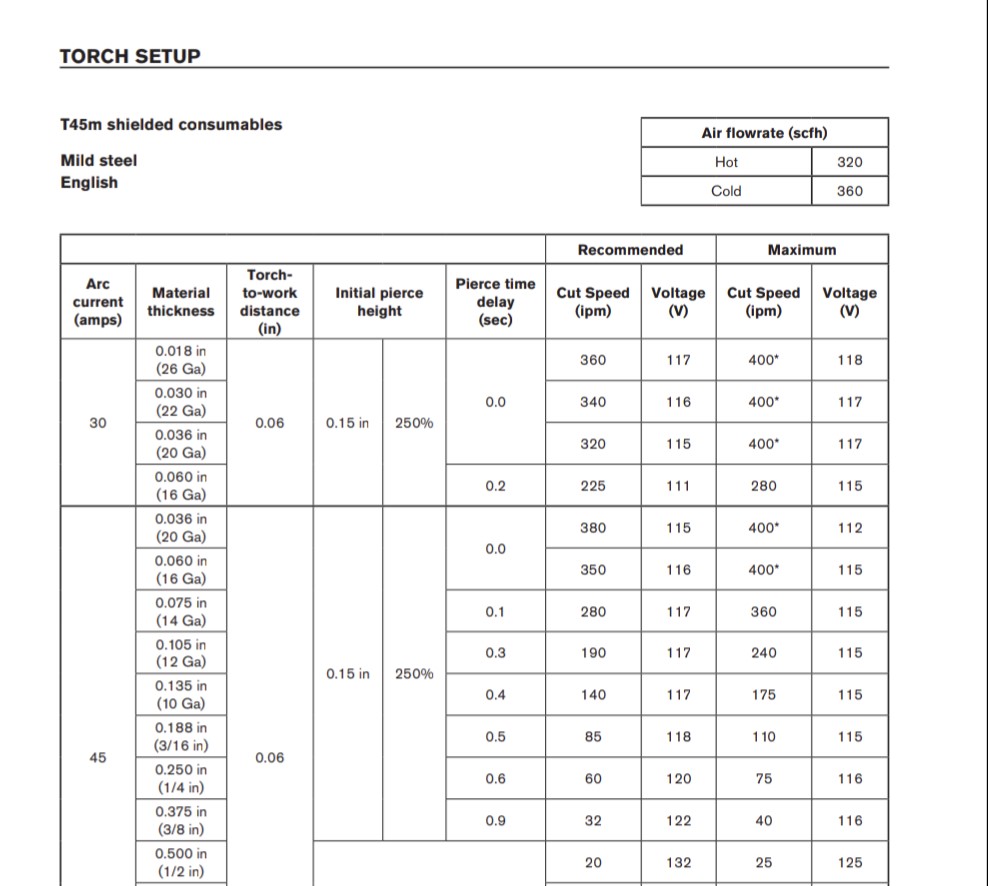
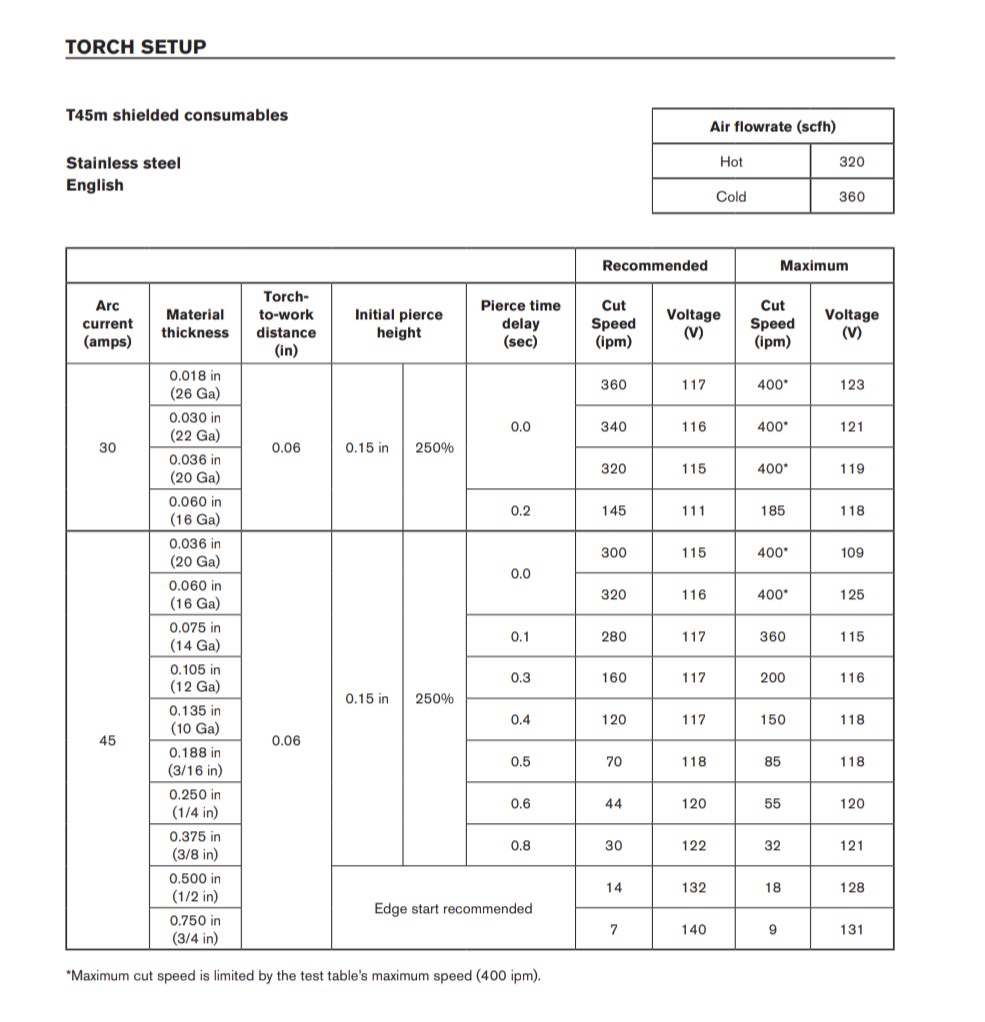
what did you set it at?
not sure how that could happen. Some times people turn off lead ins
so what were your IPM on 3/16" ? that chart seems almost double of what i cut at.
Pierce delay was .5, moving 85 IPM. I was able to knock off any slag on the back with a 5-in-1 but there wasn’t much. I can run a test tomorrow running at slower IPM and see what happens.
If i turned up my pierce delay even to .6 my torch would go out going into cutting after the pierce.
I did test cuts on a line shape I made where I cut on the line with no lead in or lead out and it pierced and cut in one operation however the pierce didn’t look like it made it all the way through and it didnt finish making it through for about a 1/16" to an 1/8" past the pierce. It looks like it needs the lead in to stabalize the arc before it starts cutting. On Langmuir’s test square it looked like the lead in was as the same size as the kerf so it could not stabalize and the arc would go out.
Your first post said
.5 did not work first time?
If your getting good cuts using that chart I would use it. I am going to try and remember to try the faster speed.
maybe you needed a longer pierce time with no lead in?
It did not because it was with Langmuir’s test program they sent over that just would not cut properly.
I do not have a lead in for the line cutting but longer pierce times tend to fail and be inconsistent. I did do a successful pierce and cut with a .7 pierce time but most above .5 the torch goes out after the pierce.
just for the heck of it try .4 or .3 Pierce delay