Hi, I was cutting along on my table just fine and then I went to start a new program and it crashed all of a sudden. Then I tried jogging in the Y axis and only one Y motor was working after that. The motor that was working was Y1 and the one that doesnt work is Y2. So I decided to flip the cables to see if it was a motor issue and when I did that the Y2 motor now worked, and then the Y1 motor did not, so that led me to think theres something now wrong in the control box. I took the cover off and when I turned the machine on the Y1 electronics and the Z1 electronics have a green light that is on and the Y2 motor does not. So what could this issue be and how do i go about fixing it. Thank you.
Check the wire harness for continuity.
1 Like
How would I go about doing that. Do you think something just got tripped?, because all the other ones are fine except the one
If you switch the wires back, does the other controller light go out?
While you have the cover off, please check the power supply voltage. It should be 36 volts DC.
Use a multi-meter on the output terminals. They are marked + and -. There should be two of each.
2 Likes
You check the wires and connectors with a volt/ohm meter.
1 Like
@ftp, from your description of the initial failure, I expect that the Y2 Motor Driver has died. These cheap stepper drivers fail quite often. Contact Langmuir Service (@langmuirsystems ) for help. They’ll probably send you a new one fairly quickly.
Welcome to the forum.
4 Likes
Well thank you I thoguht that myself after looking into it and I already ordered a new one on amazon for 10$. Cant believe there that cheap. Should be here later today and I’ll let everyone know if this fixes my problem or not.
1 Like
LOL! Now you know why they keep failing! I’ve replaced all my TB6600 drivers with, at least, DM542 drivers. Smoother operation, quieter, and MUCH more reliable.
4 Likes
Alright everyone the problem is solved with a new stepper motor driver. I found it on Amazon. its called TB6600 stepper motor driverand it was only 10$. Thank you for everyones input. Ill add a link here for it in case this happens to anyone else.
2 Likes
Tom, do you have to do anything special such as changing settings or do you just swap in the DM542, wire up to the same port, flip the dip switch to match the steps and amperage and then it is all good?
I have trouble following those charts:
On one of the manuals for the TB6600, it seems to indicate that if the only DIP switch that is “ON” (Switch 2) would indicate:
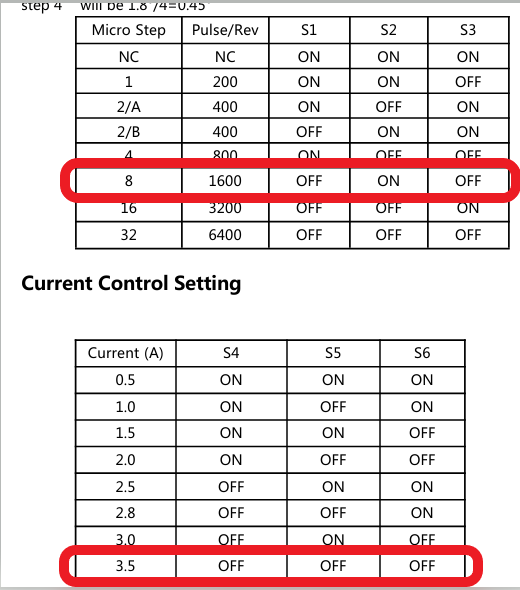
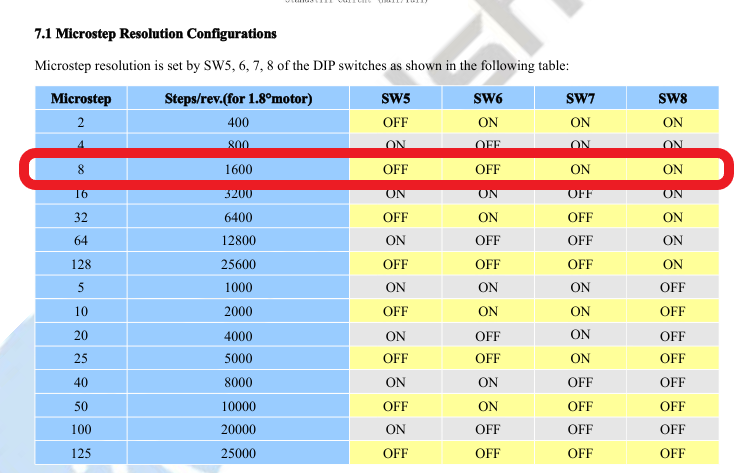
So to mimic this on the DM542 I would turn on switch 7 and 8 to get the correct steps?:
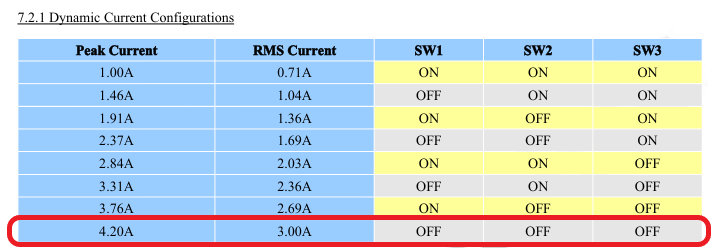
And then these switches (1, 2, 3) would all be off?:
The first thing is that the mounting footprint is slightly different - the base is slightly larger (for larger heatsink) and screw spacing so you would need to either drill a new hole for one of the screws or rely on just one screw to mount it. Since it’s not really moved after it’s wired, that isn’t a big risk…
As you have found the switch encoding is different, so, yes, use new switch settings to get the same value (8 microsteps), 3.76A peak (SW1 ON)
Finally, the motor winding assignments MIGHT be different, I don’t recall, but easy enough to change. My recommendation, if you’re not sure, loosen the couplers before you turn on the motors to verify correct operation (prevents jamming of Y axis).
Do this and kiss motor hiss goodbye.
2 Likes
Thanks Tom. I did ‘this’ more as a theoretical mental exercise for now.
Thanks for the guidance.
Always good to ‘exercise’! 
1 Like