I haven’t been able to make my legacy crossfire cut. I’ve down loaded a file from Fireshare that says ready to cut and checked the box to not use IHS but I still get the alarm for IHS light on. I can dry run the program and the torch will fire manually. I’m still missing something but what?
If you have the power z axis sounds like you have a bad connection or a unhooked wire going to the IHS switch.
You could have the torch mounted to high. The switch can trip permanently. Will it go off when you raise the z axis?
Did you download the file as is or select to have all Z axis commands removed?
Just turning off IHS in Firecontrol probably isn’t going to work.
I’ve tried it both ways. The last file I tried had the box for turning off the IHS and I did that. I’ve also tried selecting the “run as is” and the other box but neither turns off the light. You guys will have to bear with me. I bought this unit from a guy 4 years ago who said he would show me how to operate it. He came over one night and couldn’t get it to load and I never saw him again. When I finally got time to mess with it this winter, after I retired, I found a bad driver board in the enclosure and had to buy the upgraded Firecontrol electronics to get it to operate. I’m trying to figure out Fusion at the same time but it seemed like it would be easier to down load a file from Fireshare the was ready to cut. I know I’mmissing an important step. I just don’t know what it is.
Thanks, I don’t have the pwered Z axis.
If you don’t have a powered Z axis, the light will always be on. The circuit is always open, because nothing is plugged into it.
As long as your G code doesn’t contain Z axis commands, it won’t throw an error for that.
The problem is in the code that you are trying to use. It has Z axis commands in it, so Firecontrol expects the IHS circuit to be closed at the start of the program
I’m not near a computer right now, so I can’t look and see what you have to do to get those commands out of a Fireshare download.
I think there is an option to remove the IHS and THC commands at download.
1 Like
can you post the first 10-15 lines of the code to see what’s going on.
(v1.6-af)
G90 G94
G17
G20
H0
(2D Profile1)
G0 X-0.11 Y0.55
M3
G4 P0.5
H1
G3 X-0.16 Y0.5 I0. J-0.05 F60.
G3 X0.16 I0.16 J0. F60.
G3 X-0.16 I-0.16 J0.
G3 X-0.11 Y0.45 I0.05 J0.
H0
M5
G0 X-0.5775
M3
G4 P0.5
H1
It’s a small file because I wanted to start with something easy.
That doesn’t have any Z axis commands, but it does have THC on and off commands. I don’t know if that’s causing a problem or if that’s normal on a No Z program.
I didn’t see any commands for the Z axis but i wasn’t sure what I was looking for. How can I get rid of the THC commands?
I’m not even sure that’s a problem, but you can toggle off THC in Firecontrol.
When I get home, I’ll run a design through Sheetcam with a No Z tool and see what the file looks like.
Maybe someone with a standard crossfire can chime in and tell us if it’s normal to have H0 and H1 commands in a g code file for a machine with no Z axis.
I ran a design through Sheetcam with a no Z tool and it has THC on/off commands in it, so that shouldn’t be a problem.
You should not be getting an IHS fail error when running that file that you posted.
I appreciate the effort you’re putting in to try and help me. I had tried a couple of other files and got the same message. I wonder if I messed up loading the plasma cutter into the tool library or something? I’ve been able to dry run all of them, and I can fire the torch manually.
does it happen if you try to disable the ihs and thc in firecontrol? or are those options greyed out since you don’t have them.
I don’t know how I would disable them, I haven’t found a button for it. Part of my problem is that my table is in the garage but I don’t have good enough service out there to do much. I don’t know what Firecontrol will do until I go back out there and plug in.
you can disable thc, if it’s not already greyed out, by moving the slider to the right of SETTINGS.
I thought there was a slider for IHS as well, but i didn’t see it.
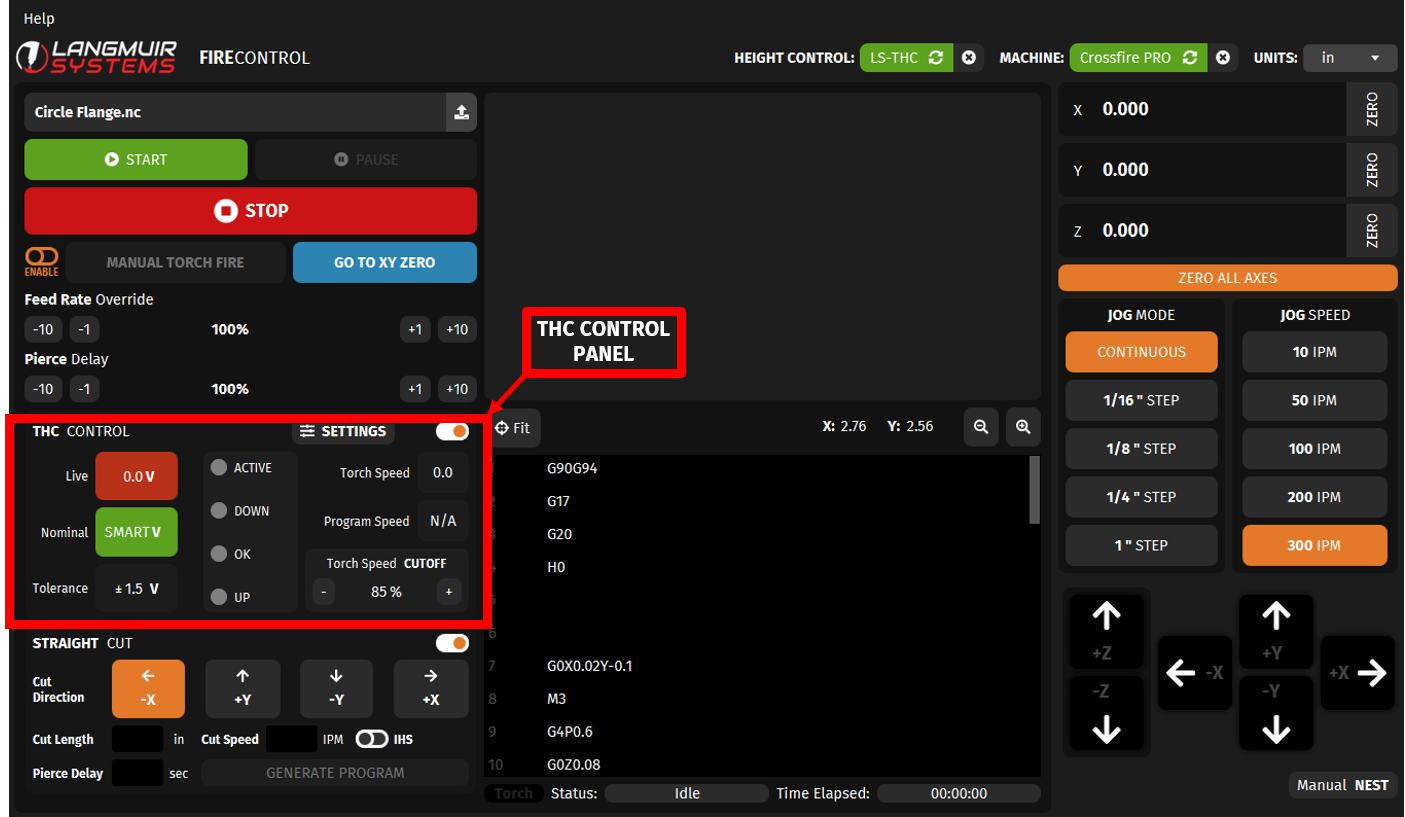
Can you post a screenshot of the error message that you’re getting?
It doesn’t make any sense that you’re getting an IHS error when there are no IHS commands in the file.
The THC control is grayed out, I never see the box you outlined. If I go to straight cut, it does give me the option to turn off IHS, as shown in your screen shot. Obviously, it doesn’t affect what I’m trying to do.
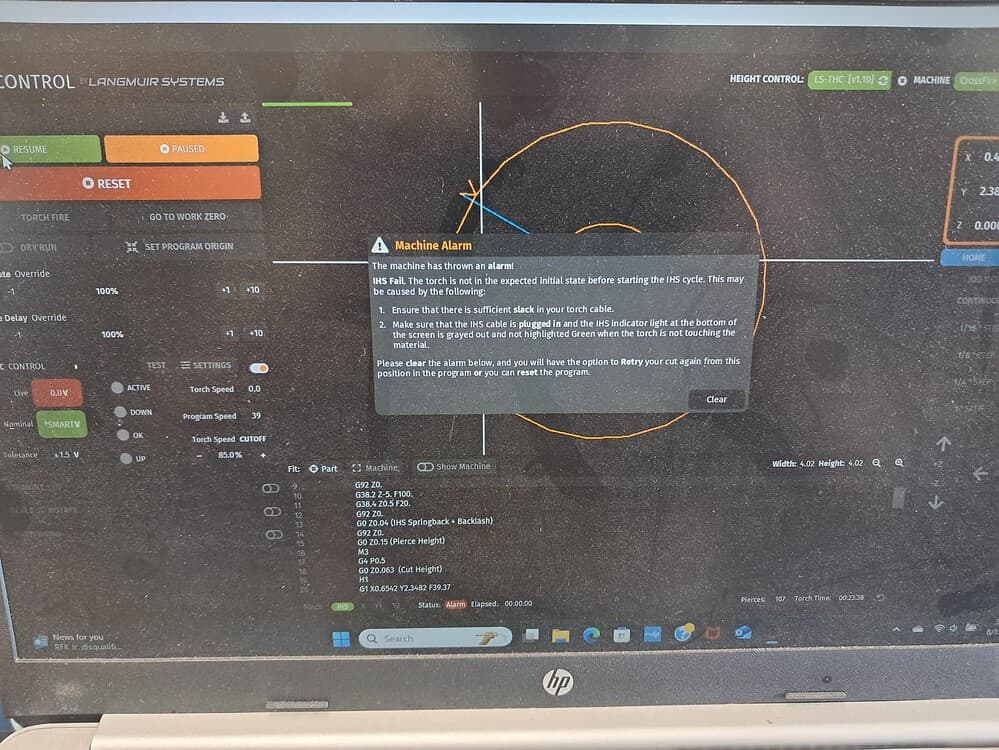
This is a screen shot someone else had used in another post, I borrowed it because it’s the same one I get.
That should not happen on a machine with no Z axis and no Z axis commands in the code.
When you say “legacy crossfire” how old is this machine? Is it a recently purchased machine that runs on Firecontrol or an older machine that is supposed to run on Mach3?
You can easily make the IHS light go out by plugging a cable into the IHS port and connecting the wires together, but that won’t fix the issue of Firecontrol throwing an error for something that doesn’t exist.