Adding a line to download

I addiing a line or boarder around a DFV I downloaded, which I want included in the toolpath for cutting. Im having issues having it included as of the original for cutting. Can anyone siplify this for me, Im missing something. Thanks

Using Autodesk Fusion

Tom

Exporting and posting your F3D file from fusion would be a great start for anyone to see you at you have specifically going on.

But you should be able to select it in the 2D profile menu by selecting the sketch involved under modeling in your browser bar on the left hand side.

Follow this topic about how to export a F3D file if you’re unfamiliar

this video may help you out it’s a little dated now

2 Likes

I uoloaded a example to show what I am asking.

The prodject is fine but I want a 1/2” border all the way around.

Im assuming this to be a line or circle added to the sketch, or Im incorrect.

I cam add the line when creating the program and tool oath.

Thanks

Export f3d-3.f3d (903.7 KB)

I think there might have been something wrong with the original sketch here’s a corrected DXF

barber.dxf (450.5 KB)

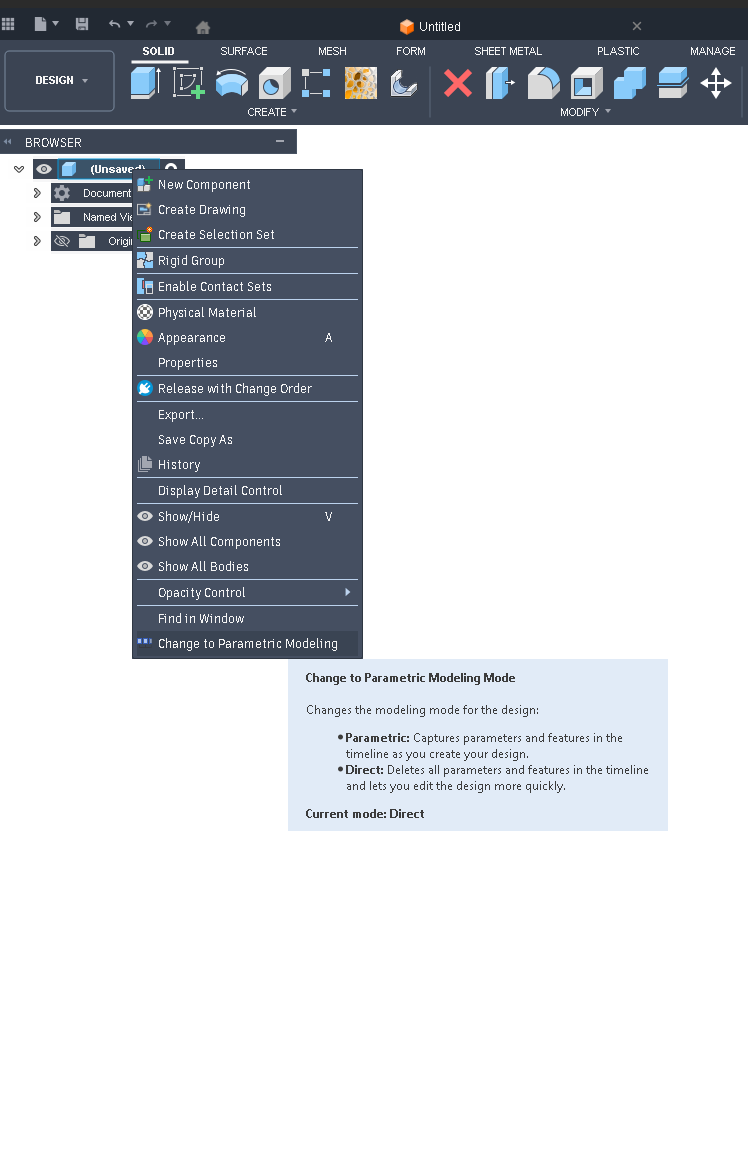
the other thing I would suggest is when you start a new model make sure that you’re in parametric mode instead of direct modeling mode.

This can be done by right clicking the first component in the browser bar on the left hand side scrolling to the bottom of the menu and change it to parametric modeling.

The benefits of this is giving you a history to work with which makes changes and navigating far easier later on.
Thank you so much, anxious to try it.

Tom

1 Like