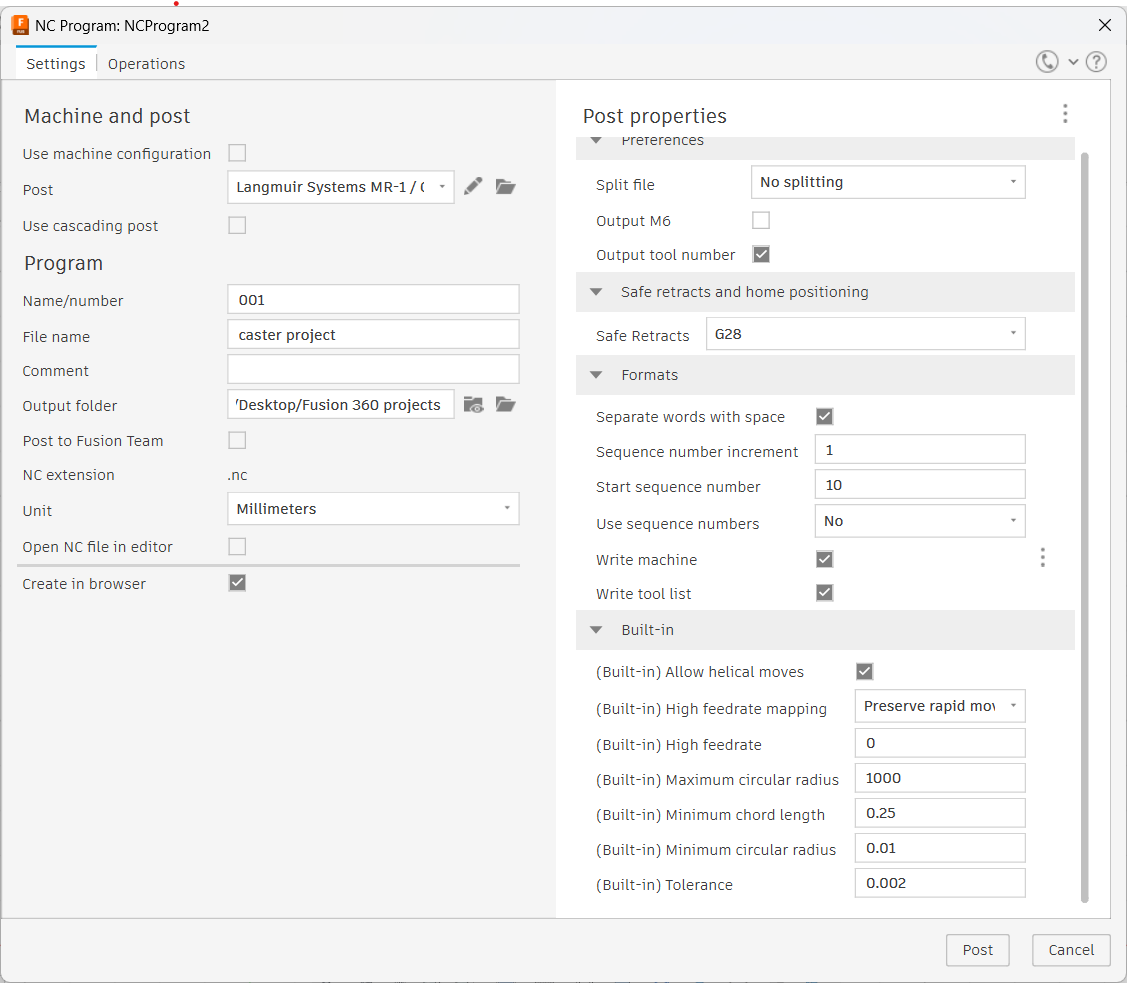
I just set up my new Crossfire Pro and I’m new to CNC. I’ve been following the Langmuir tutorials on “CAD/CAM with Fusion360” and I’m at the setting up the post properties for the Z axis settings. The Langmuir tutorial is 3 years old and may be outdated because the screenshot that Langmuir is showing doesn’t match what Fusion360 looks like. I’m in the “Fire Control with Z-Axis” section of the tutorial at step A-13. I can’t find where to input the Z-axis settings in Fusion360 before clicking the post button and finishing the project file. Does anyone have some insight on this? I would really appreciate the help. Thank You,
Eric
Fusion has changed some looks, but it is actually the same.
This is what the fusion screen looks like to me. There are no Z-axis inputs like Cut Height and IHS Springback and others.
CAD is now Design and CAM is Manufacture. Some the screens will look different but essentially it’s the same.
1 Like
I’m in CAM post properties. Where do I input my setting for Z-axis?
You have it set to a MR1 milling machine. Get the download for the Crossfire pro with THC.
2 Likes
I just looked over the tutorials and I downloaded the links they instructed. I’m not sure how the M1 is there. Do you happen to have the link for the correct download? I don’t see a specific crossfire pro with z-axis for post processing in the downloads.
correction… crossfire pro with THC
I figured it out !!! Thank You Bigdaddy !! You steered me in the right direction.
5 Likes
Welcome to the jungle my friend.
3 Likes