Valley Oak Design Manager v1 — Built to make large CNC file libraries easier to manage
Like a lot of people doing CNC plasma work, I’ve collected a ridiculous number of SVG and DXF files over the years.
The problem wasn’t finding more designs — it was finding the one I already had.
Folders inside folders, duplicate files, different versions of the same design, and plenty of times where I knew I had something but couldn’t remember what it was called or where I saved it.
So I built Valley Oak Design Manager to solve that problem in my own shop.


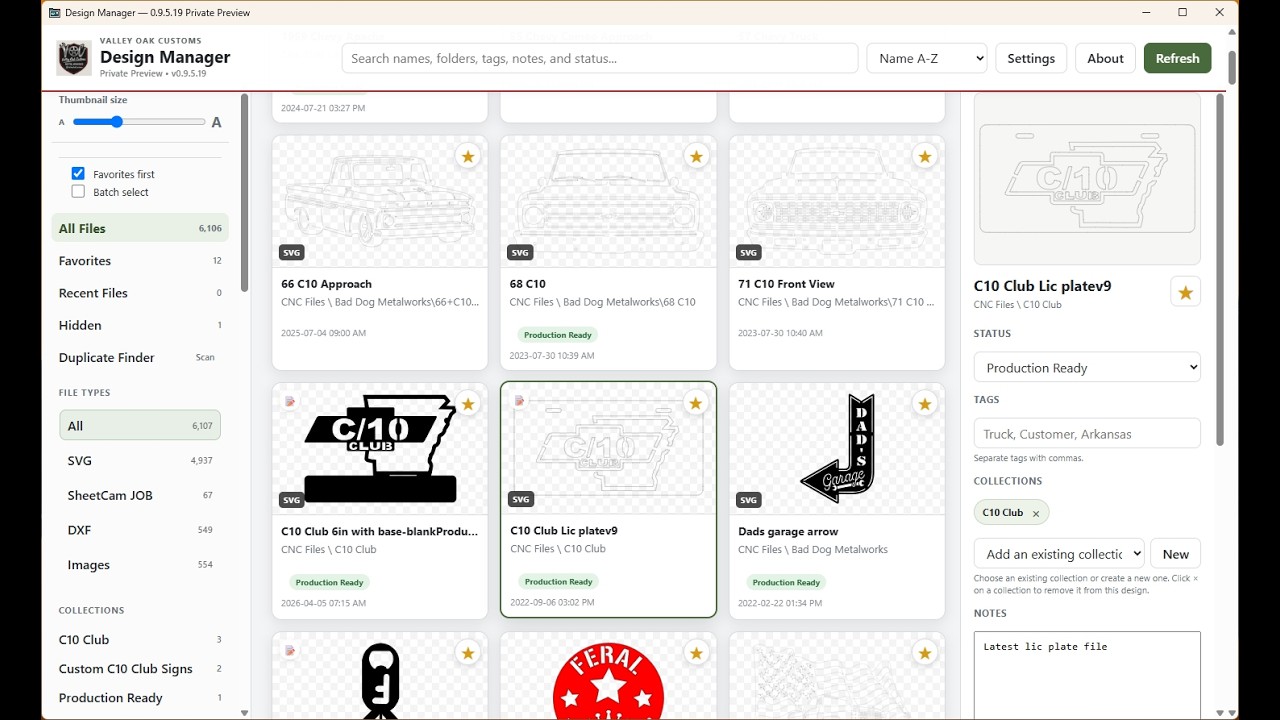
It gives you native SVG and DXF previews so you can recognize designs visually, then organize them with:
-
Search, tags, notes, favorites, status, and collections
-
Batch tagging and file organization
-
Duplicate finder
-
Cutting/testing notes stored with designs
-
Large previews without opening another program
-
Preview Studio for customer proofs and PNG exports
-
Light and Dark modes
-
Local-first storage — your design library stays on your Windows PC
It isn’t intended to replace SheetCam, Fusion, LightBurn, Inkscape, or your design software. It sits in front of those programs and helps you find and organize the file you want faster.
A couple of people have been testing it with me, and their feedback has already led to new features and fixes. I’m continuing to improve it based on how people actually use it in their shops.
Valley Oak Design Manager v1 is now publicly available for Windows.
Lifetime license: $99
 Valley Oak Software | CNC and Fabrication Tools
 Quick walkthrough:
I’d be interested to hear how everyone else here manages large CNC design libraries, especially if yours has turned into the same folder mess mine did.