Using Snippets to Show Parameters

I found that one of the things I always wished that Fire Control could do was change the amperage on the plasma cutter. But, since it can’t do that, I wanted an easy way to see the parameters, including amperage when using Fire Control.

I am using a Hypertherm 65, so for normal situation, amperage is just set to 65 and you configure the speed based on the Hypertherm Cut Chart. That is simple, but with the FineCut cartridges, the amperage does change based on the thickness of the metal. So, the simple thing is just reference the Cut Chart and then set the machine.

However, I wanted to be able to just glance at Fire Control and know. My original idea was to figure out a way to pull the amperage number from the SheetCam tool, but I didn’t figure out how to insert that variable as a comment at the top of the G-code.

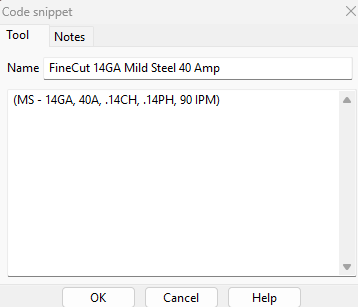
My solution then was to make code snippets for each FineCut tool that I had created. The first iteration, just had the amperage, but then I realized that it would be nice to know what material the .tap had actually been created for and since I was looking at Cut Chart anyway, I threw the cut height, pierce height and IPM in there for the heck of it. That becomes useful if it is a program you made sometime ago and now want to cut another part, but you can’t remember what the original metal size was.

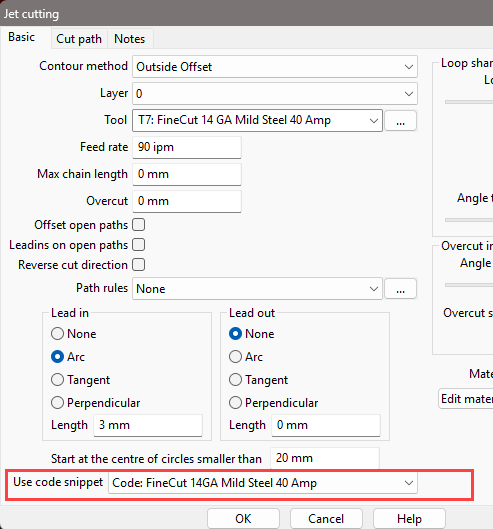
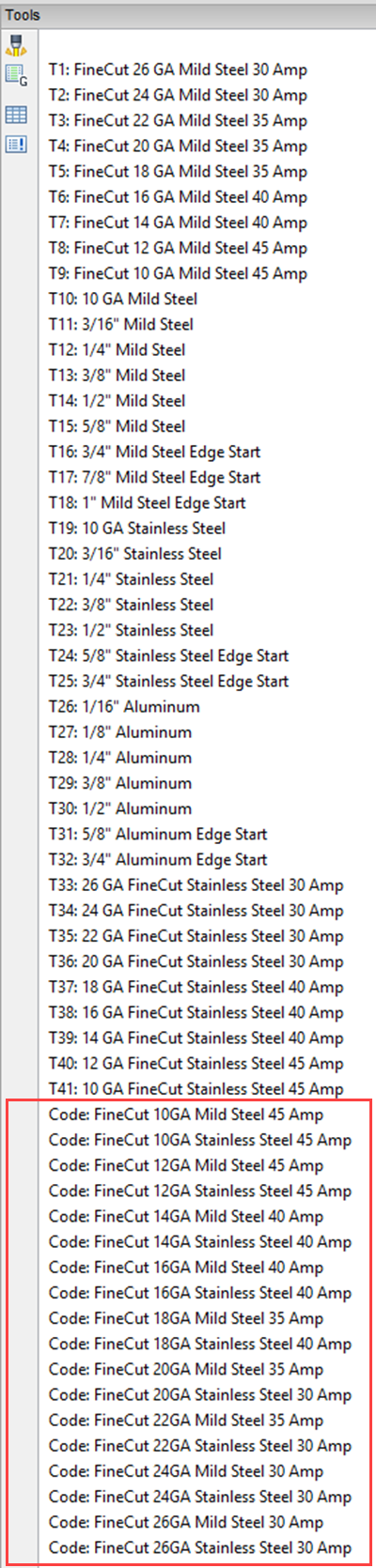
So, with about 15 minutes of typing, I developed what you see in the screen shots. I only did the FineCuts, but may go back and add snippets for all the tools. The nice thing is that once you add a code snippet to the tool and save the toolset, it will always be there.

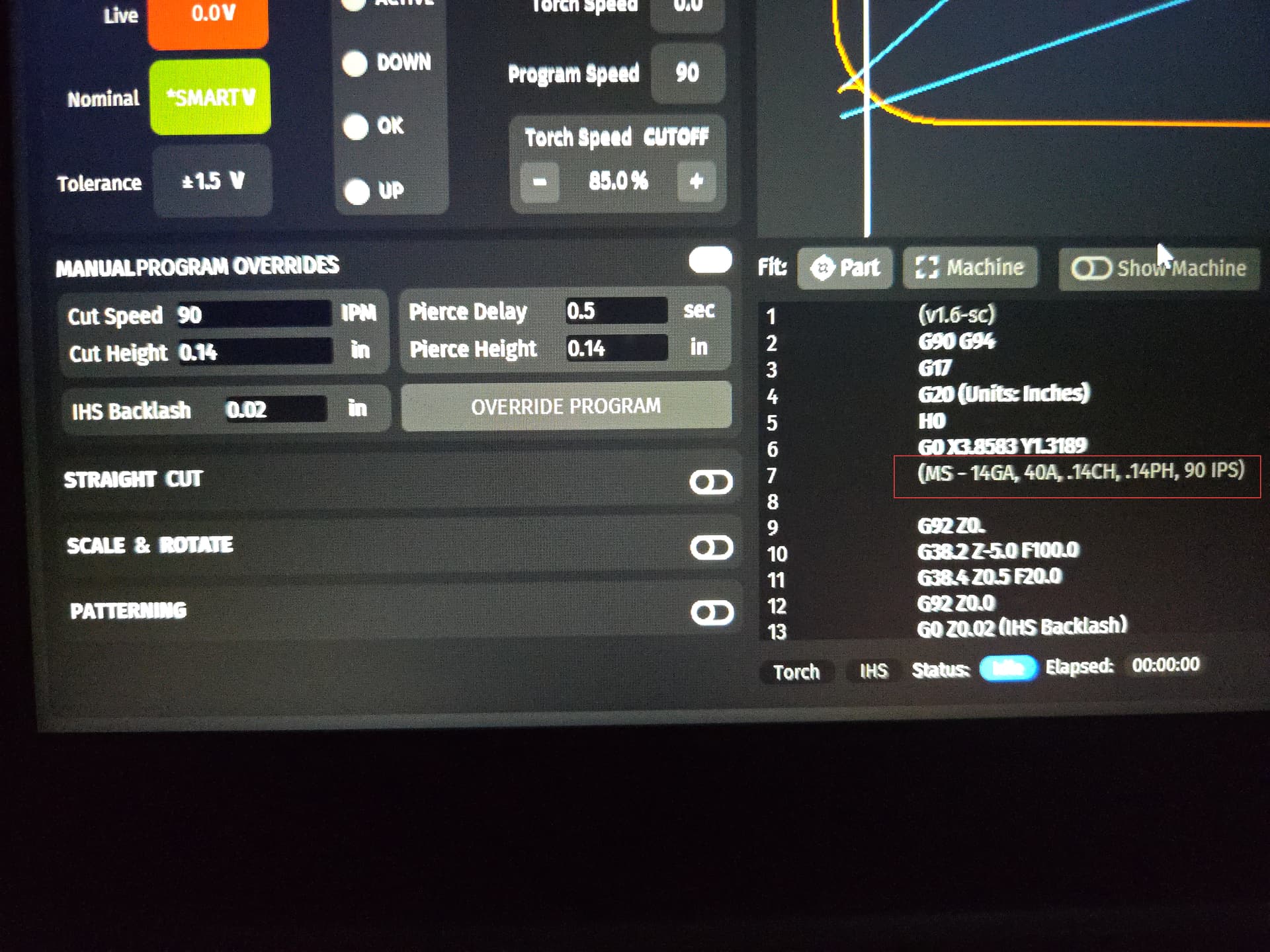
You can see in FireControl that the snippet is a grayed out comment near the top of the code. The comment will get repeated through the code before every cut, but that has no impact on actual cutting.

If anyone has an easier way please let me know. I would think there has to be, but I’m not an expert at SheetCAM or G-code.

So, here are the pictures, which are worth much more than the previous 1000 words:
Once you have your G code created in sheetcam and saved somewhere, open it up in Notpad++. You can then look at it and edit it all you like. If you want to add comments as a header you just need to put them inside parentheses (****) like so. You can add as many of these lines as you like wherever you like. As long as it is in parentheses Firecontrol will ignore it, but it will show up in the body of the G code.
You then have to save it as a .tap file wherever you save your other G code files.
If you want to save the orriginal too, you will just have to re-name one of them.

You can edit the Post Processor that SheetCam uses and add any comments you want. In my case my version of the Post Processor includes all cutting details as comments.

N0010 (Filename: LuggageTagBlank_NV_041121.tap)
N0020 (Post processor: Mach3 plasma with TWSZ_THC_OS.scpost)
N0030 (Date: 4/11/2021)
N0040 G20 (Units: Inches)
N0050 G53 G90 G91.1 G40
N0060 S500
N0070 (Part: LuggageTagBlank_NV)
N0080 (Operation: Outside Offset, Default, T4: Plasma, SS 304, 16Ga, 35A, 55PSI,58IPM)
N0090 (Tool:Plasma, SS 304, 16Ga, 35A, 55PSI,58IPM)
N0100 G00 X0.3167 Y0.9273 Z0.3937
N0110 M1 (Stopped to confirm alignment)
...

Right, I know you can edit the G-code, but I don’t ever have to edit it with what I did, it’s automatic now and forever. It is a one-time creation of the snippet and a one-time of adding the snippet to each tool.

I wasn’t clear. You edit the Post Processor ONCE to have it add the comments automatically to EVERY design you run. You never have to touch the G-Code.

Ok, that’s nice. Could you post the code you edited in the Post Processor? That is what I initially wanted to do, but I never was sure about how to extract the data from the tool.

It will be Monday or later probably before I can gather it. I’m expecting that I’ll probably lose power to the workshop sometime this evening…

1 Like

Take care of yourself Tom. And if you get a chance please send us some of the cold and snow.

Been a crazy extended fall out west.

1 Like

I live in Louisiana. Okay. First off, snow? What? What snow?

Secondly, last year about this time in the year (2025), we had an entire foot of snow. That is unheard of in southern LA.

It seems this cold blast of Fern is going north of us, i.e. thankfully. Pipes wrapped just in case.

Good luck to anyone receiving errors due to pipes. Our infrastructure in LA is far from Mamdani and NY with their 200 million lbs. of salt. We have 0 lbs. of salt.

No trucks or people to say, “Watch the ice.” I watched a dude in Dallas today give the forecast. Why? No clue… I did find it interesting that the entire ground froze over and their permafrost on top of ice seemed to be flaky.

Anyway, good luck out there in Fern. This is the first year I realized they name Winter Weather storms. I used to call it cold.

Not much (any) snow this storm. It will be all ice and I’m sure you don’t want THAT! :grimacing:

It would be like skiing New England!

1 Like

Yeah, we haven’t got as much in N. Mississippi as we were expecting. So far, not much in the trees or on the power lines. Haven’t lost power yet either and we lose power on sunny days with our screwed up utility district. I’m expecting that to change as the second wave comes through after 3am. Everyone stay warm and safe.

Yeah you can keep that ice on your side of the Mississippi :winking_face_with_tongue:

Stay safe i have only experienced freezing rain once. Once is enough for me.

Here is an updated post processor for FireControl. I have no way to test this as I don’t have a fire control system, but I’ve only added lines and didn’t modify the existing 1.6 post code.

Rename the file to remove the .txt extension (This forum is TOO STUPID to upload a post processor file!) and copy to the Sheetcam posts folder (or use their menu commands to import the post processor) then change your machine setting to use ‘FireControl-v1.6_tws.scpost’

FireControl-v1.6_tws.scpost.txt (5.9 KB)

Let me know how you make out…

FireControl-v1.6_tws.zip (1.9 KB)

Thank you Tom. As expected we lost power at 5am. House has a generator, but shop doesn’t, so it’ll be a while before I can test.

Trees down everywhere, walking around this morning it sounded like a war zone with all the big limbs, tops and entire trees breaking and falling. Absolute worst I’ve ever seen up here. But, we are safe, generator and fire place are saving the day. It’s been so cold and wet that the generator regulator has frozen twice. Crazy times.

Thanks for letting me know and I DO know that experience of having it all ‘falling down’ around you, waiting for the big one that falls on your head!

In my case, I’ve (so far) been lucky that the worst of it traveled north of us so, so far, we’ve had surprisingly little damage. I actually took my new car out onto the neighborhood roads to test its handling in the snow/ice - I was QUITE impressed!

Take care. Let me know when you get a chance.