My ecosystem is Alibre and Sprutcam. I don’t even have a subscription to fusion, so that’s kinda out for me. Lightburn is really feature right, and it should work fine when I can spend the time setting it up. This is just a bump in the road that’s annoying.
Well, good luck. Regardless, you will need a post-processer.
This document was posted a while ago and should give you the necessary info to write your own post processor for Firecontrol
3 Likes
Actually, for lightburn I won’t. They have a manual gcode device driver and I have to just fill in the blanks so to speak. If I do sprutcam then yes, I’ll need a post processor.
2 Likes
Thank you @ds690 . That will definitely help.
1 Like
Resurrecting an old thread here… I too would love to see an “offline” function. I make some unique objects that take a lot of fine tuning. It’s a pain to run from the office out to the garage to check the paths. I use SheetCAM for the CAM part. I do a lot of fine cuts that don’t always show issues until they are loaded into Fire Control. I may resort to using an old control board that has the torch on circuit hosed (don’t ask…). I’d have to cob together a 5V supply for the control board but that’s about it.
I’m curious what Firecontrol shows you that Sheetcam doesn’t. I can look at my tool paths in Sheetcam and tell if they will cut correctly.
2 Likes
Remote desktop into your fire control PC.
1 Like
What @ds690 said, I can’t see any benefit to running Firecontrol in any “offline” mode or off the table.
I used to use Fusion 360 (which is only half as good as Sheetcam) for all basic and unique designs and never felt the need to check anything on Firecontrol.
All items cut fine.
Here’s one example of something “unique” or intricate.
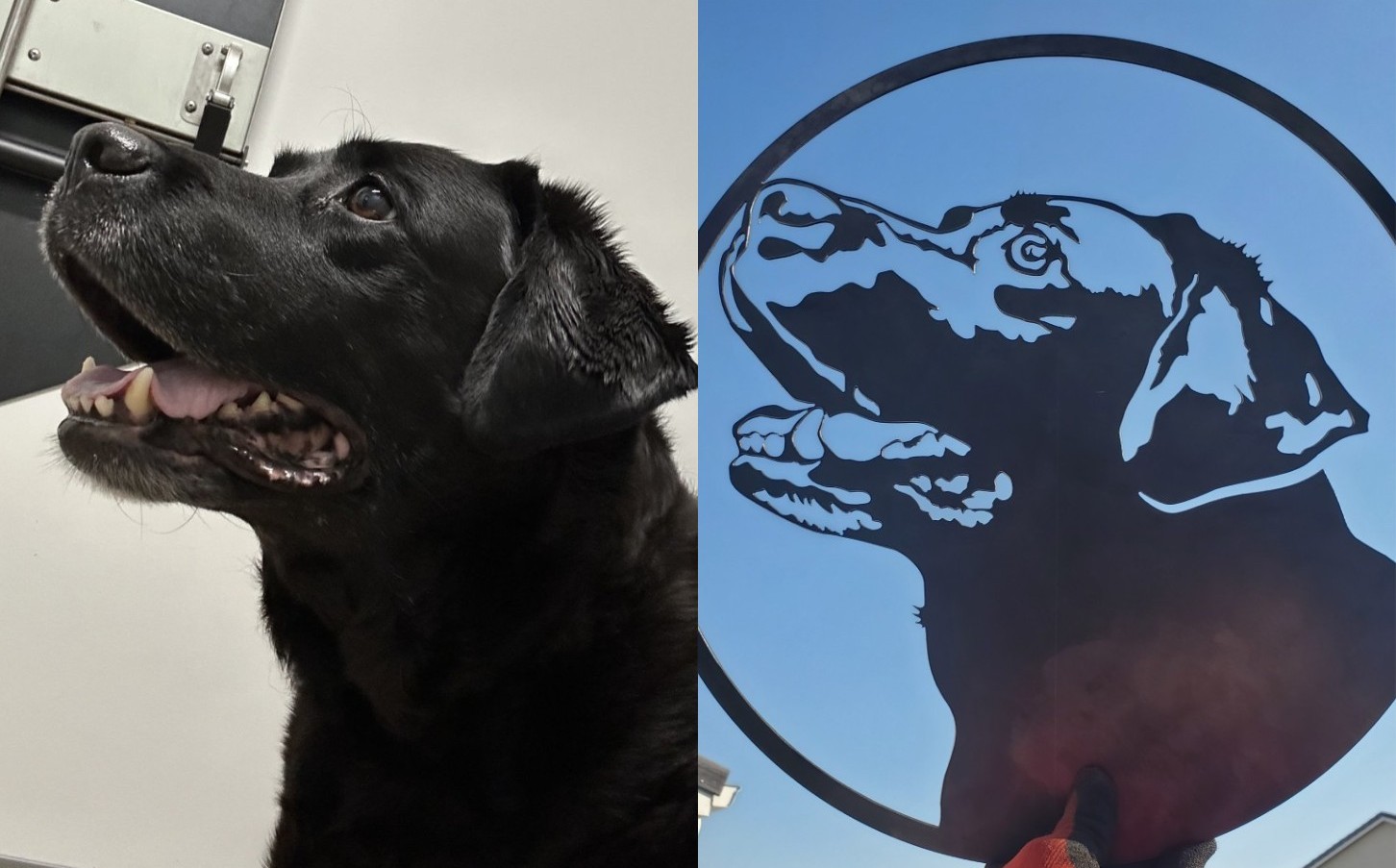
Can you share what issues “show” on Firecontrol that aren’t shown in Sheetcam? I’m guessing something like a lead-in for example where you may not have the tab enabled to Display, or something similar.
Screenshots would be a huge plus.
1 Like
Wow, that was quick response from gallery.
The tool path does show in Sheetcam but it doesn’t show correctly in FC. I’d have to get a screen cap of the FC screen to show it. I’m done dinking around in the garage for the day so I’ll have to get it tomorrow.
Question for you Kwik, what software are you using to convert the jpg to a line drawing? That looks real good!
Also, it makes a difference if you have the offset set for inside, outside or none.
This is one of those projects I’ve messed with for too long, just want to get it done. I’ll play with this when I have a bit more time.
Craig, that’s a good idea but I’m trying to keep as much stuff off my FC laptop as possible. I have enough issues with Win updates and such.
Adobe photoshop, and illustrator.
I edit the image itself, then finally use illustrator once it’s in a “basic” format, and bring it over to Fusion as an SVG for processing.
It’s all done manually pretty much.
I don’t use Sheetcam, but I know it’s a much better software on the CAM side than Fusion is so I’m really curious as to what doesn’t show correctly in Firecontrol.
Worst case you just buy a controller and hook it up to run Firecontrol anytime you wish. I have one for the sake of training people, as I don’t even own a Langmuir table anymore. But I help people daily with Fusion and/or Firecontrol.
Thanks for the response Kwik, you do pretty much the same process as I do except with different “tools”. There are some pretty good online utilities for converting a jpg picture to a line drawing. They always need clean up though. They usually leave some artifacts that sometimes are hard to see. I also used an cloud based AI type editor to remove some background stuff. Worked pretty good to be honest. I use Inkscape to do the final editing on the SVG file. Then off to SheetCAM.
I have a couple controllers that have the torch fire circuit blown (don’t ask..) that should work perfectly for doing FC on my main PC. One
The problem came up when you tell SC to do an inside cut, some of the clearances got a bit tight. It would display like it was OK but when pulled into FC some of the tighter cuts wouldn’t be there.
Above I mentioned a 5V power supply, I forgot that the controller is powered by the USB from the PC, no need for the power supply. Works like a champ, sure glad I didn’t pitch the old controller boards..
When I get some time I think I’ll 3D print a case for the controller board. Make it nice and tidy..
Nothing needed on the FC computer, use the built in remote desktop, just needs enabled in the settings.
If you don’t want it to go online because of updates. Use an old wifi router, don’t plug it into the www and use that to connect to it.
I’ve seen a few tools online, but in my experience the results were terrible.
I also don’t use Inkscape at all so I don’t even know how to do anything on it as I don’t make signs. I figure anyone that does artistic stuff could knock out actual photos much better/faster.
As for your cuts, it sounds like what we call in Fusion 360 a” linking constraint” where a cut path is too close to another. Even if the geometry itself is “small” enough to potentially cut properly, your kerf in your tool library (assuming it matches the consumables you’re running) will omit the cut as the actual cut path is offset slightly to make up for the kerf width of your nozzle.
I would attribute this to a Sheetcam issue as there should be no reason why a cut path displays as being ok, yet is discarded after you create your g-code.
Maybe @sheetcamCS2 can cover why you’re seeing this error?
Sheetcam will not leave features out without a warning.
2 Likes
My point exactly - so @bjohns0n is not seeing something or there’s something else happening during?
It would be hard to tell without a file to look at. Another alternative to check a cut path after doing codes is NC viewer.
Ooh good point, never used one but I can see now how that would be useful if one isn’t seeing the error in their CAM software.
2 Likes