Total newbie setting up the table for operations

To start off, I’m a newbie to the plasma table world so please bear with me. I bought a used Crossfire table, model LS22, which looked like it had never been fired up/used. It came with a Jasic Razorweld Cut 45 (again, looked new) and a totally inadequately spec’d Dell Laptop with Mach 3 Loader and Autodesk Fusion 360 installed on it. The laptop wouldn’t load Fusion at all and checking minimum specs on Autodesk’s website, I found the laptop was not equipped for the minimum specs to work with the program.

It looks like the previous owner set up the fire control box with an extension cord wired into the Torch on/off output, that he could plug into the extension cord that is wired into the plasma cutter. I have not removed the covers on the fire control box or the plasma cutter to see how/where this extension cord is wired into each.

This Crossfire setup does not have THC at this current time, but is something I will consider adding to it if I can get this existing setup up and cutting successfully.

My questions to the experts here:

-What laptop specs have you found to be adequate to run the programs needed to make this work?

-What programs should I be installing into the laptop ie. Fusion 360, Sheetcam, Mach 3 or FireControl taking into consideration I’m an absolute rookie wanting to learn this technology?

-Any concerns with the use of an extension cord being used as a cable for the Torch on/off function and if so, what recommendations to a better solution and how to wire it up, going forward?

My hope is to get these issues ironed out and work towards powering the table system up and running a break-in program to verify this thing works and is ready for my education process. Thanks in advance for any and all input!
So I did some digging on what I have.

-Its a Legacy Crossfire setup.

-It appears that the wiring from the Jasic Cut 45 to the Legacy control box is done right, based on the installation guide for the Crossfire system and visual inspection at the Cut45 and the fire control box. The extension cord was spliced into the Langmuir provided Torch On/Off cable, to allow the torch to be disconnected from the fire control box, presumably to allow manual torch operation. Thoughts?

-I’m going to uninstall the Mach 3 program that’s on the laptop now, then re-install the Mach 3 programs as shown on Langmuirs Legacy download page to make sure the laptop has all that Mach 3 needs to function properly.

-I know this laptop’s specs (AMD A6 Radeon R4, 64 bit, 2.0gHz, 4GB Ram, 465GB storage Windows 10 Home) won’t support Fusion properly based on Autodesk’s minimum requirements so I’m thinking I’ll install the newest SheetCam 8.0 program, if it will work with this laptop. I’m waiting to hear back from SheetCam about their requirements, as I couldn’t find them on the website. Thoughts on learning/using SheetCam 8.0 vs Fusion for a newb?

Thanks for the help!

_

Sheet cam only does Cam (computer aided machining)?

Fusion does both CAD (computer aided drafting) and CAM (computer aided machining)

Sometimes the acronyms are also read as CAD (computer aided design) and CAM ( computer aided manufacturing)

Sheet cam is easier for most new users but you’ll have to learn a CAD software on top of it.

4 Likes

Thanks for the input @TinWhisperer …appreciate it. Its my understanding that SheetCam 8.0 has some 2D CAD abilities as well as being able to import DFX files for other projects, like what’s available on Fireshare. My thinking was to get this and work towards some proficiency with it and using the Crossfire, then work Fusion into the mix, learning to actually design and cut out projects.

On another note, tomorrow I’ll be following along with the Legacy video’s, to setup my Crossfire and do a break-in run, test fire and hopefully cut out the bracket example they show, with Mach 3. That will be the milestone to prove this used table actually fires and works, fingers crossed!

Version 8 was released in September I think, and it has 2D CAD integration. You can import any DXF file or create from scratch, and immediately switch to CAM for G code generation and export. The cost was increased to $279.

1 Like

@B_Lindsey Thanks, that’s what I thought and figured might be a good way to go initially. For the $279, I’d have a fully licensed application to use and learn until I’m ready to get into Fusion.

Today was the day to see if I could get this table fired up! In a nutshell, I got it fired up and cutout my first part using a canned g-code file for a fancy T bracket. Let the learning begin!

-Checking the table setup, I found the gantry needed alignment as the far end was low. Watched the video and aligned the gantry. I checked the torch gap to the slats and found the Y axis gap to need adjustment too as one side had more gap that the other. I did the leg Caster wheel adjustment to get these gaps pretty close.

-Got used to moving the torch around the table manually by playing in Mach 3 using the step controls. After importing the break-in run g-code and adjusting/testing the torch gaps again, I ran the break-in program and all worked fine.

-I setup and powered up the Cut 45 plasma cutter and did a test fire from Mach 3. It seemed to work ok so the goofy extension cord plug setup seems to work fine for the torch on/off.

-Now the moment of truth: will this setup actually cut a project. I setup a piece of scrap 1/8” plate on the table, setting the origin point with the torch in Mach 3, trying to minimize waste. I imported the g-code for the T bracket. I setup the Cut 45 based on the Jasic cut sheet parameters for 1/8” mild steel at 45amps at 165 speed (split the difference between .105 and .130 thickness for the speed setting as there was no .125 recommendation) . After checking and double checking everything , based on the Legacy video’s, I pushed the button and let her rip! She came alive and started spitting fire, the torch moving around and cutting the Bracket as programmed; pretty cool to see finally! When the torch came back to the starting point, it seemed to continue to fire for a few seconds longer than it needed to, then the flame shutoff but cooling air blew for several seconds. I shut off power to the Cut 45 and pulled the cut Bracket off the table to check out the result. Here’s what I found:

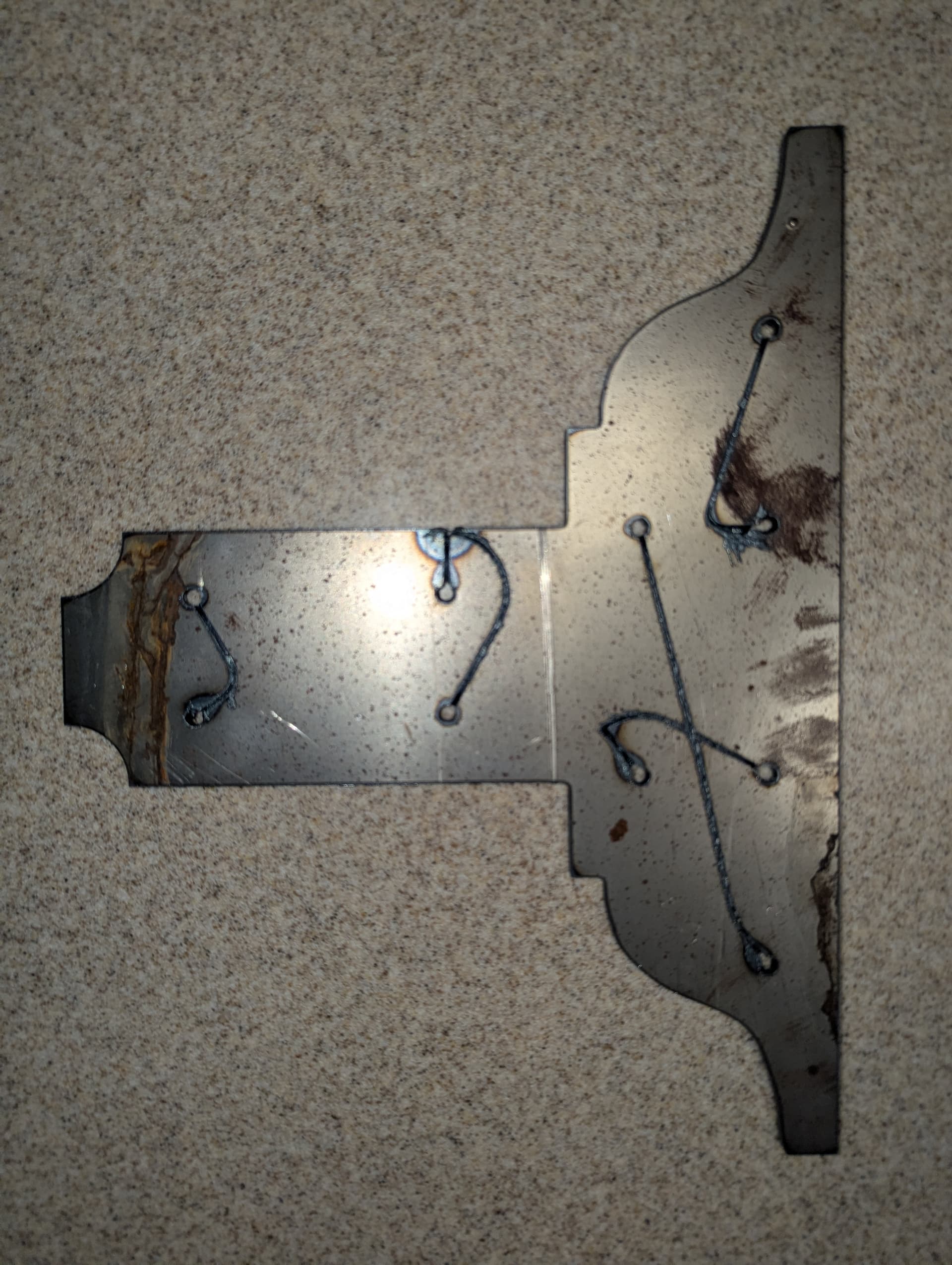
The bracket shape looks great, but the holes not so good and as you can see the torch path from hole to hole was partially gouged into the plate, though not total blow through. Any ideas what caused the track gouging? The outside edges of the bracket cut pretty smoothly, except for the start/stop point. I saw no lead in or lead out with this cutting. I’m thinking I should cut back the amp setting from the Jasic cutsheet recommended 45amps to somewhere between 30-40 amps. That might help with the raggedy small hole cutting eh? What do y’all think?

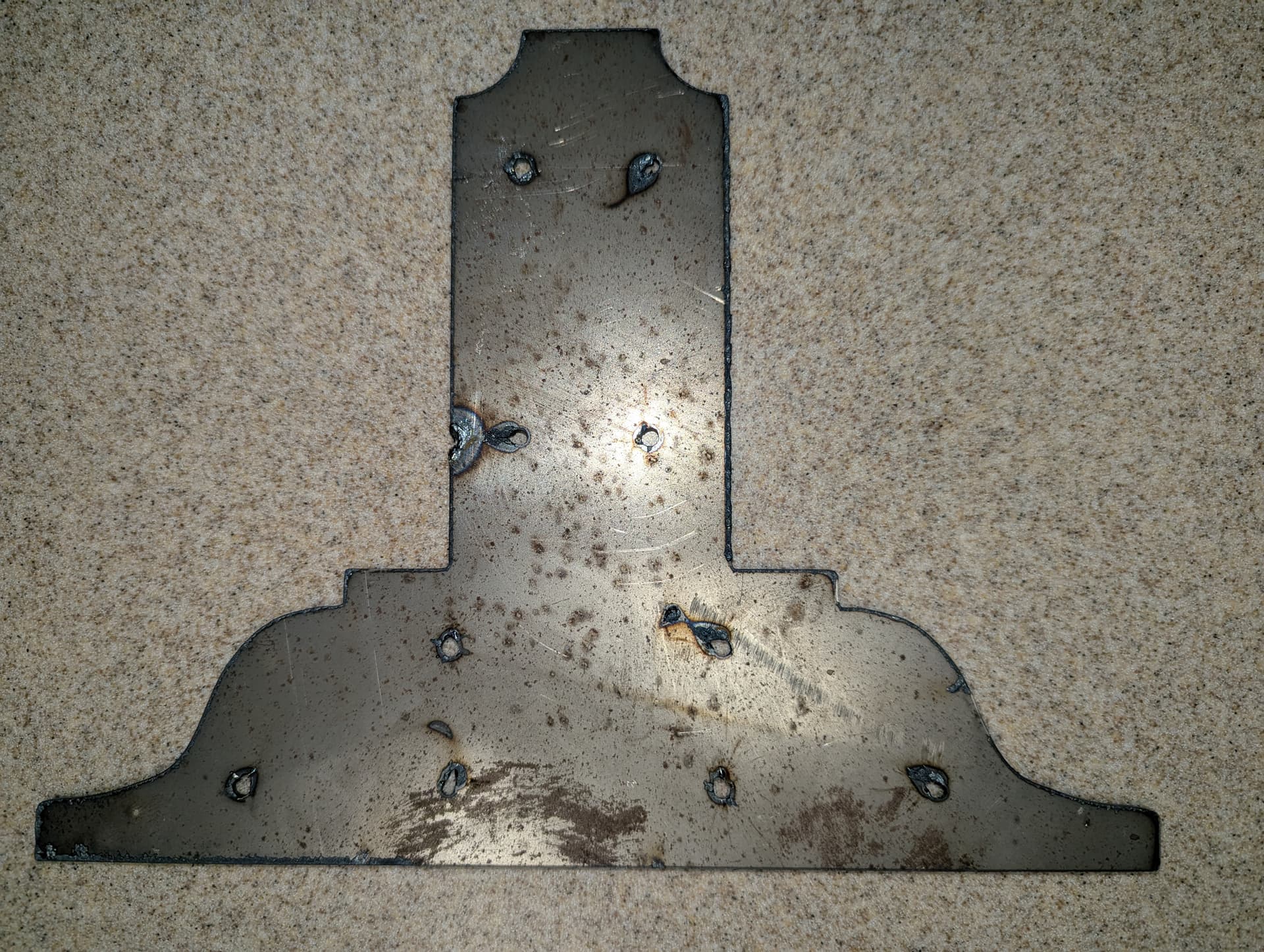
Here’s the back side. You can see the start/stop spot on the side edge and the irregular shape of the small holes with some slag. There was a bit of blow through from the torch tracking gouges seen on the other side. I’m assuming that lead in/lead out in the g-code would take care of the side cut issue. Thoughts/recommendations?

Below is a view of the edges. Pretty smooth cutting but there is a distinctive “lean” in the same direction all the way around the Bracket. Is this from a torch head angle being “off” or is this indicative of too fast a torch speed while the cuts in progress?

Thanks for bearing with me and sharing any insights on this lengthy post; it was cool to finally see this machine in action…time to get a water table!

Thought I’d share a few things I figured out about the issues I reported in my last post, so fellow newb’s can learn from my mistakes:

This was a simple fix. Turned out I didn’t have it on the 2T torch control setting on the Razorweld Cut 45 box; it was on 4T. Made the switch to 2T and on my last test cut of the same bracket the torch fired and shutoff as it moved around the pattern as it should.

This was caused by the 2T vs 4T settings problem.

This was due to the cutting tip being wallowed out a bit to the side of the orifice. I didn’t even look at the tip before making the first cut (duh)! This tip had been used before by the previous owner and it definitely needs changeout. I ordered up a bunch of consumables for both 30A cutting and 45A cutting; got a pretty good education on tip sizing and consumable wear searching through this and other forums.

Thats it for now. Waiting for my consumables to come in then the plan is to make some cut plates at various metal thickness’s and settings to see what works the best in various conditions.

Another thing I’ve learned looking around on this forum is, I have one hell of a learning curve ahead of me and there are some seriously smart guys on here with what they are into in the CNC world!

3 Likes

That is actually quite good: You asked the questions and then answered them and you got the system up and running!

Great start with this new hobby.

4 Likes

@ChelanJim Thank you sir! It was definitely cool to see that torch firing like it should and cutting out that bracket. As the old saying goes “even a blind hog finds an acorn every now and then”! Hope the consumables get here soon as I’m excited to get this thing working.

2 Likes