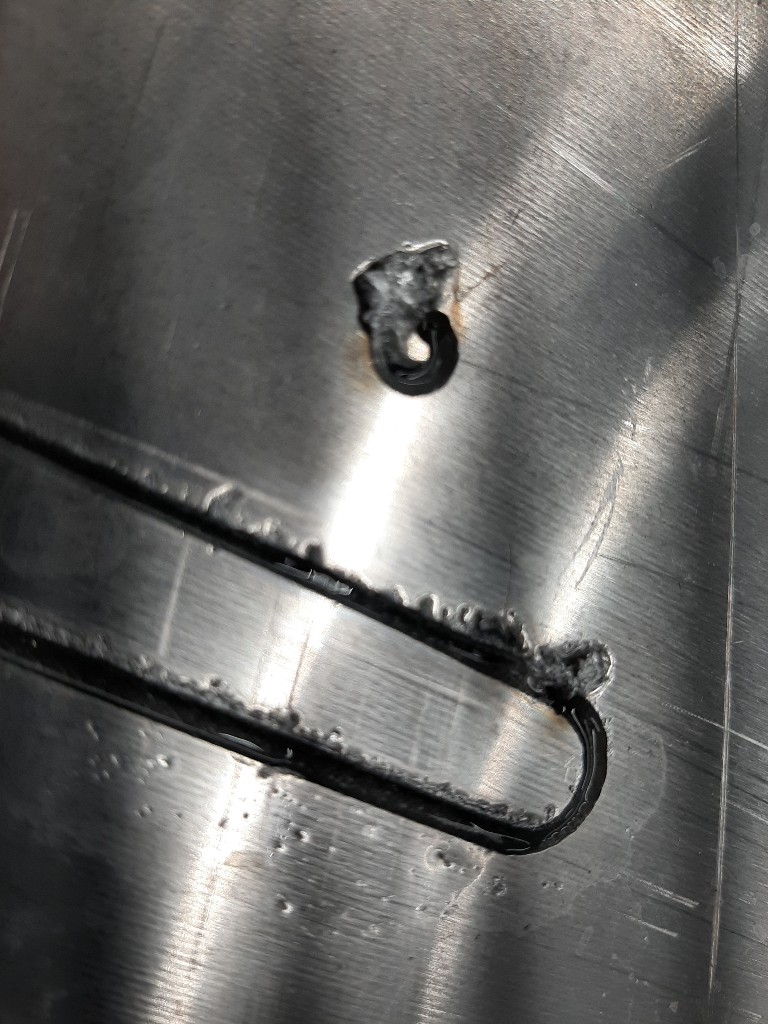
Hello, can anyone tell me why I’m getting these big goobers at the start of every cut tried a bunch of different settings got it cutting good just getting these huge Goobers.
Primeweld 60 cut 40 amp Italian tips 40 amps shim size doesn’t seem to matter I’ve tried 35 30 50 60 pictures are at 60 running 110 inches per minute 120 psi air compressor 75 at torch main unit 60 set are seems to be cutting good just can’t get rid of these Goobers. Very little topside dross very little bottom side dross just good goobers torch head hits every one of them no matter how high I put the torch where we’re at set at…Let me know thanks
how long is your pierce delay set for?
Have my pierce delay set at .5 I believe.
Are the goobers where it starts or stops?
You might want to check the G4 Pxxx code that’s produced and also check that your Dwell resolution is set to milliseconds. Mach 3 will round up to 1 second if it’s not set to mS resolution. And your CAM program might be doing other modifications to it, eg, SheetCam seems to calculate in microseconds for some reason…
At starts, head hits everyone when coming back to end of cut
You might want to check what Tom WS has suggested. what programs are you using for the gcode?
Where do you change it in Mach 3?
General Config, near top of column 4, Dwell Milliseconds check box or some such…
1 Like
If you’re talking about the pierce delay time, that will be in the Gcode
1 Like
Great guys thank you mess with it more tomorrow
Use Fusion 360 with Mach 3