Post processing runs fine in SheetCAM, but FireControl errors: “The loaded program extends beyond the Machine travel limits.” The dry run completes the whole shape.
The machine settings in SheetCAM are 48”X96” and the job settings are 12.25”X60”, which is the size of the sheet metal.
I’m seeking proper SheetCAM settings. I’m using the Hypertherm 45 Sync toolset for 16 GA Finecut Torch
I don’t yet know how to copy the G-Code for posting.
Here is the last lines executed:
G3X0.2996 Y–0.0109 I0.1899 J0.3949
G0 Z1.0
Here is the line that it stops before: G0 X5.0 Y90
Item 1. Resizing. Are you opposed to just going back to CAD and resizing the shape, then regenerating you cut file?
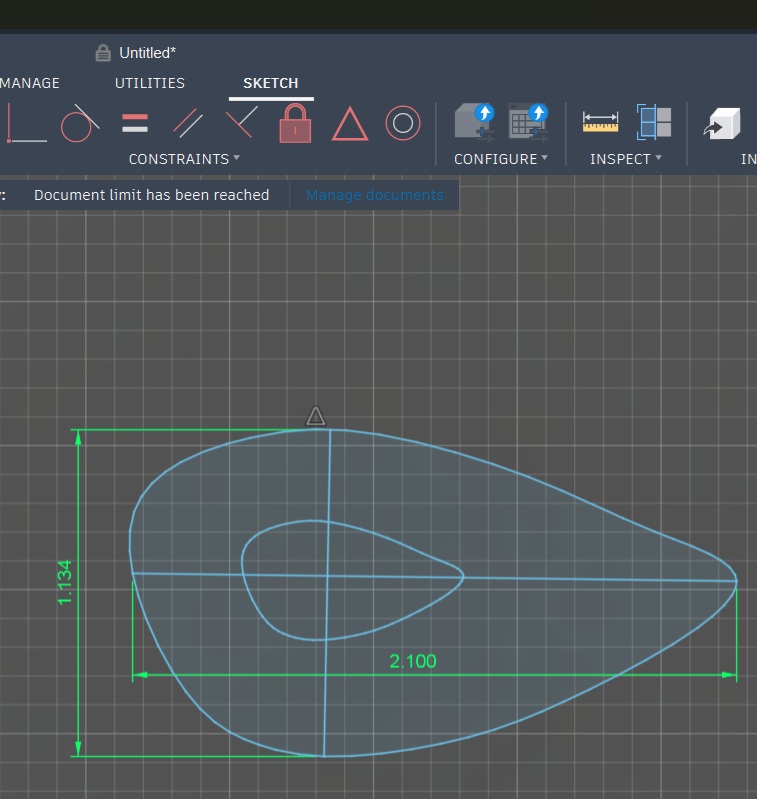
If not, here is a dxf with the x axis dimension set to 2.1”. Also, is that really all that is supposed to be there? Just an oval shape? It’s all that is contained in you dxf.
This shows original size vs setting that x axis dimension to 2.1”
Not adverse, just didn’t have success resizing in OnShape either. I tried resizing in OnShape with construction lines for constraints. First try it had no constraints. Next try it was overly constrained. Thanks for providing the corrected file – I’ll try it today.
The ear is one of three parts that constitute a bat. Eventually, I’ll cut body, wings and ears all nested. I’m new at this and still learning best practices and workflow. Any input is welcome.
I imported an image of the ear into OnShape and then created it using splines. My question now is why would the scale be off to begin with if I’m essentially tracing an image?
re. resizing / scaling a Part (imported dxf or svg) in sheetcam…
right click on the Part name in the Part window, select Scale
to rotate a Part in place, use menu Mode / ‘Nesting’, then change the angle in the ‘A degrees’ field, bottom right hand corner of the sheetcam main window. You can also relocate the Part using the X and Y fields in bottom right hand corner.
The OP seems to read as if the dxf / svg may have been imported into sheetcam with the wrong dimensional units selected on the import window, but even that is the case, the above scaling tip should correct for it.
Here’s a link to some sheetcam new user videos and tips-
Yes, it was oriented correctly. Turns out there was a setting from a previous job that sent the torch away after cutting so that the pressurized air wouldn’t kick up all of the water in the water table. After moving to a new location on the same metal, there wasn’t room for to travel so far away from the cut zone. Got rid of the setting and am able to cut the file in question.
Second issue was the the default cut rules in SheetCAM cause a bunch of THC errors because they don’t apply to the Hypertherm on XR. I was choosing “None” under add code where I saw the references to THC, but the global rules settings overrode that.
Just to submit my 2 cents worth; I started out using On Shape, but quickly discovered that for what I was intending to do, artwork and signs etc, it was very cumbersome. You are very limited to the size file that can be imported, and then tracing them with splines was a real headache.
I have found Inkscape to be far superior for importing images, converting them to SVG, and then directly into Sheetcam.
That being said, if you are drafting critical parts, then Inkscape doesn’t really cut it; it is more for artwork, like bats and things.
It all depends on the direction you want to go.
Regards.
Thanks for the input! My focus is more signs and artwork than machine part, so I’ll check out Inkscape. I took a look at Inkscape recently and liked what I saw.
I always get this message when saving in Inkscape:
“Inkscape has received additional data from the script executed. The script did not return an error, but this may indicate the results will not be as expected.”
Do you get this message? And do your files work fine when you save as dxf and open in SheetCAM? If it’s just data that’s specific to working within Inkscape, losing it should be fine.
I spent a few hours working in Inkscape and really enjoyed aspects of the program.