I have been using the fusion hobby version since I purchased my crossfire pro and have had this issue pip up in the past but for the life of me I can’t figure out how to fix it again. I can design and go to the manufacturing tab and post the process no problems. The problem arises when I try to load the files in fire control, I get a message that the file has no post processor and can’t be uploaded. I don’t know what has changed, if it was an update or what but now I am dead in the water apart from cutting past files I have already cut and straight lines. Any help is much appreciated.
Check to make sure that you have the correct post processor showing in that final page where the gcode is derived.
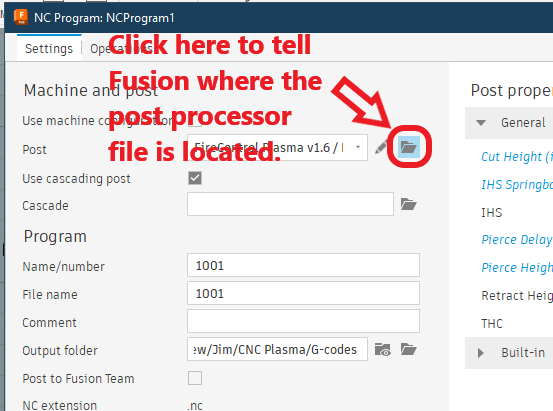

If you are showing the correct Post Processor file then reload it from the Langmuir site. Perhaps your file has been corrupted.
Recently, my virus scan keeps deleting setup and dll files from my computer thinking they are a “possible” trojan file. One of the files is from WordPerfect (which I have on a disc so I know it is not a virus and have had it for more than 10 years). I reloaded the program and the Virus scan immediately quarantined two of the files. I was able to stop the virus scanner and told it to leave those files alone.
3 Likes
Thank you I will try this soon. Hopefully this is what will fix the issue. I literally had drawn up some parts at work and went to cut them last week and ran into this issue. The week prior I had no issues. I don’t know what happened between those two weeks, perhaps my laptop had an update, I know fusion was down for maintenance within the last couple of weeks. It’s just a little frustrating when when I go to make parts expecting to crank something out in short order and have something like this pop up that prevents me from working with the table. I am not very good trouble shooting computer stuff, If it works as expected all good, if it stops working as expected it sucks, last time I had a coworker help me with this same issue but that was about 3 years ago. Thanks again.
2 Likes