For those of you like me that just ignored and closed the opening screen selection menu for type of project. My Bad !!
I found that F360 defaulted to the “Part” selection which doesn’t have the add new component or convert body to component functions available.
After a little digging, you need to select the “hybrid” or “assembly” designs on the initial startup screen OR go to the browser tree / select “part” and at the right end pops up an edit symbol that when selected allows you to convert the design format to an assembly or hybrid, both of which have the component capabilities previously mentioned.
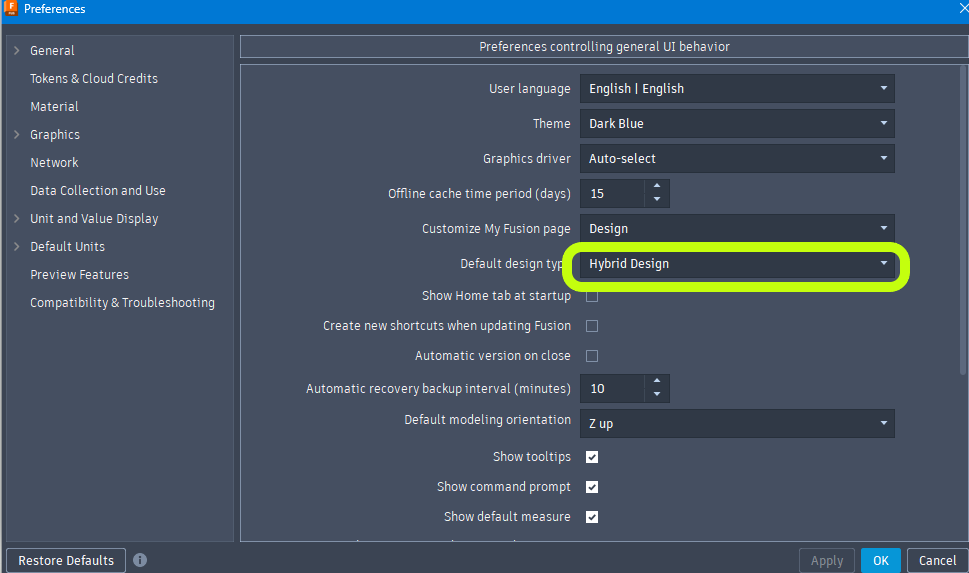
Yeah, this got me the first time. I don’t know why they don’t default to Hybrid since that was the previous behavior. In any case, you can change your default in Preferences (right click on your account ‘picture’).
It’s a little long, but the tips at the end are worth it…The video took away some of my concerns that I had with the change. I am a long time user, and I like change, but this changed was a big step for me at least.