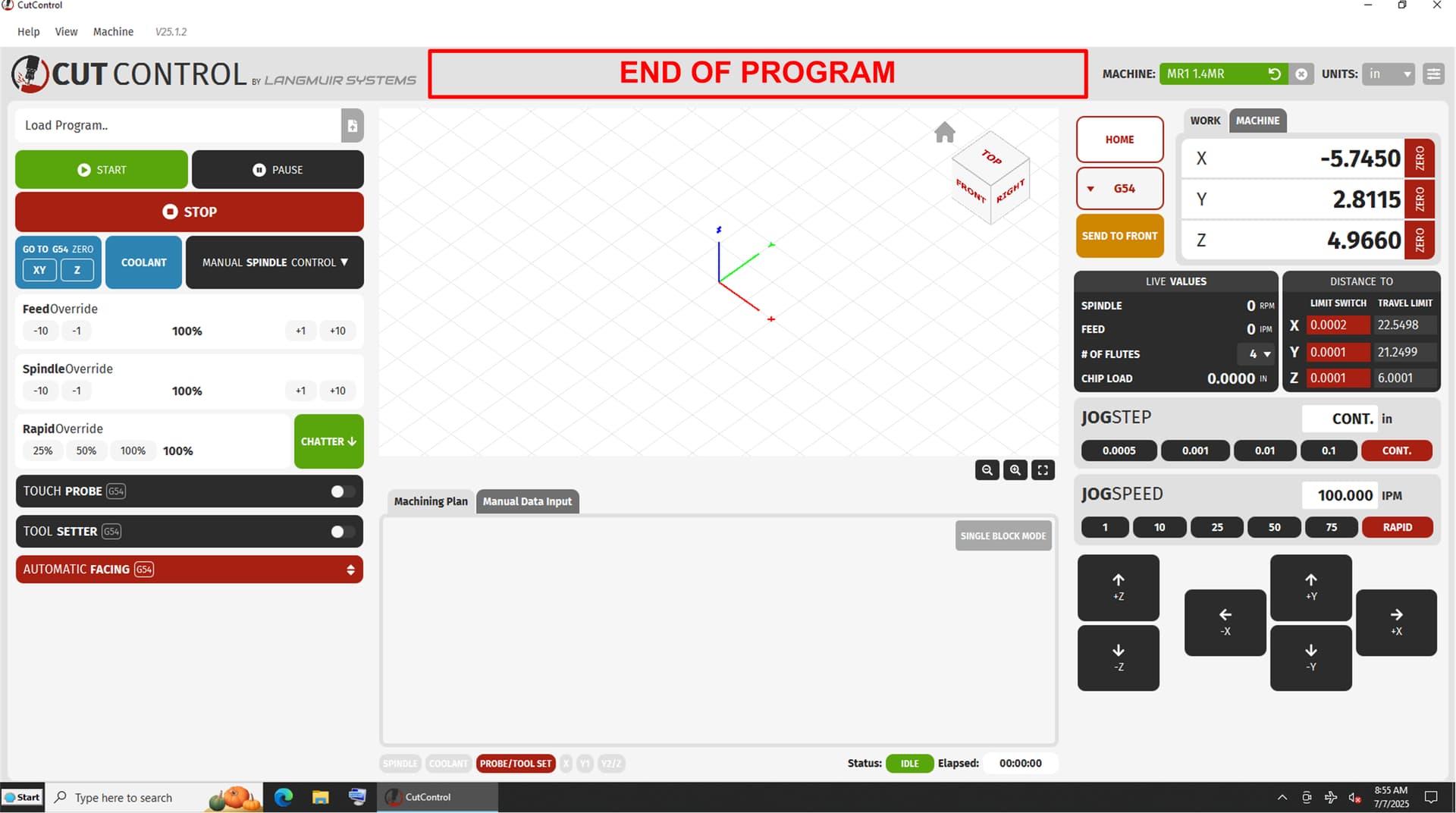
Part complete could be as simple as square that changes form program running red, yellow, or orange to program complete green. I don’t need a pop-up to tell me that the part is finished and demands my acknowledgment before I’m allowed to do anything else. To be honest this one pop-up is the thing I dislike the most about the entire machine. If we could only pick one to eliminate my vote is 100% for the part complete pop up to go away. I’m begging… lol If we need to start a fund raiser to send Zach some cash under the table for this I will contribute!
2 Likes
+1 for the popups. Understanding your target buyers, but there is some personal responsibility that goes with buying this machine, and nobody needs their hand held like this.
At the very least, add a “do not show again” checkbox. Nobody needs the popups forever.
I’m so glad I waited to read feedback about this release, while I’m also anticipating the bug fixes that cost me a ton of time.
3 Likes
There is more than enough room in the grey section toward the top of the program to place warnings (flashing or scrolling) and have them disappear on any screen touch.
4 Likes
I like that idea a lot. Still getting machine feedback, without needing interaction.
2 Likes
I totally agree it should be a program status notification and not a you must hit this button to acknowledge this pointless notification before you can do anything else on the machine.
On another note I got some more time on the new software and the probing works well. I don’t notice anything odd about it.
When trying to delete a program that I just ran it was hanging up a bit. Even though the program was deleted it stuck down at the bottom for a long time. I thought I was going to have to Ctrl, Alt, Del to proceed but it eventually cleared the deleted program. It happened every time. not sure if that’s an anomaly with my machine or a software thing. I have the Langmuir supplied computer and touch screen. Has anybody else noticed this? (yes, I had just restarted the PC. lol)
I also found this bug not too long ago, I can’t seem to reliably replicate it. But I am doing my best to resolve this one as well. I’ve found that going to the MDI tab and then back to the planning tab seems to resolve it. I’ll do my best to keep y’all updated, hoping I can get a second release of the Beta next week to see if it resolves some issues + meets expectations a bit better.
2 Likes
I appreciate you and your efforts. I’ll try the switching to MDI mode and back next time.
One other pie in the sky request (I know this is a super long shot so take this with a grain of salt) What are the odds of us getting the speed limits raised? My upgraded stepper motors and power supply can for sure go a lot faster than 100ipm and 40ipm but the machine…
You could have a drive load meter that went into the red at 100ipm to let stock users know they are going past stable operation, I could just ignore that meter and make parts a lot faster… haha
3 Likes
Just felt like I needed to throw in here, too, that those pop-ups are very frustrating at the end of a job.
Often times I need to go in and jog the torch away from the end cut so water doesn’t get thrown everywhere.
But, I can’t do that unless I click OK first. By then, I’ve got water all over the place.
(Yes, I will need to figure out the G-code to add at the end of the script to move the torch away, or maybe a setting in SheetCam that does that? Idk yet. Haven’t had much time to look into it.)
But, I have to agree… Too many pop-ups.
I do this…near the end of the program look for the end of the X-Y G movements, G1, G2, G3 etc. Insert a line below the last X-Y G move and add a G0 (rapid) command with one inch added to the X and Y coordinates. It will move the torch one inch in X and Y. You may have to change the + and - in X and Y, depending on where you want the torch to park, obviously not over open water.
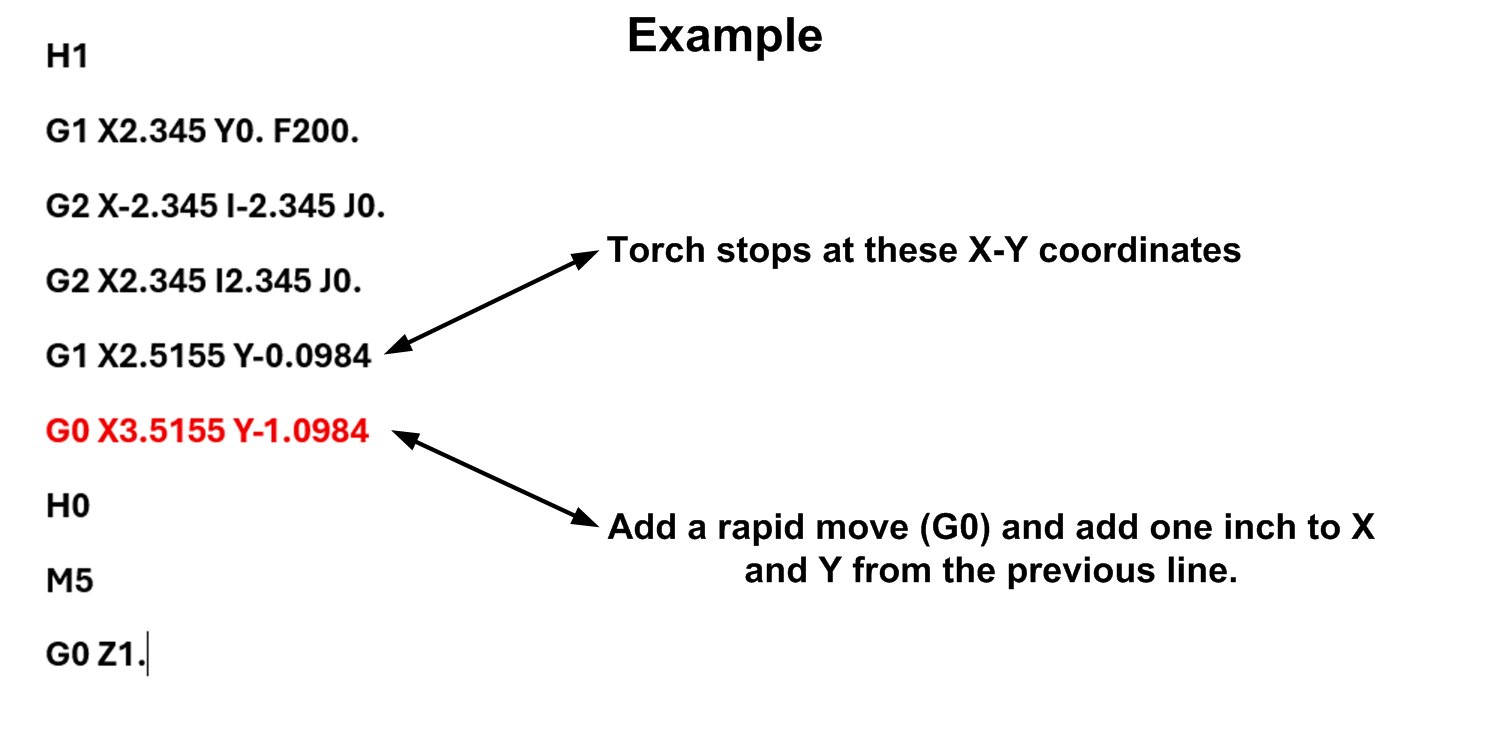
Anyone that has to deal with G code on a regular basis, should get NC Corrector. The program will show the back plot in the top half of the program, and the G code is in the bottom half. Super easy to edit code, just make sure to save after editing.
You can get it here:
2 Likes
The thread is for CutControl beta. Milling machine.
You guys need to start a FireControl wish list.
2 Likes
*sigh
Status quo
2 Likes
Apologies about being radio silent for so long. There will still be a 2nd beta release, still tweaking out the new additions as I wanted to add the ability to suppress the more benign/redundant alarms without losing any information/safety as requested (New settings + alert bar/menu). Once this feature is complete I imagine the workflow will feel a lot smoother than it does now. I unfortunately do not have a solid release date, but I may be able to give y’all a better update in a few days. These updates unfortunately take more time than I would like, as I really do want to get this out to you guys as quickly as possible.
2 Likes
Thank you for the update!
Speaking of benign alarms, I was probing a boss tonight, had the diameter set a little small so the probe hit as it was repositioning downward in z, and it forced me to home. So annoying.
I agree with Richard on this one. I’ve seen the speed go as high as 138 IPM on the “send to front” move, so why are we limited to 100 IPM while cutting?
And why is the send to Home so slow?
The stepper motors themselves are limited to 100IPM so that 138IPM reading comes from the diagonal movement that technically covers more distance.
1 Like
But what if they weren’t limited to 100 IPM?  That would be pretty dang cool!
I know, I know—I’m usually super anti-pop-ups—but I’d totally be in favor of this one…
If the software detects a feedrate over 100 IPM, it could pop up a warning like:
WARNING: This program exceeds 100 IPM!
Exceeding this speed may lead to missed steps, damaged tooling, or even machine damage.
To void your machine warranty, press “Accept.”
By pressing “Accept,” you agree to notify Langmuir Systems and forfeit your warranty.[Send Now] [Cancel Program]
And if you hit “Send Now,” it could follow up with:
Are you sure?

Boom—just like that, you’re off the hook. From that point forward, you’re selling replacement parts, and we’re all free to go as fast as we want.
1 Like
I’m still using 24.1.1 from the website and I’m not sure if this has been addressed.
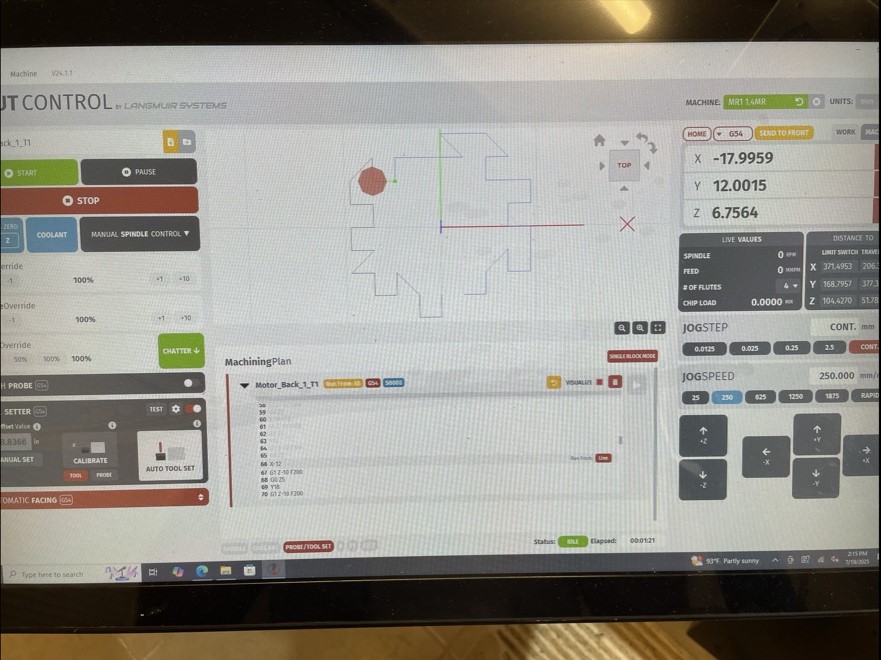
I ran into an issue with the “Run from” function. I wanted to skip a hole in a drill program I had and the machine would travel to a point within a couple microns of the correct XY position but never start the program because it would say it couldn’t reach the point. In the screen shot below, it was trying to move to X-18 and Y12 but would move to X-17.9959 and Y12.0015 and then never start the truncated program. Not sure if this error is because I was working in metric or if there is some tolerance range needed to make the “Run from” functionality work better. Seems like it was over thinking the resolution on the machine position preventing it from starting.
I just ended up mainly editing the G code to skip the holes, but would have been much better to have the run from functionality in this case.
Just giving y’all an update, we should be good to release the CutControl 25.1.2 Beta V.2 by next Friday. We are finishing up the new feature, and once testing is done we should be good to release out to y’all here on the forum.
6 Likes