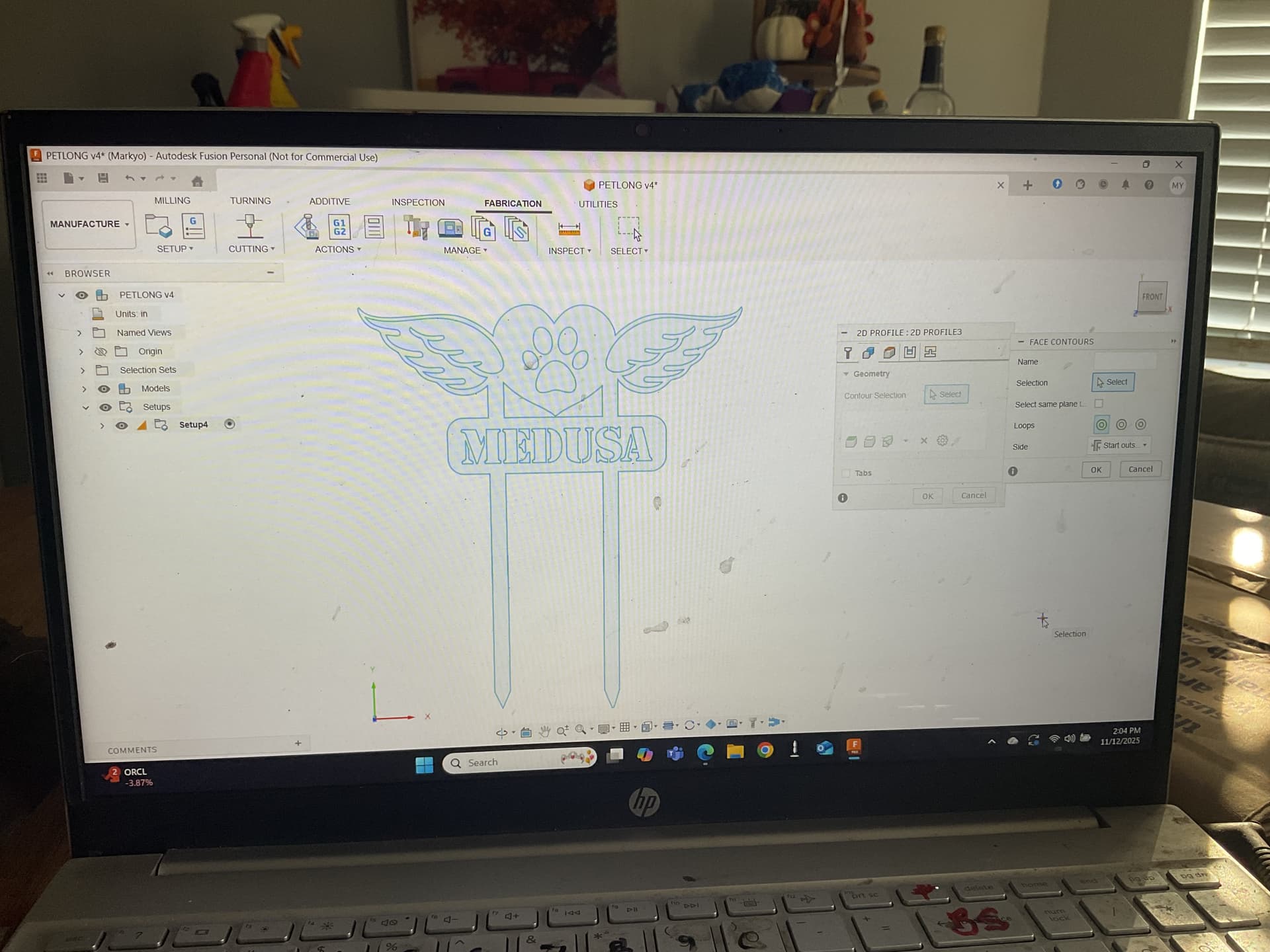
I haven’t used my machine in 8 months ( summer in fresno too hot in garage ) I’ve done 100s of projects but my most recent project I can setup but It won’t let me do the contours to save and cut project. I see they’ve updated fusion so I’m sure it’s simple I just can’t figure it out. It’s a project I’ve cut 20 times I just had to change a name in project now I can’t define contours. Any help?
Can you share a screenshot of what you’re battling with exactly?
Also, I’m just 15mins from Fresno.
Still did tons of cutting in the summer but I get it 
Ah, yeah you’re like 35-45mins away then.
Got a friend out there in Hanford.
I’ll create a new drawing and see if I get whatever issue you’re running into, or you can just share the F3D or DXF file here for anyone of us to open it.
I never use face contours, nor do I ever suggest anyone else do it either but that’s just me.
Follow-up, there’s a box that pops up asking for a name, select, and other options such as inside, outside, etc.
It just seems there’s a lot of input required from the user end, so sorry I can’t help like I thought I could. I thought you could just click the area of a closed loop (profile) in a sketch and it would select a face automatically.
It does however, allow an easy choosing of a face contour on an extruded item though.

Maybe someone else can chime in as I never select face contours.
Considering you do not have a face to make a face contour off of it makes sense that you can’t do it.
The only thing I see is a sketch with a sketch profile from your picture.
You need to extrude a body to have a face.
1 Like
Why is that? I guess if you never use them you would never see the benefits.
2 Likes
I never found a reason to.
Better yet, when I share with people what I know (from experience, self taught) I go over the ‘benefits’ of what we’re covering.
I saw one negative in doing face contours, and that is by being forced to utilize the same lead in/out features and speed for all geometries within the item being cut.
Now, have I gone further to investigate if these items can be changed? I haven’t so I could be missing some steps to help alleviate that. I just choose to create a profile or three to cut my projects.
So like you said, I can’t see any benefits over it because I haven’t dived into it to find them. We’re all here to learn!
1 Like
I take that back, I did find Face Contour to be helpful and that was during a scribing job.
Although I think clicking the sketch would’ve handled that as well.
Like you or someone else said, there are a ton of ways to skin a cat in Fusion.
1 Like
i think you’re on to something took 8 months off forgot about extruding i’m sure that’s it . i’ll try when i get by computer and let you know. sry if i wasted your time but both of you have been super helpful in the past and for that im grateful 
1 Like
Please don’t be sorry, it’s not a waste of time. The information helped you and the information may help someone else in the future who stumbles across this topic.
3 Likes
You were right I failed to extrude it worked perfect Tks to both of you 
1 Like