Clutching at straws, I changed the post from v1.6(Edited) to v1.6.
Re-ran it thru sheetcam and tried it. No joy, same error but on a different line now.
I suggest posting one of your GCode files. We’ll be able to look at it and maybe figure out the problem.
It would really be useful if you ZIP up the SheetCam .JOB file. Then we could check out all settings.
OK, I’m new at all this computer black magic but I think I can send you the g-code file; as for zipping up a sheetcam job file I don’t even know what that means let alone do it. SORRY.
Canada flag no thc.tap (7.3 KB)
We need to see the g code. Those commands would not be output by Sheetcam unless there were code snippets or path rules added to the tool set or jet cutting operation.
Did you create the tools or were they imported from somewhere?
I’m pretty sure that when I downloaded the post from langmuir the tool set came with it and was magically installed too. At any rate I can see and scroll thru them while in sheetcam. I didn’t add in any manually, don’t know how to do that yet.
If I have jumbled things up, maybe I should just delete everything and start again?

That helps a lot. On those bottom lines where it says “use code snippet”, click on those fields and select “none”. Those tools are from someone that uses another brand of table.
You might want to click on that “path rules” field and see what the default rules are.
1 Like
I did try selecting “none” once already but the same thing happened. I think that might have been before I set the pierce and cut heights to 0. This raises another question in my mind, with those set to 0 how does the IHS work?
IHS doesn’t work if you set them to zero. Why did you think you had to set them to zero?
The THC is a Firecontrol thing. There should be no reason to do anything in Sheetcam to enable or disable it.
You have to set the code snippet thing to none on both the tool and the jet cutting operation pages.
2 Likes
On the langmuir downloads page it says to set both to 0 if you dont have powered Z axis, sheetcam says the same in the post processor section. I thought that was referring to THC, but from your reply I can see that was wrong. I did try setting those things to 0 earlier in the day ( you can scroll up to where Tin Whisperer first answered) but it didn’t do anything.
The path rules are about slowing down in a corner; good advice for any situation.
Path rules for slowing down are fine. Those code snippets are a disaster.
There are no tool sets that come with the post processor, so those tools came from someone else. If you open a “job” file from someone else, their tools will be imported into your version of Sheetcam. That only becomes an issue if you save the tool set when you exit the program. If you save that tool set, when prompted on exit, it now becomes your default toolset.
I suggest creating your own tool and trying to use that to create a cut file. Just click on the picture of the torch, next to the tools on the left side. That will open a new tool window. Just change the parameters to whatever you want and hit OK. The new tool will appear in your list of tools.
The Pro table has a powered Z axis. That is a completely different thing from a THC, although people confuse the issue by referring to the Z axis as a THC.
1 Like
I just came back in from the shop ( no internet out there) after setting the code snippets to “none” and the pierce and cut heights back to whatever they were. now that you mention it , I think tose tool sets must have beed loaded in from an Avid cnc site I was watching. They are the Hypertherm numbers though which is the machine I was thinking of getting, so it never occured to me they could be problematic. I’ll try as you sugested (tomorrow) and see what happens. Maybe I’ll try a different file too.
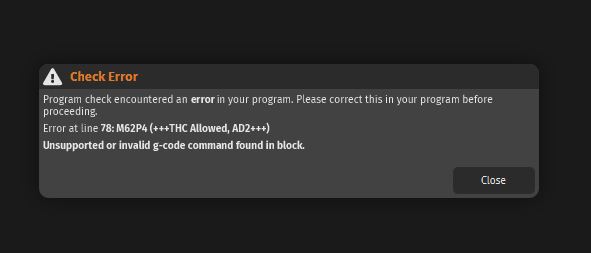
you have probably seen this a million times but here is the error message I keep getting, the only difference being the line # is always different.
Thankyou for bearing with me for so long, you have the patience of Job.
1 Like
This cut fie, do you keep trying to get the same one to work, or are you starting from the original?
More to point, did you download the file you are trying to cut or your own creation?
If you keep trying to modify the same file over and over, you may have deeply embedded issues and should start from scratch. I don’t know sheetcam so this is why I think it’s a possibility. Fusion keeps the drawing and the post process very separate and can be deleted and start fresh without tweaking the drawing.
2 Likes
Here is how that file looks with “NC Viewer”
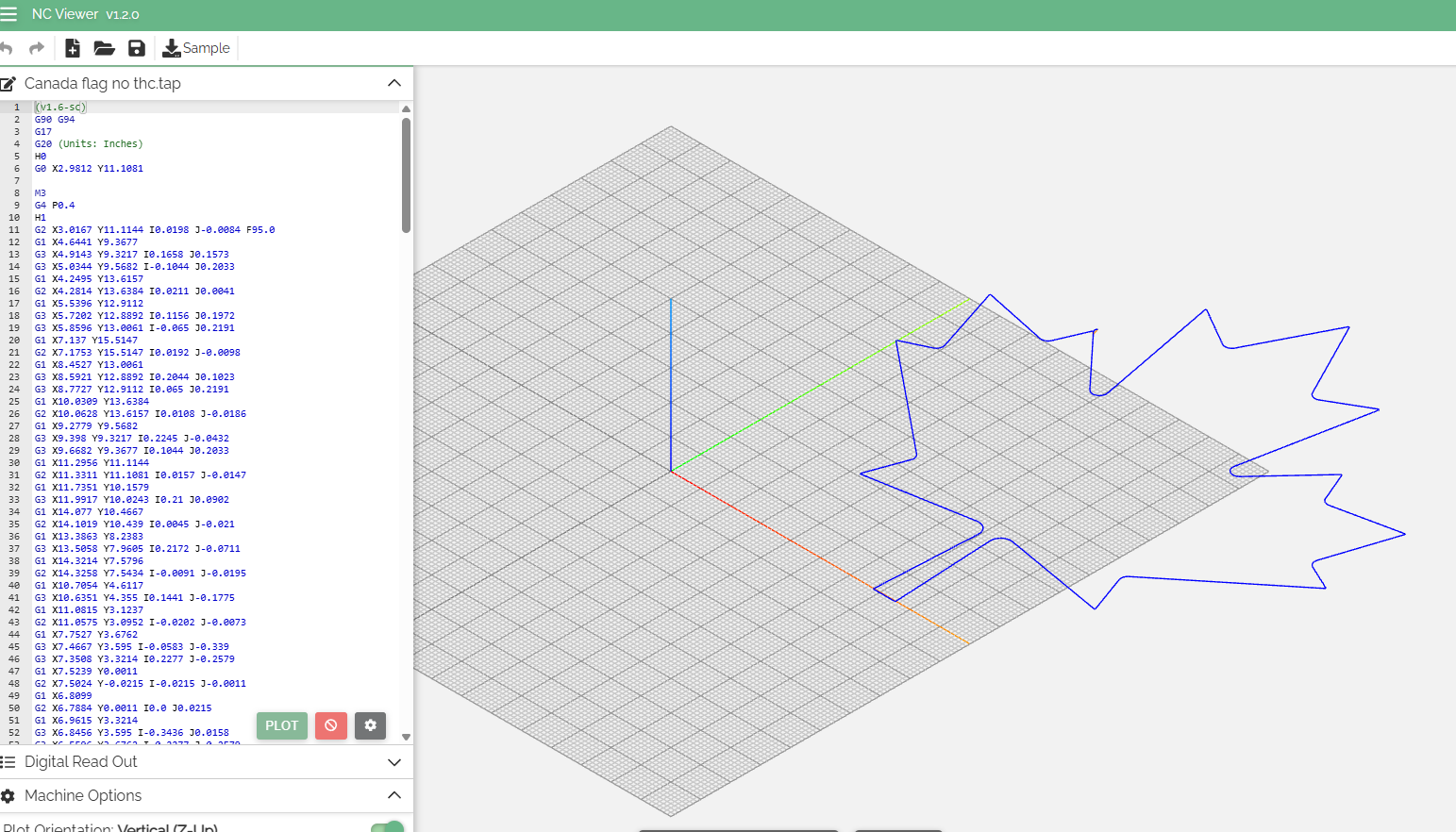
But there is something deeply flawed with this gcode file, as far a typical files generated for FireControl. There is no active Z commands: Perhaps because you turned off not only the THC but also the IHS commands.
I am not totally clear why the image is not completely on the grid pattern. Perhaps that is a clue.
Sticks is correct: Stop trying to use this file.
The file isn’t the problem. There are no Z commands, because he set the pierce and cut heights to zero on someone’s recommendation.
The problem causing his error is 100% the code snippets in his tool set.
1 Like
The file is an image from google images I put into inkscape, played with it then saved it as a plain SVG into my file folder. From there I imported the SVG into sheetcam and ran the simulator. It ran OK so I generated the g-code and saved it to my g_code folder. The rest you know.
I was wondering though, could the drivers have not been installed correctly? It takes almost a minute for firecontrol to launch and I often get erratic responses when I jog, plus this problem of the programme not accepting a cut file. Could that be something worth checking?
Firecontrol always takes a long time to start.
Ok, if firecontrol always takes a long time to launch, then we can eliminate that as a symptom. I do get very erratic movements though. So you know my settings, I have the jogger set to continuous and the speed at 50 to keep things less frantic. When I hold and release the jog right button on the comp keyboard the assembly keeps moving for about 2-3 seconds then stops. Sometimes it doesn’t move at all for 2-3 seconds, then moves and stops on its own. The same thing happens whichever direction I try to jog it. It does this when I use the screen arrows too. At other times, however, it does respond properly.
Since you can’t do anything infirecontrol without the controller physically connected to the comp, file loading must also be via the controller and if this is the case then maybe if the computer and the controller are not on speaking terms this is where the problem lies.
Is this making any sense or am I chasing my tail?
I can’t explain your erratic movement, but it could be a computer issue. That is not related in any way to you error message when loading a file. That error is solely from unrecognized commands in the file.
1 Like