Anybody else been having issues with fusion lately? With their constant updates it seems like there is always something messing up but lately it’s gotten almost unusable for me. I’ve cut easily a hundred projects with it from fancy art to tons of brackets , but lately ive been having issues with selecting a tool when setting up the manufacturing portion (restarting fusion usually fixes this) and it’s also been ignoring selected cut lines while showing the cut paths to be good with no errors. But if you simulate the cut you can see it ignores some selected cut paths.
Sounds like something is corrupt in your system.
Fusion user here, and always up to date and I don’t see what you’re seeing.
I’d completely uninstall and reinstall it - make sure to export your tool library first so you can import it back.
I’ll give that a try. It is a new fusion download I had to comply with the new windows 11 update by getting a new computer
That really sucks to hear.
You should just update the OS on your old computer as there are ways to circumvent hardware requirements. Unless of course the computer is just super old and not worth bothering with.
I’ve noticed people think they have to buy a new computer and that’s usually not the case (most of the time).
I was running an older dell latitude laptop it wasn’t the best option, as the graphics card was severely lacking for fusion. But I was also ready to get a dedicated desktop for working my designs. Just for convenience
1 Like
Hopefully you get your issue resolved by reinstalling Fusion!
Just know, it takes very little on the graphics side of things and nowhere near as much as people make it out to be.
I tested this on multiple computers I built myself and even my 2013 build only saw a maximum of ~40% GPU utilization during any rendering (simulation cut on a 3D item).
Otherwise, the GPU isn’t used at all for anything else as it’s all CPU usage.
[When I say 2013 build, I mean all components are those from when I built the computer back in 2013, so a good decade out of date]
1 Like
When I get home I’ll try a reinstall and see if that gets rid of my issues. It hard worked pretty well up until the last week or so then I started getting all those odd issues. but it was probably only my 4th or 5 part on the new computer an download. I ordered a skytech gaming PC so it should be well beyond any of my needs. But I was getting very aggravated this afternoon when I was trying to make a very simple rectangular bracket with 2 slots and fusion kept ignoring the slots and failing to load my selected tool. Thanks for the help I’ll let ya know how it works out
1 Like
Are you sure the kerf width of your tool is not larger than the slots? Sometimes Fusion is more intelligent than us… Have you tried no lead in or out with a center pierce?
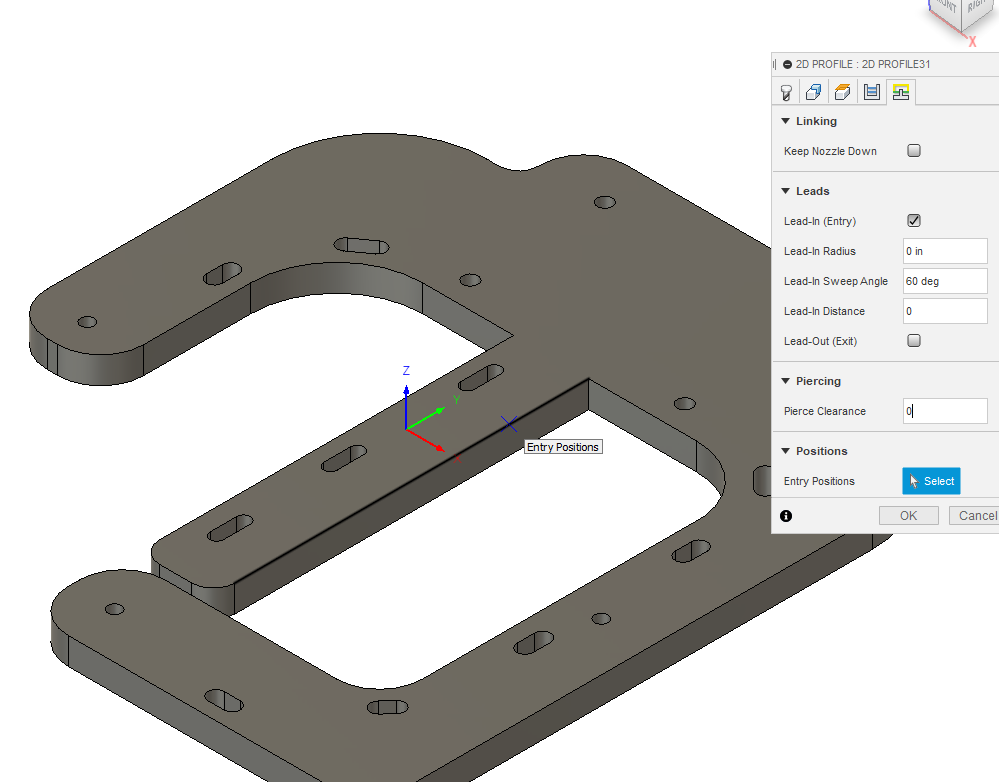
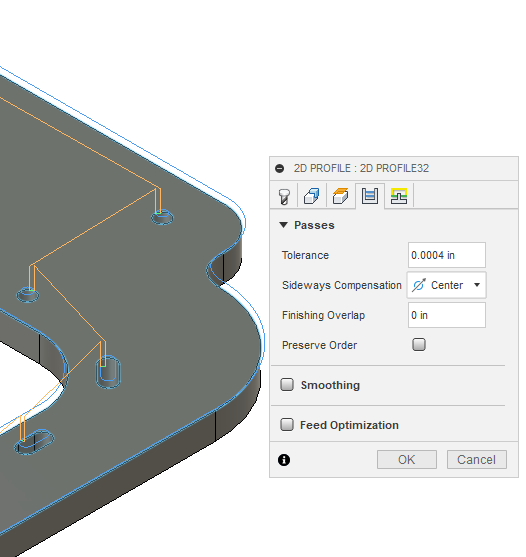
1 Like
I’ve tried no lead ins or exits. usually if my slots to tight for my kerf it’ll give me an error warning but this time it’s been showing my no errors at all giving me the green check mark. I’m running setup on my plasma at .038 kerf trying to cut a 3/8s slot.
Was just a shot.. My Fusion is working perfectly. I get what you’re saying about, and update every two days, though.
I’ve been trying everything I could think of, but it haddent crossed my mind that my download could have been bad that was around the time my issues started. But good looking out on that thought that has hung me up before in the past
If you are getting a green checkmark and it is not giving you a warning that it discarded a contour, it is likely the contours are on a different plane.
When doing brackets, it is best to turn off the 3D sketch on the drawing palette. That way you won’t inadvertently put a point on another plane.
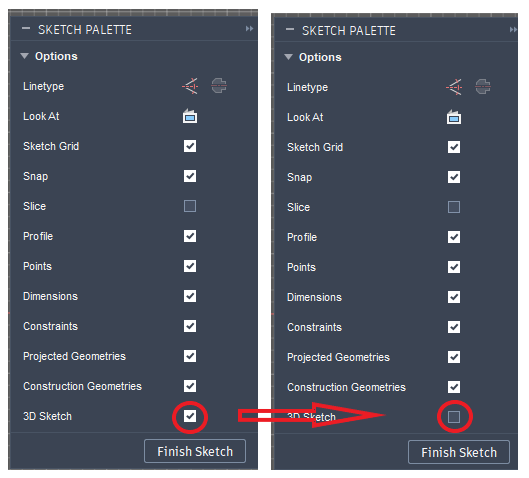
Another area that will trip you up is doing a bracket, extruding and then using a surface to do another sketch. It may look like it is on the same plane because in the straight on view, everything is aligned. But the sketches are on a thin slice away from each other.
2 Likes
I’ll give that a shot later today. I’ve not changed any of the way I’ve been doing it for the last hundred or so parts I’ve cut but maybe on my download I lost some of my original settings I was using before
Just export your library from the old computer and load it into the new one.
I exported my old library over which wasn’t much to switch. I only have one plasma saved in there, and I just change the feed rates for different material’s as I go. I also double checked the 3d sketch option it was still turned off. Fusion was down an only able to work offline so ill try again later and see what happens. Thanks again for the help and ideas, hopefully we will get this figured out. Up until now I’d rather enjoyed using fusion over the last year
Even though I have a connection before I open F360 and it’s moderately fast fiber optic, I get the message about not being connected to the internet. A connection is recognized within a few seconds after the message is shown, but no updated message is given.
1 Like
Got on fusion this morning after it did a brief update, so far it has all worked correctly with no issues. I designed 2 signs and finished up a fire pit design. I also finished that motor mounting bracket I was attempting to make the other day. So far it hasn’t had any problems with my tools paths. After doing some further research and going back threw my old computer plus the photos Bigdaddy2166 put on here the other day. I think my tool path issue was due to peirce clearance. I was only thinking of kerf width the other day when he suggested the kerf and then I remembered peirce clearence should be 0 or atleast that’s what it defaulted to in the past for me. Since that change I’ve had no issue
2 Likes
Good job. I always say that it is ultimately the OP that figures out the issue. And…every time you solve a problem, you learn more along the way.
Yes. Pierce clearance should always be 0. I can’t think of a time when you would need it. I have been told that it is a throw-back to the milling operation when you would need time and room for the “tool” to spin up to speed before it touches your work piece, otherwise the tool or work piece could be damaged. Plasma cutting does not have that issue.
It is always nice when people report back with what was their solution as it helps others to find out. And yes, BigDaddy is a wizard of many Langmuir tools.
5 Likes